


Question

Activity-Level Project Budget Control Across Cost Elements

  • Oct 13, 2026 10:57 AM UTC
  • 2 replies
  • 37 views

HoiJewelP
Sidekick (Partner)
Forum|alt.badge.img+9

Hi everyone,

In IFS, project budget control is enabled, but it appears that budget validation is performed at the cost-element level rather than the activity level.

For example, an activity has an estimated cost of KWD 1,000 under BM-CIV, but a Project Supply Request using BM-MEC can still create commitments exceeding the total activity budget.
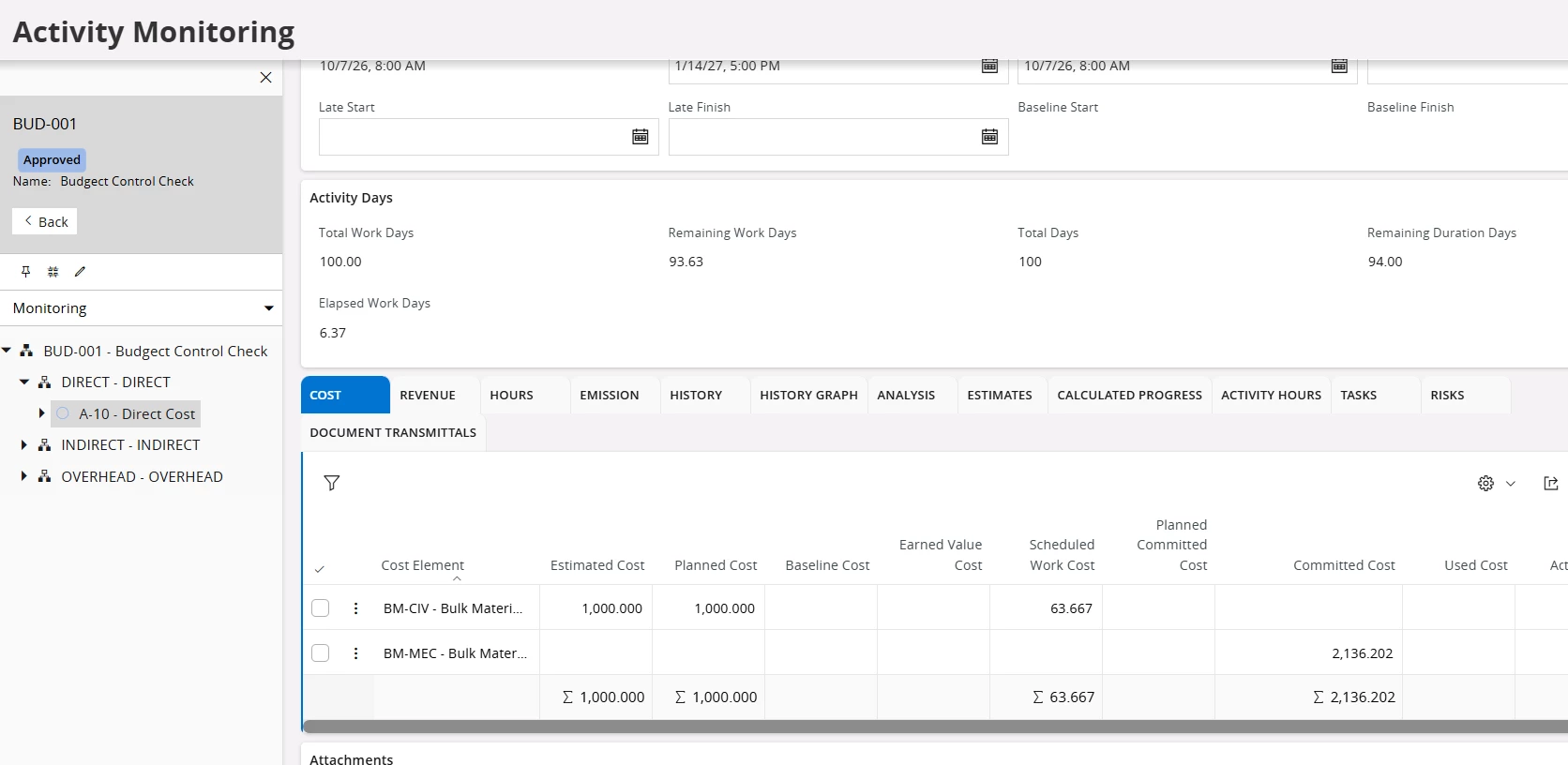
 

My questions are:

  1. Is there a standard IFS configuration to enforce budget control at the activity level across all cost elements?
  2. If not, is a custom event or extension required to validate the total activity estimate when creating a Project Supply Request?

Any guidance or experience with similar scenarios would be appreciated.

Thanks!

2 replies

Abdul
Superhero (Partner)
Forum|alt.badge.img+20
  • Superhero (Partner)
  • Oct 13, 2026 5:51 PM UTC

Hi ​@HoiJewelP,

There is an OOTB functionality to enable Project Activity wise budget control.

Please have a look on discussions below. Hopy you will your answer.

Budget Control on specific Activity Level | IFS Community

Budgeting and Forecasting | IFS Community


richardwoods
Do Gooder (Partner)
Forum|alt.badge.img+6
  • Do Gooder (Partner)
  • Nov 24, 2026 10:41 PM UTC

Short answer: project budget control is rule based, and what it compares depends on the control method chosen on the project. If it is behaving at cost-element level, or against the total, the first thing to look at is which method is selected and what the active budget looks like. A custom event should only be needed if the standard rules cannot be shaped to the level you want.

How the control is built

Budget control applies to purchase requisitions and purchase orders, from the Consumption Point set per company. A project supply request that creates a requisition is posted with the project and activity, so it falls under the same rules. The project needs an active (approved) budget, and each rule gets a Control Total from that budget and a Consumed value from the transactions.

A setup along these lines

  • Project Management > Budgeting and Forecasting > Basic Data > Project Budget Control: set the Consumption Point for the company, for example the stage at which requisitions count as consumed.
  • On the project in Project Setup Parameters, enable Budget Control On (More menu, Enable/Disable Budget Control).
  • Choose how it is controlled. Control As Budgeted generates the rules from the structure of the active budget (WBS, cost elements, code parts), so if the budget lines are held per activity, the rules follow them. You cannot edit those rules by hand.
  • Control on Total Budget instead compares all consumption across the project's cost elements with the total budget. That is a different thing from per-line control, and it can sit alongside custom rules.
  • Without either, define custom rules in Project Management > Budgeting and Forecasting > Project Budget Control Rules List, one per combination you want controlled, for a cost element or cost breakdown structure and selected code parts.
  • Check the result in Project Budget Control Summary (under Analysis), which shows Control Total and Consumed for each rule.

With your example

Say the active budget has KWD 1,000 on BM-CIV for the activity and nothing on BM-MEC. Under control as budgeted, a rule with no budget lines has a Control Total of zero, so a BM-MEC requisition for that activity would be expected to be stopped. If it is not, compare the method on the project with the rules shown in the Summary.

Things to know

  • Changing Control As Budgeted on a project replaces the existing rules, and you are asked to confirm.
  • If the budget is held only at project or cost-element level, the generated rules cannot be tighter than that, so the activity split has to exist in the budget itself.
  • Only the code parts selected on the Cost Element Code Part window can be used in rules, so check whether activity is available there before planning custom rules.

Worth a look: the IFS Cloud documentation for Enable and Create Budget Control Rules, Define Budget Control Rules and Project Budget Control Summary.

Is the active budget loaded per activity, and which control method (as budgeted, total budget or custom rules) is ticked on this project?

Created with the help of Ask Olive.