Question

Technical Drawings - Error when trying to add

  • March 30, 2026
  • 12 replies
  • 54 views

Forum|alt.badge.img+1

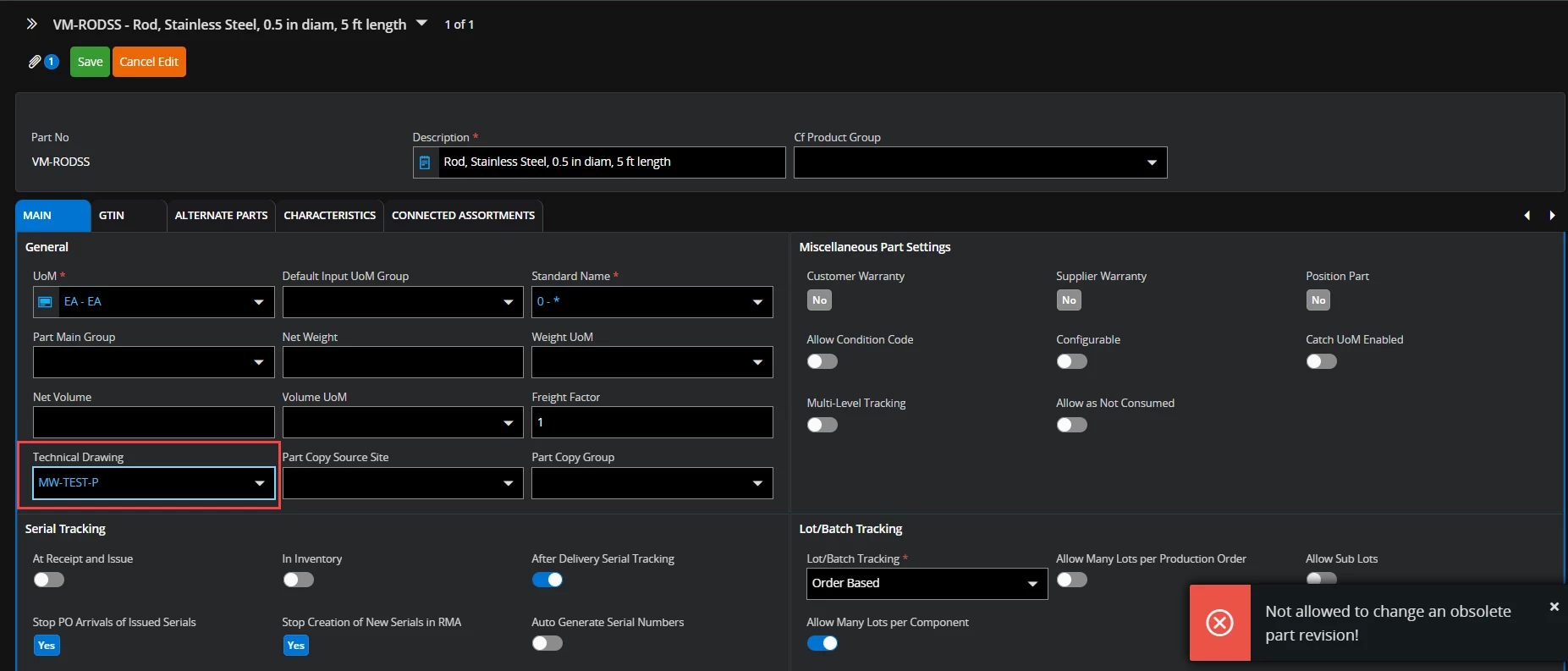
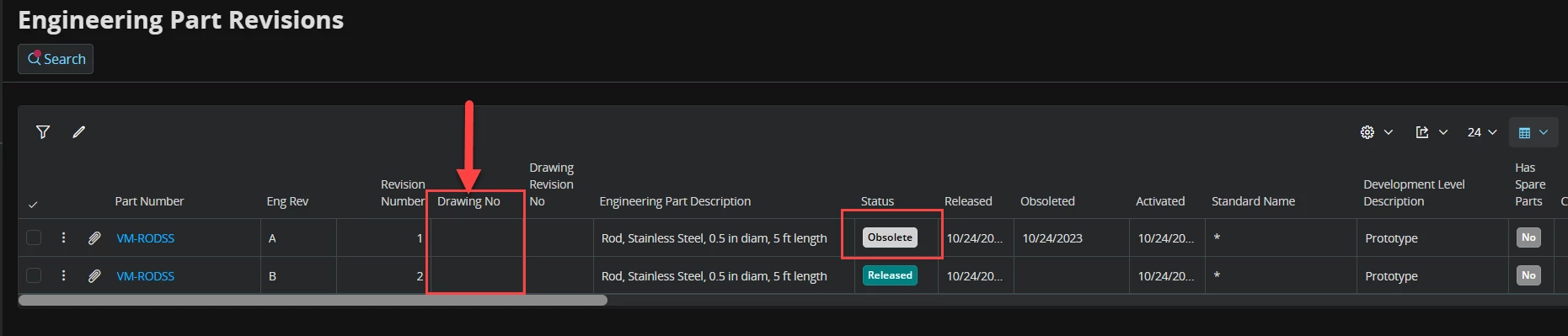
Hi, I’m trying to add a technical drawing to a released part. Im in Master part > Part and trying to add a previously created technical drawing. When i try to save i get the following error “Not allowed to change an obsolete part revision”. im unable to determine why this is occurring. The part is no obsolete and is marked as released. There is a previous revision that IS obsolete. 



12 replies

imkhin
Hero (Employee)
Forum|alt.badge.img+8
  • Hero (Employee)
  • March 30, 2026

Hi ​@bradlyj,

The message is correct from system perspective: it is blocking changes to an obsolete part revision, not to the part itself.

Please ensure you are on the Released revision of the part when adding the technical drawing.


imkhin
Hero (Employee)
Forum|alt.badge.img+8
  • Hero (Employee)
  • March 30, 2026

The standard approach is to:

  • Work with the current Released revision, or
  • If further design change is needed, create a new revision from the Released one and manage drawings there.

Forum|alt.badge.img+1
  • Author
  • Do Gooder (Customer)
  • March 30, 2026

When you say the Release revision… in which area of IFS are you in?

Engineering Part Revisions the current revision is release, J. 

Inventory parts > Part Revisions, the current Eng rev J has a phase in date of 1/29/2018


Master Part > Part does not contain any revisions


imkhin
Hero (Employee)
Forum|alt.badge.img+8
  • Hero (Employee)
  • March 30, 2026

In IFS, the place where part revisions are controlled depends on the type of part:

1. Engineering Part Revisions (Engineering Part > Engineering Part Revisions)

This is where Engineering revisions (A, B, C… J, etc.) are created, released, or set to obsolete.

This is the revision the system is checking when it gives the message “Not allowed to change an obsolete part revision.”

So, when I said, “Released revision”, I was referring specifically to the Engineering Part Revision window — the revision that is currently in Released status here.

2. Inventory Part > Part Revisions

This shows how Engineering revisions map to Inventory revisions.
The phase‑in date confirms which revision is active from an inventory perspective, but this is not where document revision rules are enforced.

3. Master Part > Part (Aurena)

This page shows the details of the part, but does not contain revision control, which is why you don’t see any revisions there.


imkhin
Hero (Employee)
Forum|alt.badge.img+8
  • Hero (Employee)
  • March 30, 2026

Even though the part is active and the latest Engineering revision J is Released, the error means the document connection you are modifying is pointing to an older, obsolete Engineering revision.

You might be on the Master Part screen, but the document is still linked to the obsolete revision underneath.


imkhin
Hero (Employee)
Forum|alt.badge.img+8
  • Hero (Employee)
  • March 30, 2026

When attaching the technical drawing:

  1. Go to:
    Engineering > Engineering Part > Engineering Part Revisions
  2. Select Revision J (Released)this is the only revision you can attach documents to.
  3. Attach your drawing here.
  4. Save.

Once attached at the Released Engineering revision, the drawing will display correctly in Master Part > Part as well.


Forum|alt.badge.img+1
  • Author
  • Do Gooder (Customer)
  • March 30, 2026

Thanks for clarifying which released you were referring to.

Can you only use the “technical drawing” field if there is a document attached? it didnt seem that way. I have been able to connect technical drawings to other parts. Certain parts kick up that error and it doesnt make sense considering the part is released. 

And im referring to the PART MASTER DATA > REVISIONS AND ATTRIBUTES > TECHNICAL DRAWING in IFS Cloud

I wasnt trying to attach a document, only show the drawing part number in this field as its different then the part number. 


matt.watters
Ultimate Hero (Partner)
Forum|alt.badge.img+26
  • Ultimate Hero (Partner)
  • March 30, 2026

@bradlyj I think you’re stuck and cannot do what you want due to a ‘glitch’ in the system design around Engineering Part Revisions

When you try to select a value in the Technical Drawing field on the Part page, the system wants to assign this metadata to ALL EXISTING Engineering Part Revisions, regardless of status. But you cannot update the data on an Obsolete revision.

Why this failed:

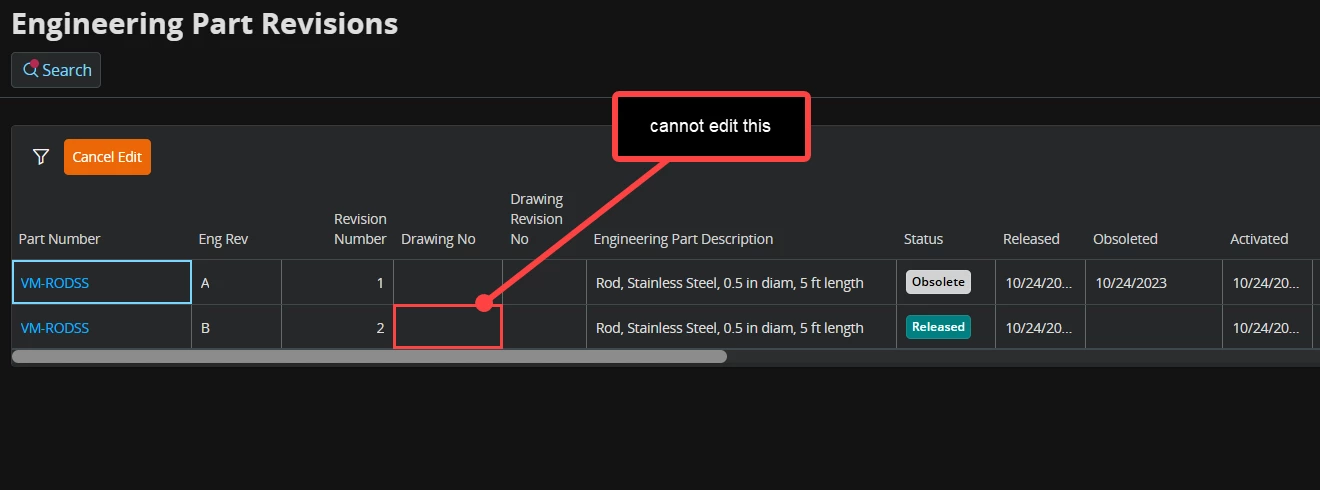
And another problem is you cannot manually add this metadata to the non-obsolete Eng Part Revs; it cannot be done in Edit mode.

A solution would be to delete the obsolete revisions.


Forum|alt.badge.img+1
  • Author
  • Do Gooder (Customer)
  • March 30, 2026

@bradlyj I think you’re stuck and cannot do what you want due to a ‘glitch’ in the system design around Engineering Part Revisions

When you try to select a value in the Technical Drawing field on the Part page, the system wants to assign this metadata to ALL EXISTING Engineering Part Revisions, regardless of status. But you cannot update the data on an Obsolete revision.

Why this failed:

And another problem is you cannot manually add this meta data to the non-obsolete Eng Part Revs; it cannot be done in Edit mode.


Ah! So this is an IFS issue!

That would explain why some work and others did not. 

is it just not implemented correctly then? There is no current way around that i would think. 


matt.watters
Ultimate Hero (Partner)
Forum|alt.badge.img+26
  • Ultimate Hero (Partner)
  • March 30, 2026

@bradlyj I updated my post for “A solution would be to delete the obsolete revisions”.


Forum|alt.badge.img+1
  • Author
  • Do Gooder (Customer)
  • March 30, 2026

Thank you. That is unfortunately not a legitimate option as we would need to still see obsolete revisions. it seemed like a very useful field for legacy parts that have separate drawing#’s but oh well. 


matt.watters
Ultimate Hero (Partner)
Forum|alt.badge.img+26
  • Ultimate Hero (Partner)
  • March 30, 2026

@bradlyj maybe a migration job can accomplish what you require?