Solved

Shop Order Work Instructions Report - Print attached documents not visible - 25R1

  • May 5, 2026
  • 7 replies
  • 63 views

Forum|alt.badge.img+2

Hi, 


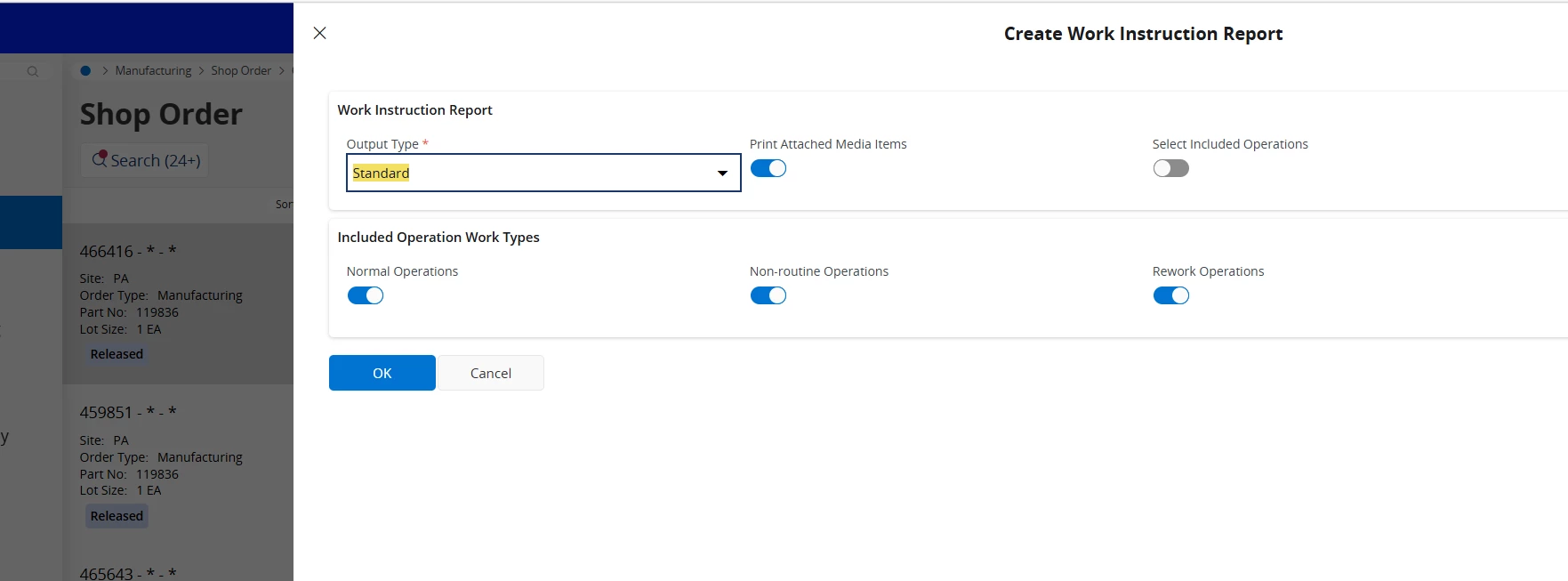
When using IFS Cloud 25R1, I have Shop Orders setup with documents either directly connected to operation work guidelines or transformed to them, yet when I try to create Work Instruction report, I do not get the option to “Print attached documents”.  I have checked release notes and can’t see that it has been deprecated and the help guides still say that this function is there (with no prereqs).  Is this something anybody has seen?  


Also, logged in as ifsapp, so not a permissions thing.   

Best answer by matt.watters

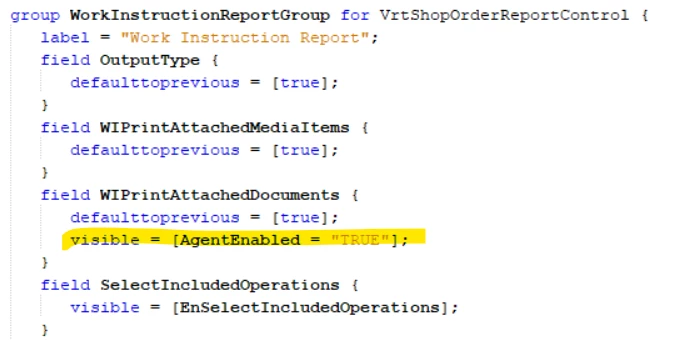
@svaughan I believe the AgentEnabled setting pertains to the Aurena Agent being installed and its browser extension enabled. Install this and see if the option is in the dialog.

7 replies

Björn Hultgren
Hero (Employee)
Forum|alt.badge.img+25

Could it be something with the Print Agent?


Forum|alt.badge.img+2
  • Author
  • Do Gooder (Customer)
  • May 5, 2026

I mean, it could be but for the option to not be visible makes me think not?  I am happy to check the agent though.  


Björn Hultgren
Hero (Employee)
Forum|alt.badge.img+25

@svaughan It seems to be a visible condition like that in the client code 


Forum|alt.badge.img+2
  • Author
  • Do Gooder (Customer)
  • May 5, 2026

Thanks Bjorn.  

Do I set this in the ifs-printing.properties file, agent or is this client side?  I had a quick look on report rules to see if I could build one out using this as an action (thinking naively it would be listed there).  Still no joy.  I am currently waiting on access to the print agent so I can have a look through how they have been setup.  


Björn Hultgren
Hero (Employee)
Forum|alt.badge.img+25

@svaughan Unfortunately I’m not an expert on print agent. Hopefully someone else can assist.


matt.watters
Ultimate Hero (Partner)
Forum|alt.badge.img+26
  • Ultimate Hero (Partner)
  • Answer
  • May 5, 2026

@svaughan I believe the AgentEnabled setting pertains to the Aurena Agent being installed and its browser extension enabled. Install this and see if the option is in the dialog.


Forum|alt.badge.img+2
  • Author
  • Do Gooder (Customer)
  • May 7, 2026

Thank you both for helping me out with this.  The Aurena agent was the root cause of that option being absent.