Question

Shop Order Start Date changed after report scrap

  • May 26, 2025
  • 4 replies
  • 108 views

Marcel.Ausan
Ultimate Hero (Partner)
Forum|alt.badge.img+22

Hi All, ​@Björn Hultgren (would greatly appreaciate your oppinion on below matter).


IFS Cloud 24.2.3


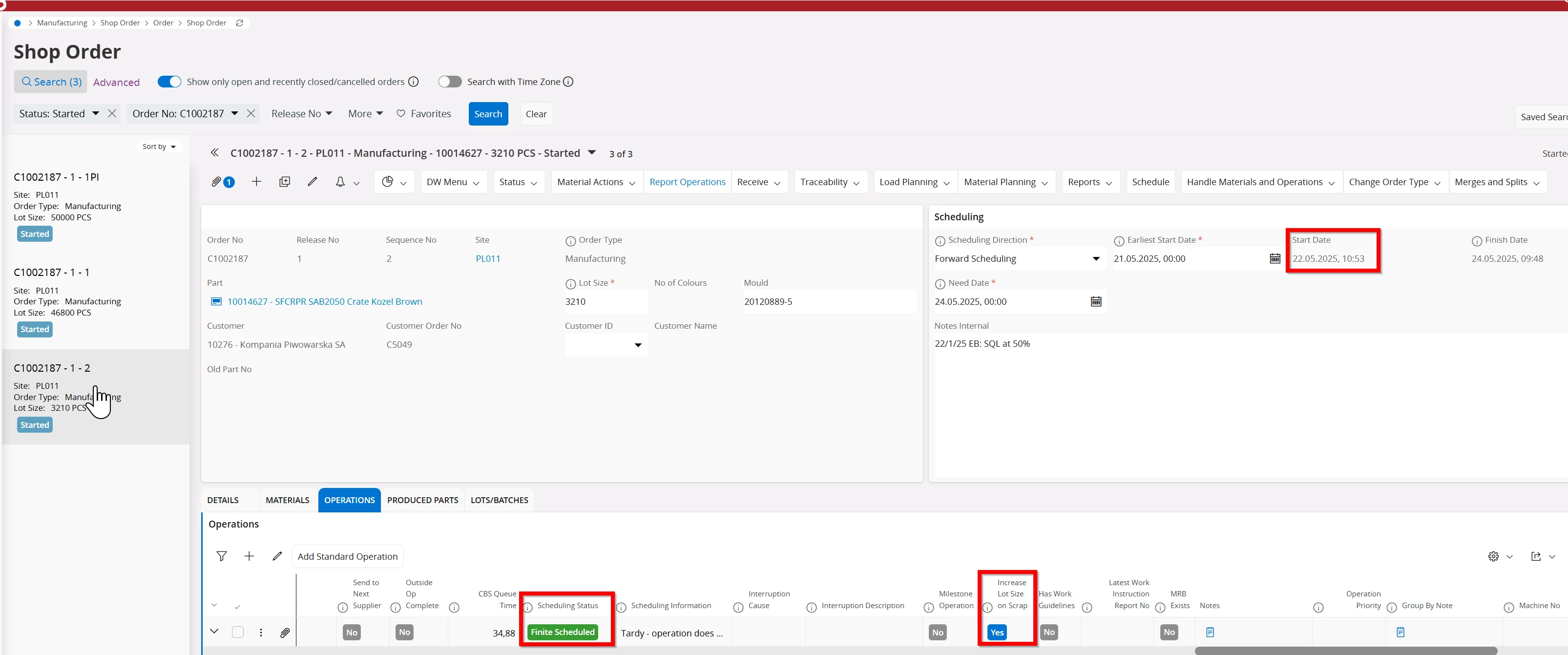
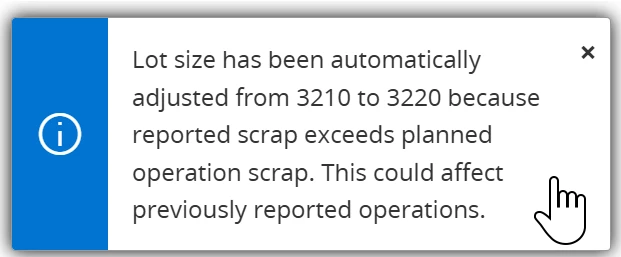
We’ve noticed that after reporting scrap on a Shop Order Operation, when Increase Lot on Scrap is enabled, once the lot-batch qty is incresed, the shop order is rescheduled and Start Date is changed to match the Earliest Start Date (Forwards Scheduling).

Since the SO is started, I see no point in updating the Start Date of the Shop Order. Is this a bug that should be addressed to R&D? Or is there any setup that could prevent rescheduling SO when lot-batch is increased?

Before reporting scrap - Start Date - 22nd of May
 

After scrap was reported - Start Date changed to 21st of May.


4 replies

Forum|alt.badge.img+1
  • Do Gooder (Partner)
  • April 20, 2026

Hi Marcel, did you find out why the shop order dates are changing? Ours are changing even when lot increase for scrap is OFF. Thanks, Petr


Yathartha Karunananda
Hero (Employee)
Forum|alt.badge.img+12

Hi ​@Marcel.Ausan,

I believe this is the expected behavior. 

Once you scrap the quantity of an operation, (with adjustment in lot size or , not) , rescheduling will happen to calculate the new machine loads.

Say after scrapping action - we just keep the operations where they are, then still the results are wrong.

The reason is with the scrap, operation quantity adjustment should happen, and time has to be booked for that.

lets say, there are 5 operations. 10, 20, 30, 40, 50. Lot size is 20. This means each operation should produce 20 on respective machines. Then lets say, shop order is scheduled for this week and you report 10 and 20 without any problem. Lets say total quantity of operation 30 has to be scrapped and shop order is set to adjust lot size. Now what should happen is, Lot size has to be doubled, and operation 10 and 20 again has to produce 10 each. Then from 30 onwards, the operation qty 10 again. This means for operation 10, 20, 30 the machine should spend double the time it booked originally as the items produced in 30 got scrapped at first run.

As part of that rescheduling, the system recalculates dates based on parameters such as scheduling direction, need date, and earliest possible start time. In forward scheduling, this can result in the Shop Order Start Date being updated to the recalculated Earliest Start Date, even if the order has already started.


Forum|alt.badge.img+1
  • Do Gooder (Partner)
  • April 21, 2026

Hi Yatharta, but when the setting is set not to adjust lot size for scrap, why the recalculation takes place then? Because the next operations are less quantity? Understand, but this recalculation changes also finite planned (by APB) back to infinite and then creates mess in both cloud and APB.

Unfortunately the infinite scheduler can be switched off (manual planing of SO) only when MSO and APB is off, otherwise this would be a nice solution.


Yathartha Karunananda
Hero (Employee)
Forum|alt.badge.img+12

Hi ​@PECACZ,

The infinite scheduler manage the load calculation by triggering infinite scheduler again according to need date , EPST, scheduling direction and qty.

The workaround there may be to , set EPST to [before scrap start time] - not 100% false proof.

For APB it will work as well.

But you have to run Adjust schedule to finite schedule the infinite - started shop order.