

Question

Shop Order re-explosion of materials on Lot Size change

  • March 24, 2026
  • 3 replies
  • 67 views

OllieByrne
Do Gooder (Customer)
Forum|alt.badge.img+2

We have recently upgraded to Cloud version 25R1 - previously we used version 22R2… my planning colleagues say that if they manually amend the materials requirements on the shop order (to remove or replace or add a component for example), then if they subsequently change the lot size, the material components requirement revert to the effective revision structure and so undoes the previous component changes, reinstating the components before the earlier change but relative to the new lot size.  Effectively, there is a re-explosion of the effective structure based on the new lot size

However, I am not convinced that this did not also prevail in the older version 22R2 - Co-pilot cannot find any reference to a change in this regard.  I cannot prove that it existed in our old version.

Anyone know if this feature did exist in 22R2 and/or if it is indeed standard functionality?

3 replies

Lingesan08
Hero (Partner)
Forum|alt.badge.img+9
  • Hero (Partner)
  • April 2, 2026

Hi ​@OllieByrne ,

Yes — what you are seeing is standard behavior in IFS Cloud, and it is related to how Shop Order structure is regenerated (re-exploded) when key parameters like lot size are changed.

 What is happening

When you:

  1. Manually modify shop order materials
    • Add / remove / replace components
  2. Then change the lot size

 IFS triggers:

Re-explosion of the shop order structure based on the effective revision

This means:

  • System rebuilds material requirements from:
    • Product structure (BOM)
    • Revision
    • Lot size

 Result:

  • Your manual changes are overwritten
  • Structure returns to standard BOM definition

 Why this happens

IFS treats lot size change as a structural recalculation trigger because:

  • Component quantities depend on:
    • Lot size
    • Scrap factors
    • Scaling logic

 So system ensures:

Structure = consistent with engineering definition

 Important Behavior

Manual changes are not permanently stored as overrides

 They are:

  • Temporary adjustments
  • Lost when:
    • Re-explosion is triggered

 Was this different in 22R2?

From practical experience:

  • This behavior already existed in earlier versions (including 22R2)
  • However:
    • It may have been:
      • Less noticeable
      • Triggered less aggressively
      • Dependent on how change was done

 In 25R1:

  • Behavior is more consistent/strict

 How to Handle This

 Option 1: Make changes after lot size update

Best practice:

  1. Change lot size first
  2. Then adjust components

 Avoids re-explosion overriding your changes

 Option 2: Use Alternate/Engineering Structure

If changes are permanent:

  • Update:
    • Product structure (BOM)
  • Or:
    • Use alternate structure

 Option 3: Lock Structure (if applicable)

  • Some setups allow:
    • Preventing re-explosion

 Depends on configuration

 Option 4: Use Shop Order specific changes carefully

  • Treat manual edits as:
    • Temporary

 Key Insight

Lot size change = system assumes structure must be recalculated

 So it prioritizes:

  • Engineering accuracy
    over
  • Manual adjustments

matt.watters
Ultimate Hero (Partner)
Forum|alt.badge.img+26
  • Ultimate Hero (Partner)
  • April 2, 2026

@OllieByrne what you are seeing is NOT standard behavior. Shop Orders can be manipulated to any extent and will not revert to the content of the original structure/routing revision if the Lot Size is changed.

Do you have a customization that is resetting the Materials list when the Lot Size is changed?

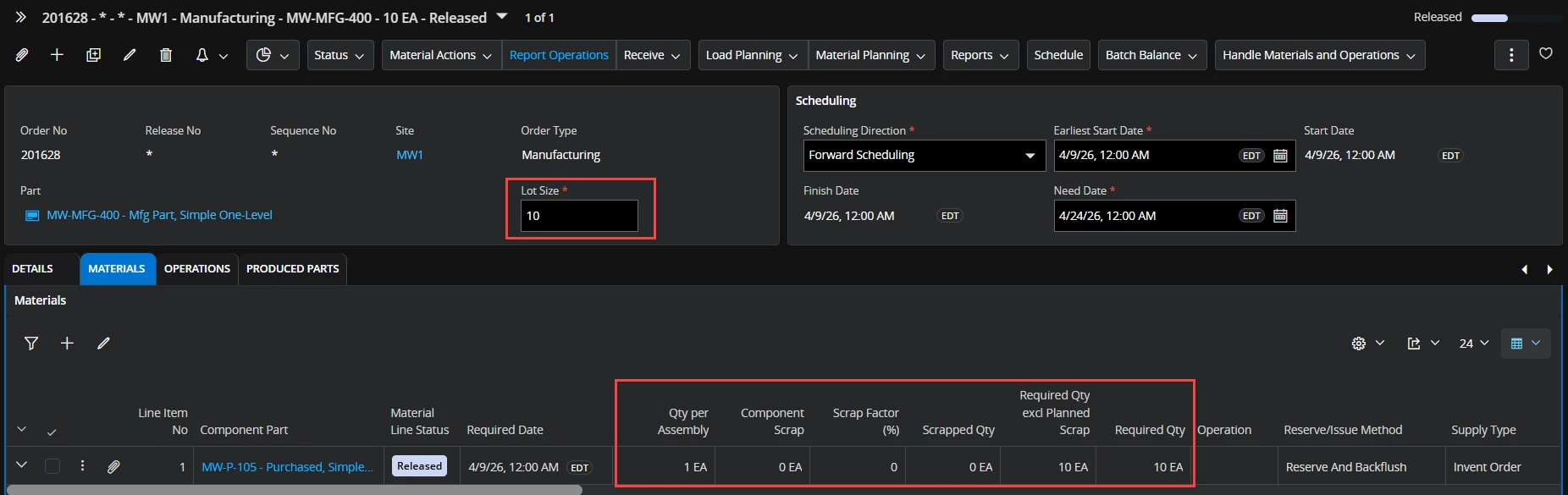
In 25.1.2 Here is a released shop order with its standard materials list. Lot Size = 10.

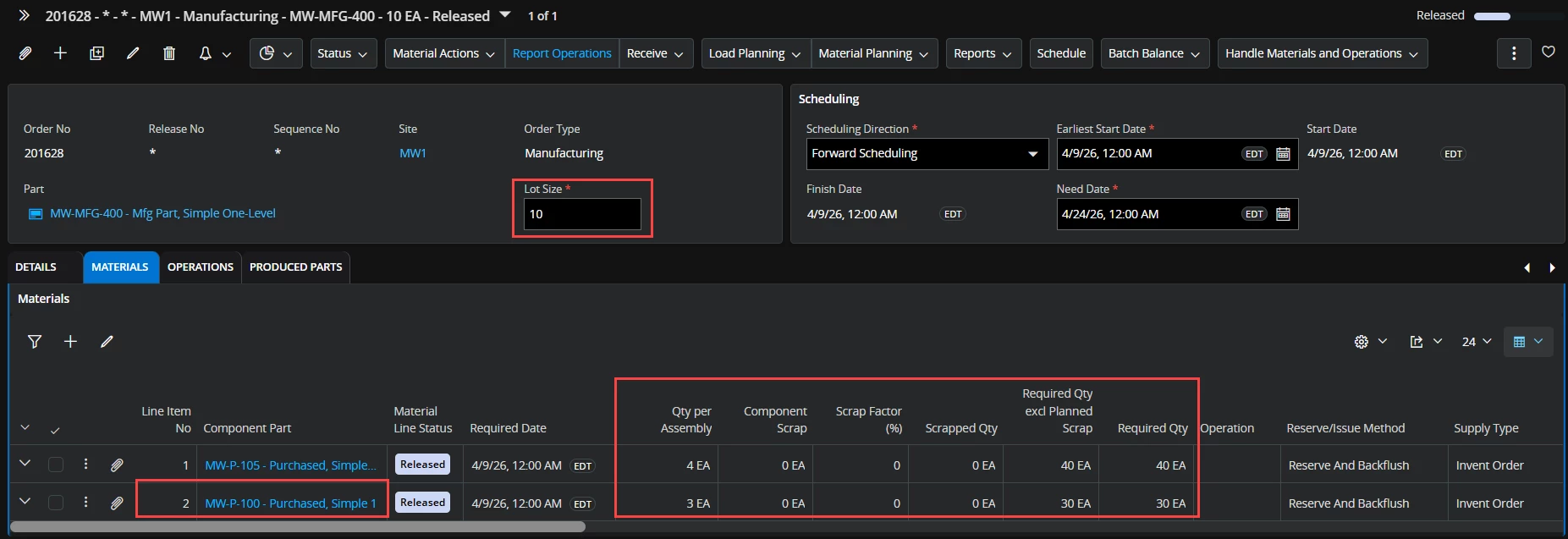
Change the QPA of the component from 1 to 4.

Add a component, QPA = 3.

Lot Size is still 10.

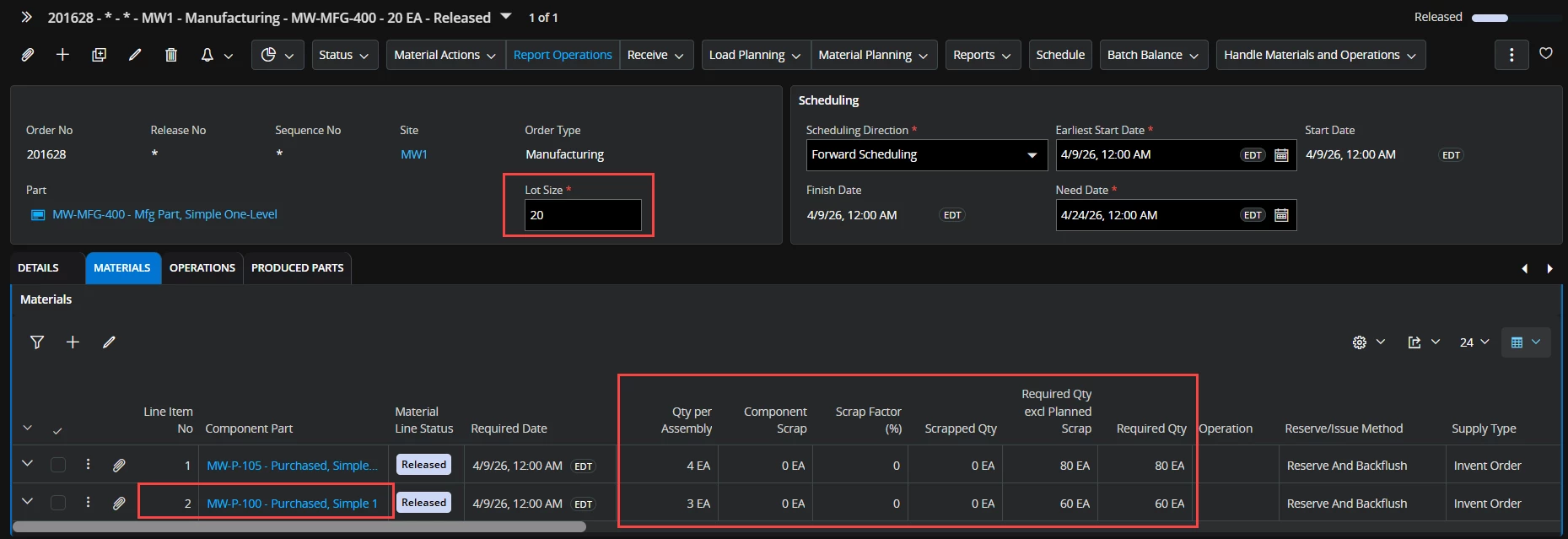
Change the Lot Size to 20. Manual changes to the components list and QPAs stay in effect. As expected, the Required Qty is updated accordingly.


Another way to know this is not standard behavior - recall the setting on a routing operation for ‘Increase Lot Size on Scrap’. Imagine if this were ‘on’, multiple scraps were performed, and the Lot Size kept changing with each scrap. Should we expect the materials list to keep reverting with each scrap?


OllieByrne
Do Gooder (Customer)
Forum|alt.badge.img+2
  • Author
  • Do Gooder (Customer)
  • April 7, 2026

@OllieByrne what you are seeing is NOT standard behavior. Shop Orders can be manipulated to any extent and will not revert to the content of the original structure/routing revision if the Lot Size is changed.

Do you have a customization that is resetting the Materials list when the Lot Size is changed?

In 25.1.2 Here is a released shop order with its standard materials list. Lot Size = 10.

Change the QPA of the component from 1 to 4.

Add a component, QPA = 3.

Lot Size is still 10.

Change the Lot Size to 20. Manual changes to the components list and QPAs stay in effect. As expected, the Required Qty is updated accordingly.


Another way to know this is not standard behavior - recall the setting on a routing operation for ‘Increase Lot Size on Scrap’. Imagine if this were ‘on’, multiple scraps were performed, and the Lot Size kept changing with each scrap. Should we expect the materials list to keep reverting with each scrap?

Hi ​@matt.watters , thanks for that - what you say makes sense from the ‘Increase Lot Size on Scrap’, perspective. Note, we have NO customizations related to this. Your example clearly demonstrates that in 25.1.2 lot size changes do not revert the materials to the effective revision, but does adjust quantities pro-rata. Strange as in release 25.1.4 what you describe is NOT what happens when lot sizes are changed in the Shop Order screen - perhaps this is a ‘service update’ specific bug.  In 25.1.4, what you have shown only results if the shop order was already started!

Note, we have a way to subvert the 25.1.4 behaviours by using a migration job to change the lot sizes rather than doing the change on screen, manually.  See the below table for my findings..

IFS Behaviours in 25.1.4:

Shop Order State

Method of Lot Size Change

Effect on shop order materials, even if they had been changed prior to lot size change

Desired Planning result?

Planned

On Screen

Reverts to original effective structure revision

No

Released

On Screen

Reverts to original effective structure revision

No

Started

On Screen

Retains changes and amends quantities pro-rata

Yes

Planned

Migration Job

Retains changes and amends quantities pro-rata

Yes

Released

Migration Job

Retains changes and amends quantities pro-rata

Yes

Started

Migration Job

Retains changes and amends quantities pro-rata

Yes


Conclusion – our fix going forward…:


Shop Order State

Method of Lot Size Change..

If the shop order materials/operations had been changed prior to lot size change

Planned

use Migration Job to change lot sizes

Released

use Migration Job to change lot sizes

Started

1 - use Migration Job to change lot sizes or..

2 - On Screen


In summary, as with many other issues we have identified through our upgrade process, every release version and in particular service update pack bring differences to system behaviours.  We have come across multiple issues where the response from IFS has been - ‘that issue was acknowledged and has been corrected in a later service update or release’.


Thank you all.