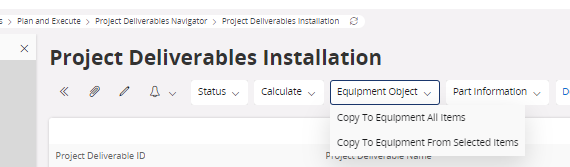
Question

Project deliverables - Copy to Asset Design - Equipment

  • May 20, 2020
  • 4 replies
  • 262 views

Forum|alt.badge.img+7

Hello


from the documentation, I understand that the IFS instance has to be set up exclusively either as 1) enabling copy from Project Deliverables to Asset or 2)to Copy to Equipment.

This setup being based on property COPY_TO_MAINTENANCE.

Does it mean that once it’s defined for an IFS instance, and that Project Deliverables has been used, then it should stay as it is?

Does it means that it’s not possible to run both flows in the same instance?

Thanks

4 replies

AveTonitM
Hero (Partner)
Forum|alt.badge.img+10
  • Hero (Partner)
  • August 27, 2024

I’m working with IFS Cloud 24R1. The documentation is missing the description how Object Property “

COPY_TO_MAINTENANCE” affects the system functionality.

Do You @Olivier Maillard have any information how this parameter affects the project delivery and how equipment objects are created after the project delivery is completed? My requirement is to get equipment objects created after the IFS Project is delivered.


Forum|alt.badge.img+7

Hello @AveTonitM , it was long ago and I did some reseach back.

In 24R1 it seems that COPY_TO_MAINTENANCE is driving the behaviour of this “copy” feature.

https://ifsgcsc1-d04.demo.ifs.cloud/ifsdoc/documentation/en/ProjectDeliverables/ActivityCopyDeliverablesStructureToEquipment.htm?StandAlone=true


I did some basic tests about copy and received a nice message telling me that the copy was successful, but I have not been able to retrieve the copied equipement.


I did assume that the equipment would be created under the material site, however I have searched without success.


This looks different from Apps 10 where two different behaviours (YES and NO) were described: this was quite strange, since I was wondering what was happening if one toggled this flag. In IFS CLoud, only the “YES” is described.


Setting the property COPY_TO_MAINTANANCE to YES:

  • Enables the option for copying to Equipment.
  • Disables the option for copying to Asset Design.
  • Disables plant and class information to be defined.
  • Shows the Project Deliverables Definition/Tags tab and the Project Deliverables Navigator/Tags tab.
  • Hides the Project Deliverables Navigator/Design Object tab.

Setting the property COPY_TO_MAINTANANCE to NO:

  • Enables the option for copying to Asset Design
  • Disables the option for copying to Equipment.
  • Enables plant and class information to be defined.
  • Shows the Project Deliverables Navigator/Design Object tab.
  • Hides the the Project Deliverables Definition/Tags tab and the Project Deliverables Navigator/Tags tab.


Hope this helps, and if you manage to go further I’d be happy to know  😊


  • Do Gooder (Employee)
  • February 3, 2026

In IFS Cloud 25R2, we confirmed that the message “Copy to Equipment completed successfully” can appear even when no Functional Equipment objects are created.
Based on validation, Equipment creation works only when all required steps in both the Project Deliverables Design and Project Deliverables Install screens are completed correctly.

Below is the correct end‑to‑end process.

Required Steps for Equipment Creation in 25R2

Step 1: Define Tags in “Project Deliverables Design”

Tags must first be defined in the Design stage.

  • The Tag Number becomes part of the Functional Equipment ID.
  • The Tag Name becomes the Functional Equipment Name.

This Design-stage setup acts as the master structure for later equipment generation.

Step 2: Add Tags Again in “Project Deliverables Install”

Even if tags exist in the Design screen, Equipment will NOT be created unless the tags are explicitly added in the Install screen.

Step 3: Enter a Serial Number for Each Tag

Functional Equipment is generated using the unique combination:
Tag + Serial Number
If the Serial Number is missing, the system displays “success” but creates no Equipment.

Step 4: Select the Tag Row to Reveal the “Equipment” Link

In the Install screen, the created Equipment only appears when the tag row is selected.
This UI behavior is easy to overlook and is a common reason users believe Equipment was not generated.


Forum|alt.badge.img+7
  • Author
  • Sidekick (Partner)
  • February 3, 2026

Thanks ​@Yas  for the detailed answer. I’m not following this kind of topic now, but I’ll check it or may share with colleagues if we have to set up this feature.