Solved

Permissions Required for the Media Attachments

  • May 5, 2026
  • 3 replies
  • 28 views

Forum|alt.badge.img+5

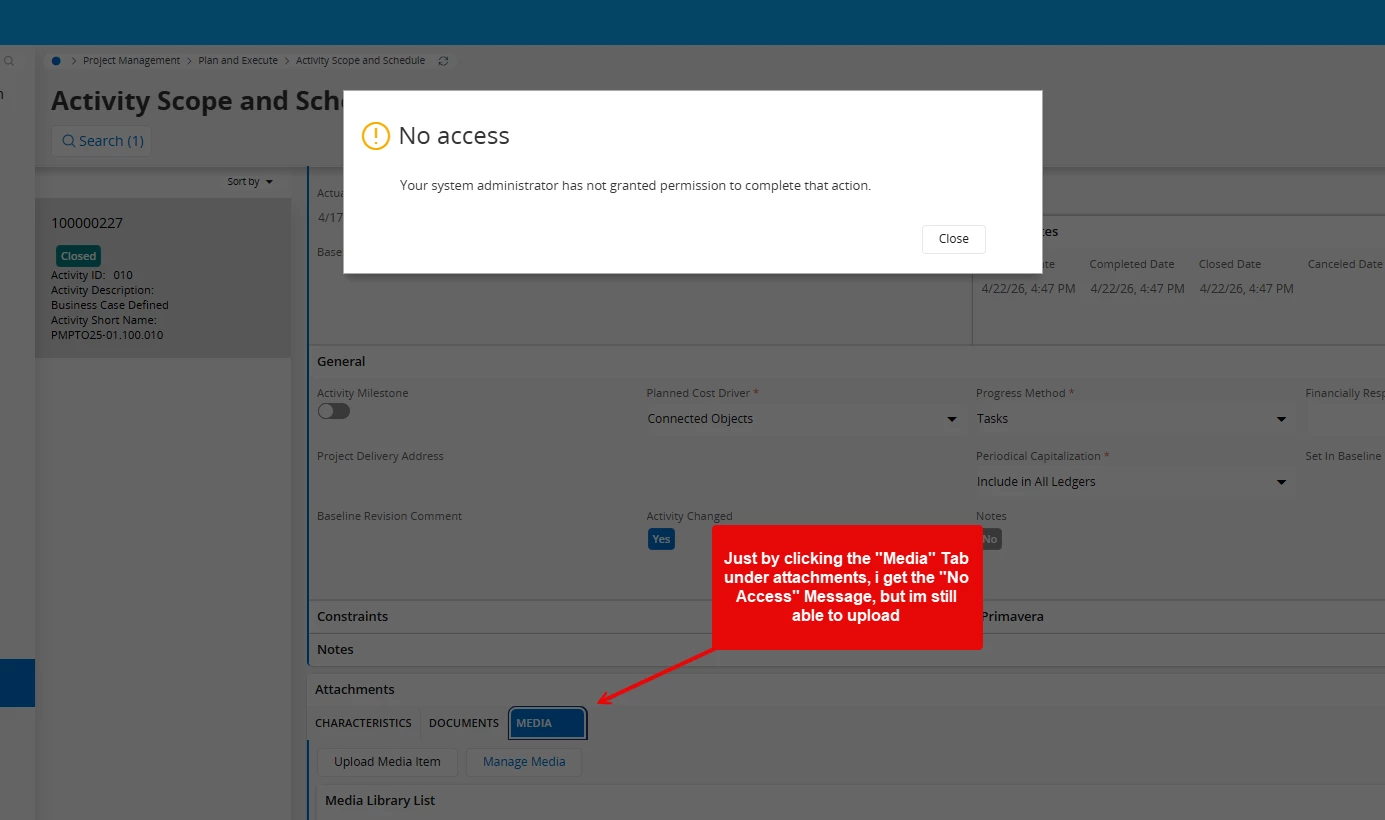
Hello IFS Community, hope somebody has an answer for this, i’ve been searching with no solution just yet, i got the Media Objected connected to my Activity Scope and Schedule page, but when i try to go in it, as soon as i click the “Media” tab under the attachments, i get the “No Access” Message below, i added a few Media related projections i got it to where i can upload media items, but everytime i click the “Media” tab, i get the message below.


i added the “MEDIA_LIBRARY” Permission set added and i algo added the “MediaHandling” projection, along with a few other related.


what permission am i missing here? im in 24R2.


thank you in advance for all your help!


Best answer by Yathartha Karunananda

Hi ​@QHFJESP,

This is bit of a technical way to find it. Since sometimes the projection in the URL you try is not the one that gives the access issue. You can try to find it out accurately by using below steps:

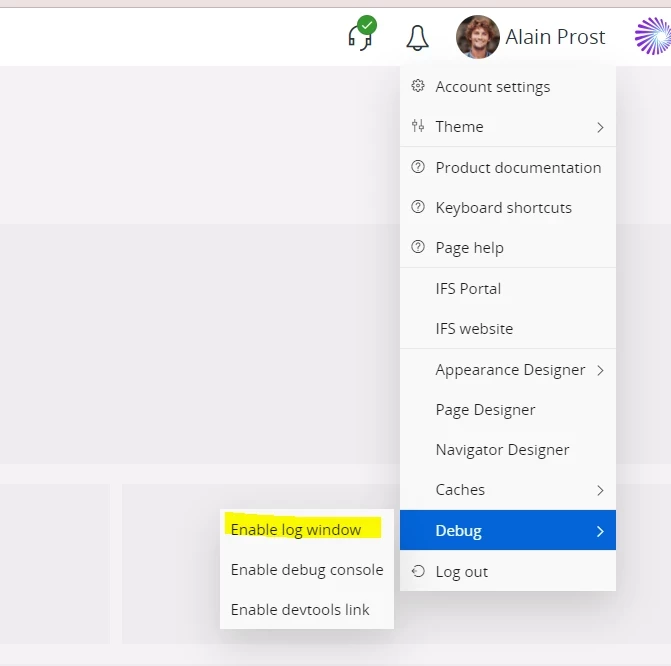
1.open the log window. You can find it like below

2.Now try the accessing the window where you get this error

3.go to the log window and search for the word FnDPorejectionGrant.SRV_NOT_ACCESS

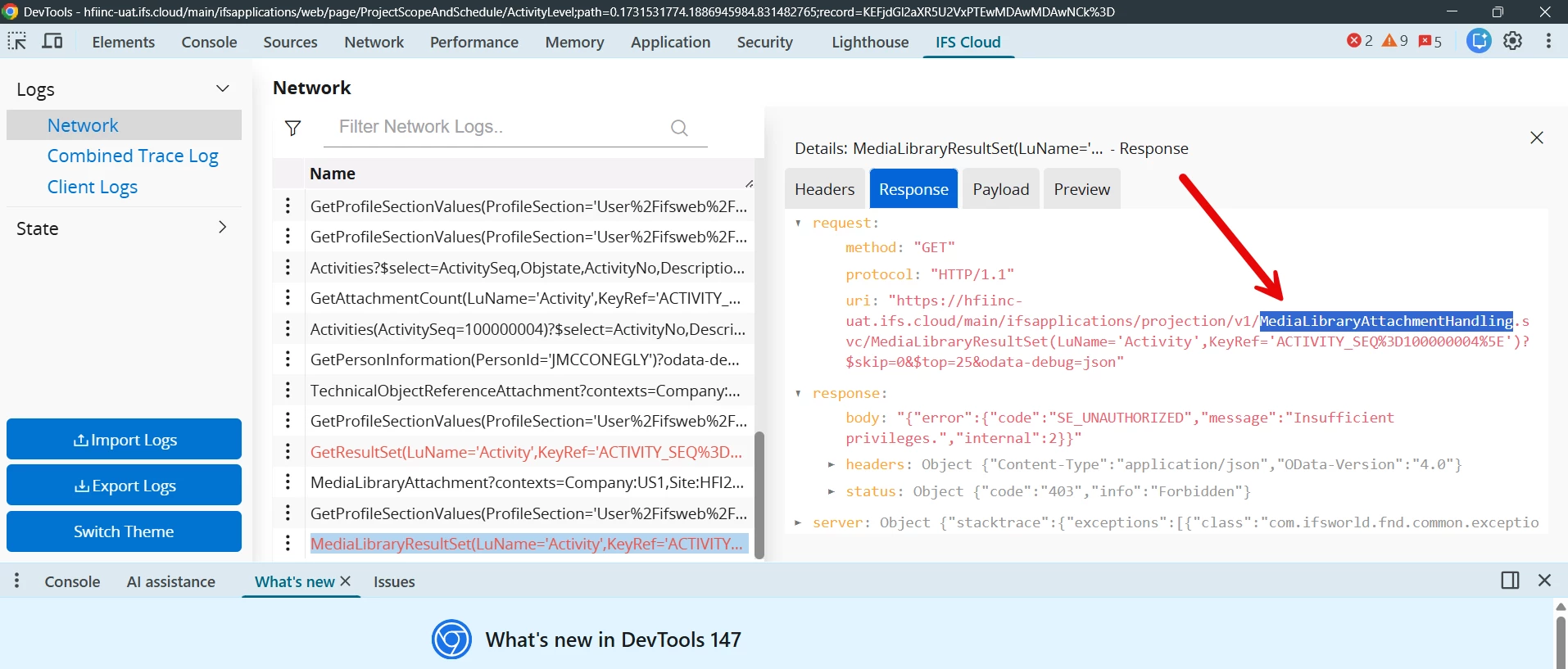
In there you can see the projection id you are missing. For example in below TechnicalObjectRefereneceAttachmentHandling is the missing projection grant

4.Now you can grant that permission to the relevant user.

Hope this helps

3 replies

Yathartha Karunananda
Hero (Employee)
Forum|alt.badge.img+12

Hi ​@QHFJESP,

This is bit of a technical way to find it. Since sometimes the projection in the URL you try is not the one that gives the access issue. You can try to find it out accurately by using below steps:

1.open the log window. You can find it like below

2.Now try the accessing the window where you get this error

3.go to the log window and search for the word FnDPorejectionGrant.SRV_NOT_ACCESS

In there you can see the projection id you are missing. For example in below TechnicalObjectRefereneceAttachmentHandling is the missing projection grant

4.Now you can grant that permission to the relevant user.

Hope this helps


Forum|alt.badge.img+5
  • Author
  • Do Gooder (Customer)
  • May 6, 2026

Hi ​@QHFJESP,

This is bit of a technical way to find it. Since sometimes the projection in the URL you try is not the one that gives the access issue. You can try to find it out accurately by using below steps:

1.open the log window. You can find it like below

2.Now try the accessing the window where you get this error

3.go to the log window and search for the word FnDPorejectionGrant.SRV_NOT_ACCESS

In there you can see the projection id you are missing. For example in below TechnicalObjectRefereneceAttachmentHandling is the missing projection grant

4.Now you can grant that permission to the relevant user.

Hope this helps


Hello  Yathartha, what you have shown me is really really good! im in 24R2, looks like you might be in a different version, but i believe i have found the equivalent of what you are showing me.

looks like going into the console i can se the projection with the error!…  i had no clue you could do this, this will be very useful.


this is where the good old “Teach a man how to fish...” saying comes, you just showed me how to deal with this in the future.


Thank you very much!!


Yathartha Karunananda
Hero (Employee)
Forum|alt.badge.img+12

Hi ​@QHFJESP,

This is what IFS community is all about! Do not forget to mark my answer as the best one so it would be helpful for others in the future as well✌🏻