Question

Numeric Default Value in Cloud

  • Oct 2, 2026 12:06 PM UTC
  • 2 replies
  • 40 views

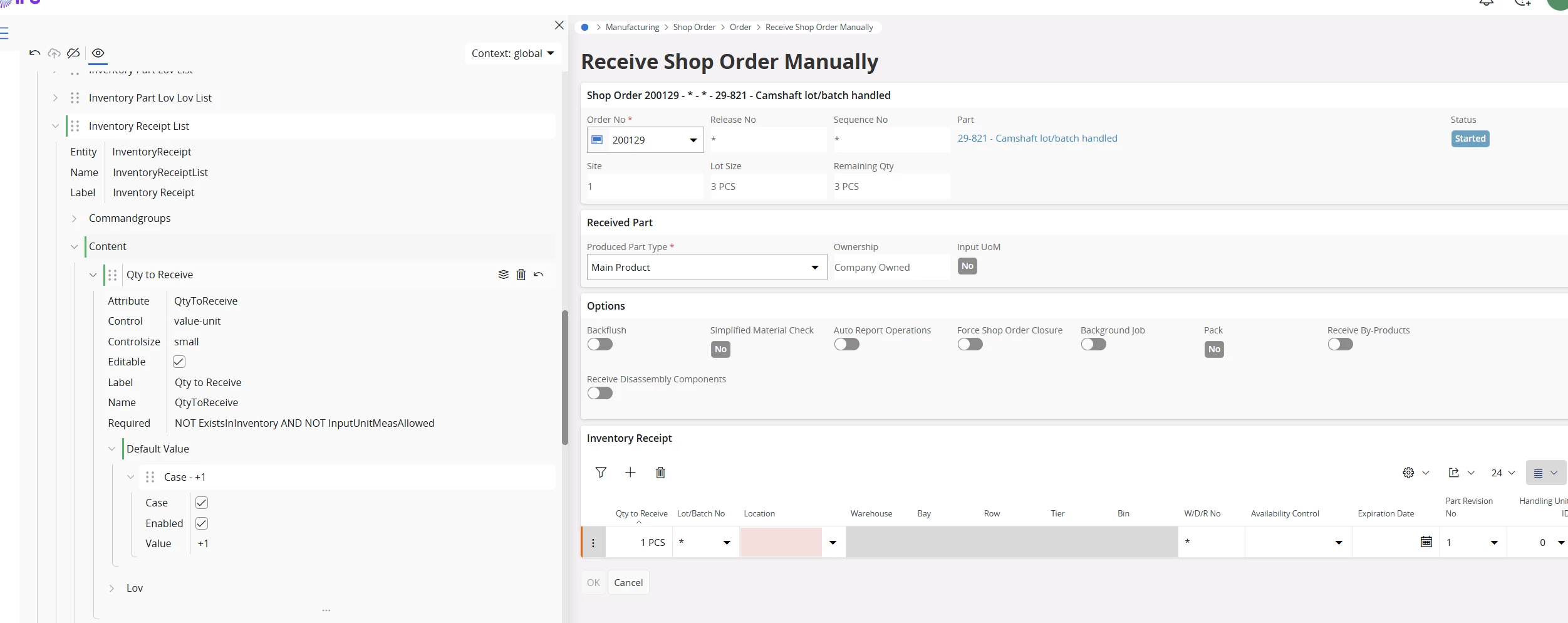
I’m trying to default Qty to Receive to 1, but nothing seems to work.  Any idea what I’m doing wrong?
 

2 replies

Yathartha Karunananda
Superhero (Employee)
Forum|alt.badge.img+12

Hi ​@CherylGodfrey-Cooke,

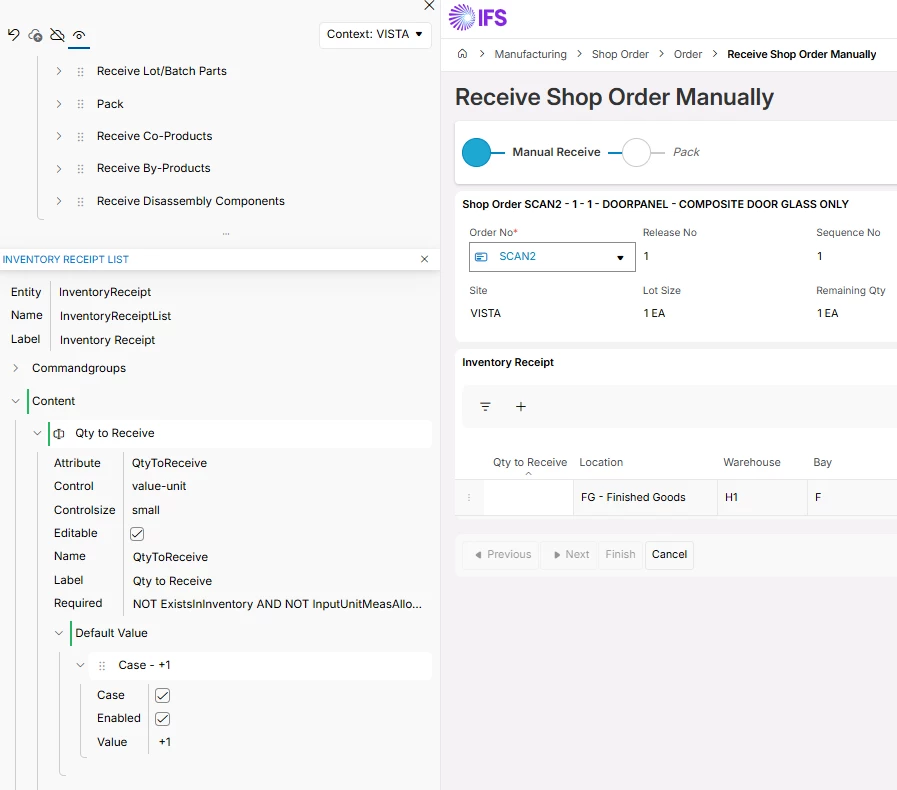
Not quite able to reason why, your set up is correct and it worked for me too.


richardwoods
Do Gooder (Partner)
Forum|alt.badge.img+6
  • Do Gooder (Partner)
  • Nov 24, 2026 10:58 PM UTC

Short answer: a default value in Page Designer is a rule that fills the field when a new record is being created, so whether it can work on Qty to Receive depends on where that field sits. If the field is on a line that already exists, or the page fills it itself, a rule on the field may never get a chance to fire. Worth testing it on a page or assistant where you really are creating a new record, then comparing.

How the default rule works

Each field can hold a list of rules. The first rule whose condition is met is the active one and the rest are skipped. Its value is put into the field as the initial value, and the user can still overwrite it. Once someone has typed their own value, a later rule change will not overwrite it. If no rule is active, whatever value the page or server set for the field is left alone.

A setup along these lines

  • Open the page, click the user icon and choose Page Designer, then select the Qty to Receive field.
  • Default Values is an optional attribute, so it may not show in the attribute list at first. Click the (...) icon at the bottom of the field attributes to show the optional ones.
  • Add a default value case item with Case set to a condition that is true when you want it (for a flat default to 1, a condition that always holds, or one tied to another field such as the line status).
  • Value = 1 (a hard-coded value is allowed; it can also be another field, a CSV value or an expression of the right data type).
  • Make sure Enabled is ticked on the case item, and that no rule above it is catching the same condition first, because order matters.
  • Save the configuration and test with a freshly created record, not an existing one, and after clearing the browser cache or reloading the page.

What to expect when it is working

The field shows 1 as soon as the new record opens, and the page behaves as if you had typed it, so a save is possible straight away if the other mandatory fields are filled.

The awkward case

If Qty to Receive is shown on existing order lines in a receiving list or dialog, I would expect no new record to be created there, so a default rule has nothing to react to. In that case a rule on the field will not help. The usual routes are a different place to set the value (for example a workflow that populates the value, or setting it on the page where the line is created) rather than the default rule.

Things to know

  • The condition has its own syntax, so keep the first test as simple as you can, then add conditions.
  • On mobile, field default rules apply only when the record is created through an assistant.
  • A different value set by the page for that field is kept when no rule is active, so test with the rule on a field you know the page leaves empty to prove the rule itself works.

Worth a look: the IFS Cloud documentation topics Field Default Values, Configure Conditional Default Values and Condition Syntax.

Which page are you on when you open Qty to Receive, and is it a new record being created or an existing line you are receiving against?

Created with the help of Ask Olive.