Solved

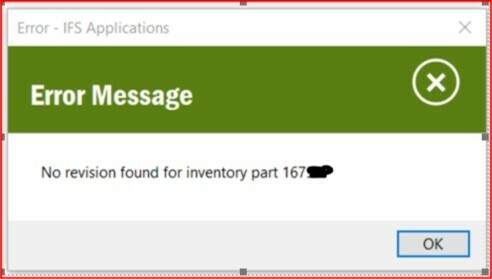
No Revision Found For Inventory Part

  • Aug 11, 2020 11:04 AM UTC
  • 7 replies
  • 1610 views

Hi,


I have an Inventory Part but when we try to raise a Purchase order we get ‘No Revision Found For Inventory Part’

This was transferred to Inventory Part form Engineering Part and is Revision 2

Can anyone help Please? 
 

Best answer by MR10


View original

7 replies

Forum|alt.badge.img+12
  • Hero (Employee)
  • Aug 11, 2020 11:06 AM UTC

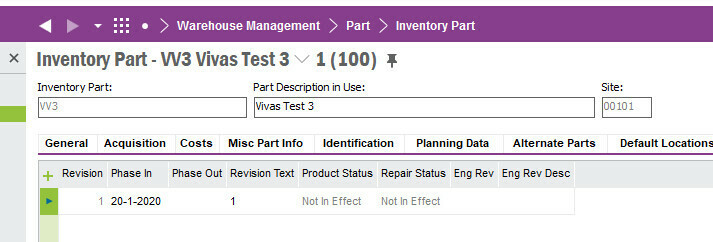
Is the valid from date earlier then you want to make your transaction?

Probably that is raising the error.


  • Author
  • Do Gooder (Customer)
  • Aug 11, 2020 11:32 AM UTC

Thank you for replying.

Do you mean the revision phase in date for the valid date?


Forum|alt.badge.img+12
  • Hero (Employee)
  • Answer
  • Aug 11, 2020 12:00 PM UTC


  • Author
  • Do Gooder (Customer)
  • Aug 11, 2020 12:21 PM UTC

Thank you. So my Product phase in date is 08/08/2020. what date within the purchase order screen do i i compare this to?


Thank you again, you have been a great help.


Forum|alt.badge.img+12
  • Hero (Employee)
  • Aug 11, 2020 12:24 PM UTC

I think it is the PO-line Expected Arrival date, but if you don’t use it actively (otherwise you probably would have found it) I would just back date it a year.


  • Author
  • Do Gooder (Customer)
  • Aug 11, 2020 12:31 PM UTC

Thank You, I will get MRP run for the part and let you know.:slight_smile:


MatAntoiF
Hero (Partner)
Forum|alt.badge.img+9
  • Hero (Partner)
  • Feb 28, 2025 3:06 AM UTC

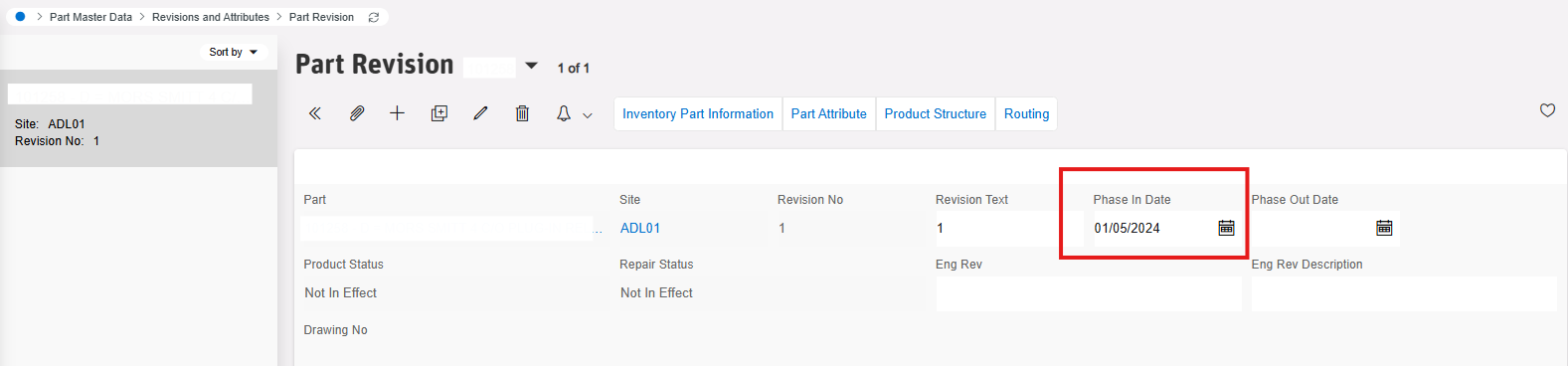
For cloud to find the phase in date, go to inventory part screen and select the part with the issue. There is a command button in header level “Part Revisions” click on it

 It will take you to the Part Revisions page, select the line and click on Details command 

The phase In date will now be on this screen, back date it to before the purchase you want to make