I have some general questions regarding how MSO handles shop order and operation statuses.
As far as I understand, MSO mainly considers shop orders in Planned status. However, the Planned status only exists on the shop order header level, while MSO schedules the individual operations. This is where I am currently a bit confused, especially regarding the interaction between the shop order status and the operation status.
My questions are:
When material is reserved, the shop order header status changes to Reserved. How does MSO handle these shop orders? Are they still considered for scheduling/rescheduling, or are they treated differently?
When material is issued, the shop order header status changes to Started. What is the expected MSO behavior in this case?
Also, what happens if an operation has already been started, but material has not yet been reserved or issued? How should MSO handle such a scenario?
From my understanding, operations that have already been started should not be rescheduled by MSO. However, I have noticed that changing the demand date or changing the operation time can cause the shop order to be rescheduled once the background job is executed → even a fixed operation seems to be unfixed and rescheduled.
Is this the standard behavior?
As an example, let’s assume a company has shop orders from the past that are already started. How should these be handled in MSO? If the demand date is moved into the future, would MSO schedule them again as soon as possible, even though they are already started?
General: Is there a difference on which level the scheduling will be execute (finite scheduling shop orders . resource schedule on smart manufacturing schedule, shop order schdeule on manual mode)
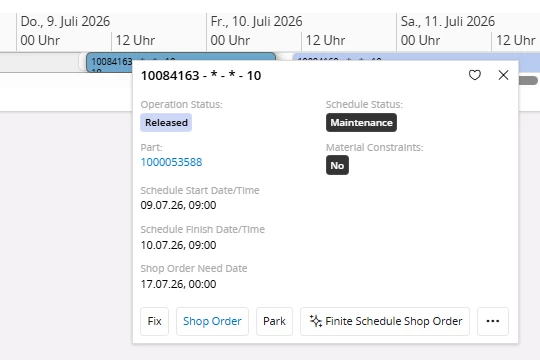
In addition, I would like to understand why the schedule status sometimes shows Maintenance, even though it is a normal shop order operation
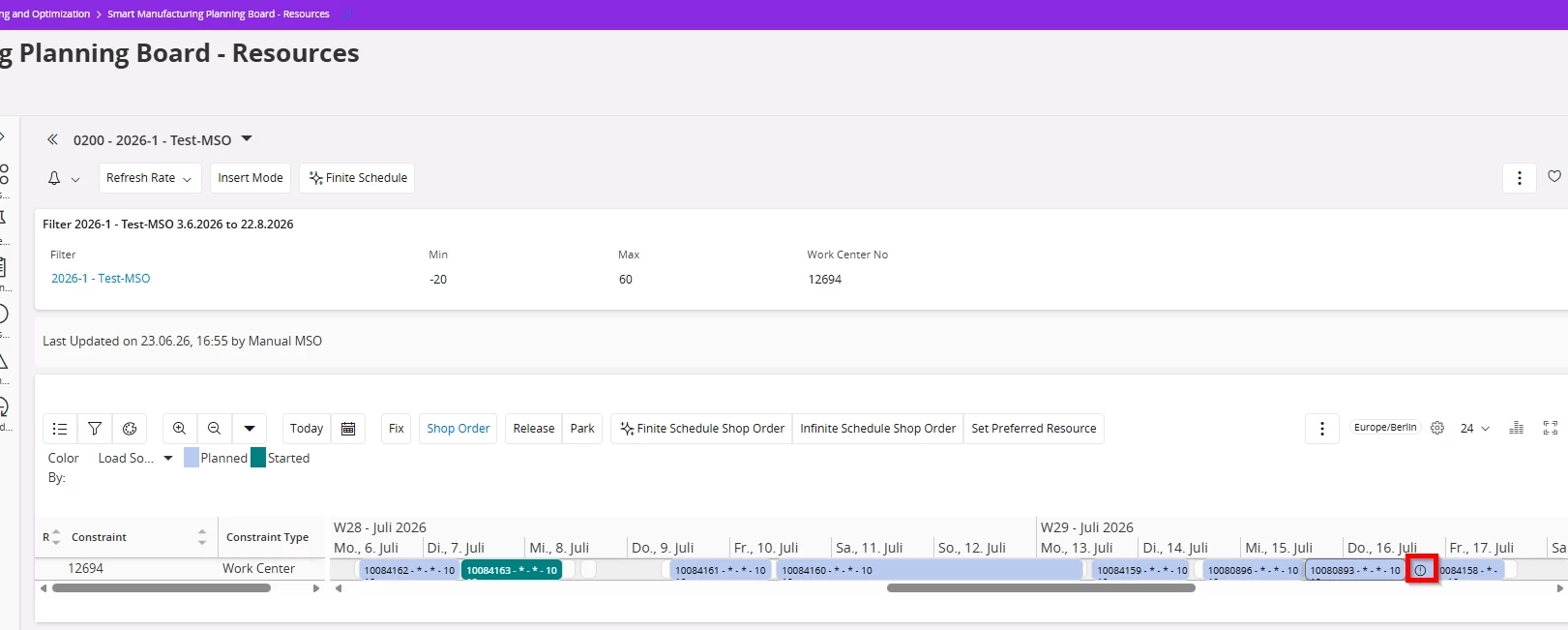
Whats the meaning of the exclamation mark in my picture down below?
Has anyone experienced similar behavior or can explain how MSO is expected to handle these different status combinations? Also sometimes i feel like MSO is giving different results even though nothing on the basic data side was changed.
Any input would be highly appreciated.
Kind regards
Best answer by Lakshan Thiranagama
Hi,
MSO primarily uses the shop order status to decide whether operations can be scheduled or rescheduled. The shop order operation status is only considered when operations are marked as fixed. Otherwise, MSO continues to rely on the overall shop order status during rescheduling.
Shop Order Status Behavior in MSO
Planned
Rescheduling is allowed.
MSO can freely adjust operation dates.
Released / Reserved
Treated as firm planned orders, so MSO will not automatically reschedule them.
However, rescheduling is still possible by:
Using Selective Scheduling, or
Enabling options in the Include Released Shop Orders option in schedule dialog (Only available in Manual mode in MSO).
Started
Also treated as firm planned orders, so MSO does not reschedule them by default.
If Adjust Schedule is enabled, MSO can reschedule unreported operations around the already reported ones.
Parked
Not considered for scheduling or rescheduling.
However, they are still treated as load (firm planned orders) depending on the park reason configuration.
Closed / Cancelled
Completely excluded from scheduling.
MSO does not consider these orders for rescheduling.
Let me answer your questions one by one.
When material is reserved, the shop order header status changes to Reserved. How does MSO handle these shop orders? Are they still considered for scheduling/rescheduling, or are they treated differently?
The Reserved status is functionally very similar to the Released status in terms of shop order operation scheduling. It primarily represents the reservation of materials for a specific order from inventory, and therefore does not require separate consideration during scheduling.
When material is issued, the shop order header status changes to Started. What is the expected MSO behavior in this case?
As I already described above, These are treated as firm planned orders, so MSO does not reschedule them by default. However, if the Adjust Schedule option is enabled, MSO can reschedule unreported operations around those that have already been reported.
Also, what happens if an operation has already been started, but material has not yet been reserved or issued? How should MSO handle such a scenario?
MSO considers material constraints only when they are defined as Finite or Always Finite in the Inventory Part Planning data page. If the Adjust Schedule option is enabled, MSO will reschedule operations based on the material availability date.
From my understanding, operations that have already been started should not be rescheduled by MSO. However, I have noticed that changing the demand date or changing the operation time can cause the shop order to be rescheduled once the background job is executed → even a fixed operation seems to be unfixed and rescheduled.
Is this the standard behavior?
Yes, when you change the demand date or modify the operation time, it means the shop order has deviated from its original firm planned schedule created by MSO. As a result, it is no longer considered a fully finite-scheduled shop order, and some or all operations may shift to an infinite-scheduled state. In such cases, MSO needs to re-evaluate and reschedule the order accordingly. This is the intended system behavior.
As an example, let’s assume a company has shop orders from the past that are already started. How should these be handled in MSO? If the demand date is moved into the future, would MSO schedule them again as soon as possible, even though they are already started?
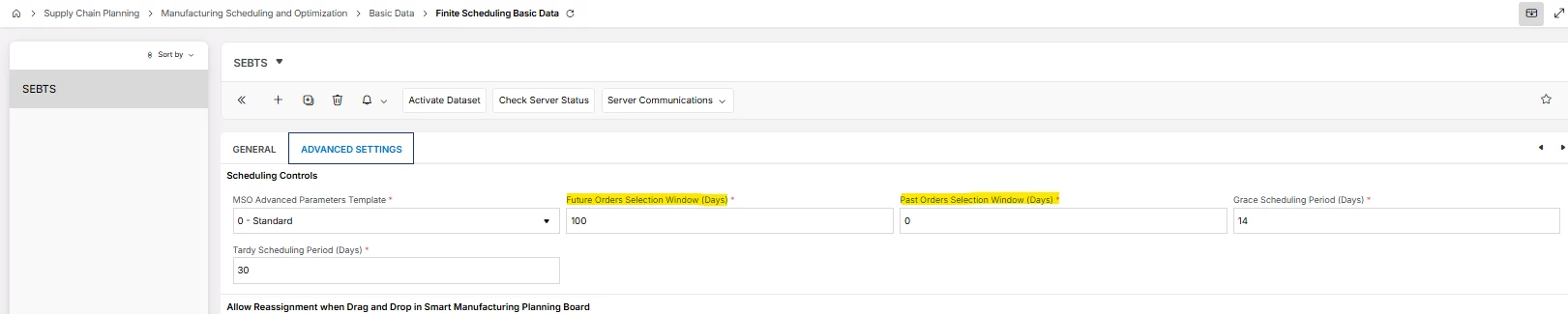
Yes, when a user updates the Need Date, the shop order returns to an infinite scheduled state for all un-reported operations. Then if the order falls within the defined future and past selection day range, MSO will reschedule it.
General: Is there a difference on which level the scheduling will be execute (finite scheduling shop orders . resource schedule on smart manufacturing schedule, shop order schdeule on manual mode)
No, But there can be variations on the order selection based on the command location that you select.
In addition, I would like to understand why the schedule status sometimes shows Maintenance, even though it is a normal shop order operation
Please check if there is any maintenance work task is scheduled on specific work center around particular shop order operation on-time scheduling time period.
Whats the meaning of the exclamation mark in my picture down below?
That means specific operation has scheduled Tardy.
Has anyone experienced similar behavior or can explain how MSO is expected to handle these different status combinations?
I hope I answered all your questions.
Also sometimes i feel like MSO is giving different results even though nothing on the basic data side was changed.
Yes, this can occur because MSO is not a rule-based engine like APB. Instead, it operates on a priority-driven algorithm that continuously optimizes the schedule based on shop order importance. As a result, such inconsistencies may arise; however, the system should produce a consistent output after the optimization interval in PSO has been completed. If it’s not like that you can raise it to IFS R&D.
MSO primarily uses the shop order status to decide whether operations can be scheduled or rescheduled. The shop order operation status is only considered when operations are marked as fixed. Otherwise, MSO continues to rely on the overall shop order status during rescheduling.
Shop Order Status Behavior in MSO
Planned
Rescheduling is allowed.
MSO can freely adjust operation dates.
Released / Reserved
Treated as firm planned orders, so MSO will not automatically reschedule them.
However, rescheduling is still possible by:
Using Selective Scheduling, or
Enabling options in the Include Released Shop Orders option in schedule dialog (Only available in Manual mode in MSO).
Started
Also treated as firm planned orders, so MSO does not reschedule them by default.
If Adjust Schedule is enabled, MSO can reschedule unreported operations around the already reported ones.
Parked
Not considered for scheduling or rescheduling.
However, they are still treated as load (firm planned orders) depending on the park reason configuration.
Closed / Cancelled
Completely excluded from scheduling.
MSO does not consider these orders for rescheduling.
Let me answer your questions one by one.
When material is reserved, the shop order header status changes to Reserved. How does MSO handle these shop orders? Are they still considered for scheduling/rescheduling, or are they treated differently?
The Reserved status is functionally very similar to the Released status in terms of shop order operation scheduling. It primarily represents the reservation of materials for a specific order from inventory, and therefore does not require separate consideration during scheduling.
When material is issued, the shop order header status changes to Started. What is the expected MSO behavior in this case?
As I already described above, These are treated as firm planned orders, so MSO does not reschedule them by default. However, if the Adjust Schedule option is enabled, MSO can reschedule unreported operations around those that have already been reported.
Also, what happens if an operation has already been started, but material has not yet been reserved or issued? How should MSO handle such a scenario?
MSO considers material constraints only when they are defined as Finite or Always Finite in the Inventory Part Planning data page. If the Adjust Schedule option is enabled, MSO will reschedule operations based on the material availability date.
From my understanding, operations that have already been started should not be rescheduled by MSO. However, I have noticed that changing the demand date or changing the operation time can cause the shop order to be rescheduled once the background job is executed → even a fixed operation seems to be unfixed and rescheduled.
Is this the standard behavior?
Yes, when you change the demand date or modify the operation time, it means the shop order has deviated from its original firm planned schedule created by MSO. As a result, it is no longer considered a fully finite-scheduled shop order, and some or all operations may shift to an infinite-scheduled state. In such cases, MSO needs to re-evaluate and reschedule the order accordingly. This is the intended system behavior.
As an example, let’s assume a company has shop orders from the past that are already started. How should these be handled in MSO? If the demand date is moved into the future, would MSO schedule them again as soon as possible, even though they are already started?
Yes, when a user updates the Need Date, the shop order returns to an infinite scheduled state for all un-reported operations. Then if the order falls within the defined future and past selection day range, MSO will reschedule it.
General: Is there a difference on which level the scheduling will be execute (finite scheduling shop orders . resource schedule on smart manufacturing schedule, shop order schdeule on manual mode)
No, But there can be variations on the order selection based on the command location that you select.
In addition, I would like to understand why the schedule status sometimes shows Maintenance, even though it is a normal shop order operation
Please check if there is any maintenance work task is scheduled on specific work center around particular shop order operation on-time scheduling time period.
Whats the meaning of the exclamation mark in my picture down below?
That means specific operation has scheduled Tardy.
Has anyone experienced similar behavior or can explain how MSO is expected to handle these different status combinations?
I hope I answered all your questions.
Also sometimes i feel like MSO is giving different results even though nothing on the basic data side was changed.
Yes, this can occur because MSO is not a rule-based engine like APB. Instead, it operates on a priority-driven algorithm that continuously optimizes the schedule based on shop order importance. As a result, such inconsistencies may arise; however, the system should produce a consistent output after the optimization interval in PSO has been completed. If it’s not like that you can raise it to IFS R&D.