Solved

MSO: Labor run factor and infinite scheduling

  • April 1, 2026
  • 2 replies
  • 33 views

Forum|alt.badge.img+5

Hi all,

we are currently facing a situation in IFS Cloud where operations (especially in assembly) are defined with labor time only (labor run time), without any machine time.

We observe that in such cases, the system sets start time equal to end time, meaning no actual duration is considered for scheduling → Which is standard

From our understanding, scheduling in IFS is based on the work center/resource occupation, which is driven by machine time.

This raises the question:

Is it mandatory to maintain machine time (machine factor) for proper scheduling, even if the operation is purely labor-based (e.g., manual assembly)?

And in addition, in the context of MSO.

Will missing machine time prevent MSO from correctly scheduling and considering capacity, since no resource load is generated?
We did a few testing without machine run factor no scheduling.

We would appreciate confirmation whether this is standard system behavior or if there are alternative modeling approaches for labor-only operations.
Are there any suggestion how to set in this case?


2. Second question:


Additionally, we have a question regarding finite scheduling vs infinite scheduling :

If a work center / labor class is set to infinite, shouldn’t operations still be scheduled with a proper duration and simply be allowed to overlap (i.e., no capacity restriction)?

Currently, even when using such work centers or labor classes, the operations still seem to be planned in a capacity-constrained way, which is confusing to us.

This raises the question:

What is the exact difference between lnfinite and infinite scheduling in IFS (and in MSO)?
How does this setting influence operation scheduling and duration? Are we misunderstanding how “infinite scheduling” should behave in combination with operation times and MSO scheduling?


Kind regards

 

Best answer by Yathartha Karunananda

Hi ​@FleVidurK,

Answer to the question 1, in the MSO, it is fine to go with the 0 machine runtime and it does consider the labor runtime for scheduling unless you have Exempt Labor enabled in finite scheduling basic data window:
 

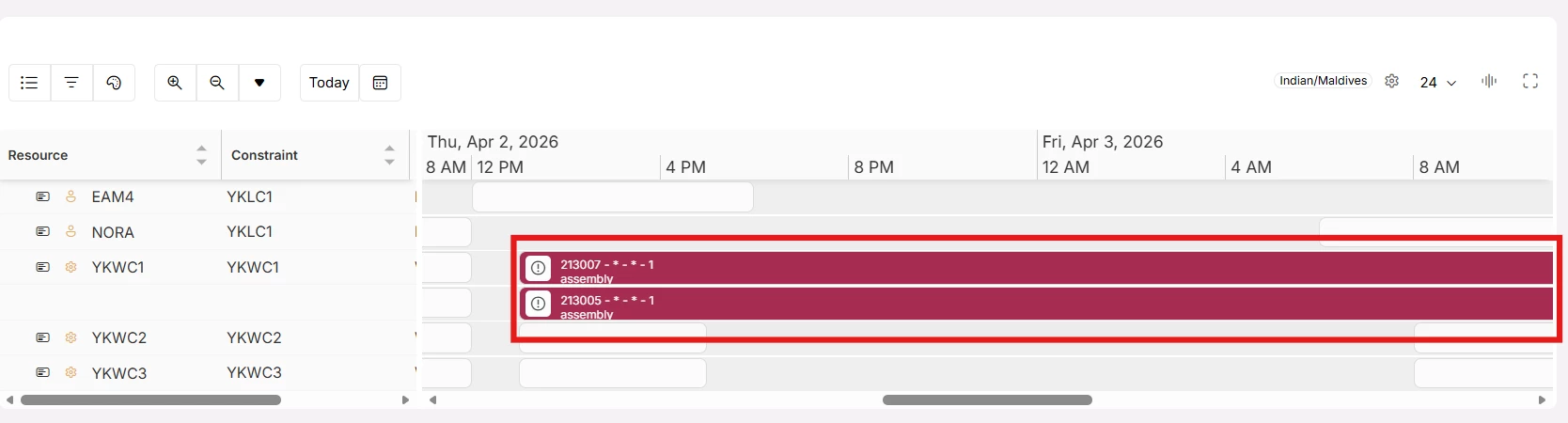
Answer to the question 2. Your understanding about finite vs infinite scheduling is correct. It should behave exactly as mentioned. I just checked this in 25R2 and I observed it is working correctly. As you can see below, the work center YKWC1 is infinite and the overlapped operations has been scheduled without considering the capacity.


2 replies

Yathartha Karunananda
Hero (Employee)
Forum|alt.badge.img+12

Hi ​@FleVidurK,

Answer to the question 1, in the MSO, it is fine to go with the 0 machine runtime and it does consider the labor runtime for scheduling unless you have Exempt Labor enabled in finite scheduling basic data window:
 

Answer to the question 2. Your understanding about finite vs infinite scheduling is correct. It should behave exactly as mentioned. I just checked this in 25R2 and I observed it is working correctly. As you can see below, the work center YKWC1 is infinite and the overlapped operations has been scheduled without considering the capacity.


Lakshan Thiranagama
Hero (Former Employee)
Forum|alt.badge.img+7

Hi,

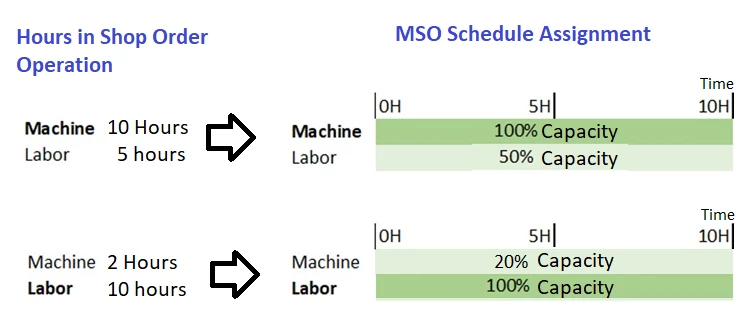
For the first question, Yes as Yathartha mentioned, MSO is having the capability of scheduling labor only operations. You can refer Machine Operations and Labor Operations section in About MSO help documentation for more information. The behavior in MSO is more practical and not like in APB or SOIS (Shop Order Infinite Schedular). Hopefully SOIS will reimplement in the same manner in future. In MSO If machine hours and labor hours are not equal in a shop order operation, then MSO always considers the operation (i.e., machine or labor) that requires the largest hours load to set a base duration and allocate it in full capacity (i.e., 100% capacity). The resource requiring the lower hours load allocates for the same duration at a partial capacity (i.e., less than 100%) booking based on the Load difference. This approach is considered for both Setup & Run operations and is calculated as separate transactions.

Example:

For the second question, 

Yes, If a work center / labor class is set to infinite, shouldn’t operations still be scheduled with a proper duration and simply be allowed to overlap (i.e., no capacity restriction.)

For labor classes with Individual capacity, MSO is looking at Person level Finite/Infinite Capacity flag on Manufacturing Labor Class page. For labor classes with group capacity, MSO is looking at the header level flag for Finite/Infinite Capacity in Manufacturing Labor Class page. So makesure to set them in proper way.

When using the System without MSO or APB, there is not any difference on scheduled times between Finite and infinite scheduling. That flag is considered only when using Finite scheduling solutions of IFS (APB,CBS or MSO).

This Finite/Infinite is not influencing operation duration. So the duration of each operation will be set based on run factors, lot sizes and setup times, resource share, efficiency, etc. As Yathartha already tested and confirmed, system considers it appropriately. 

Thanks!

Lakshan