Question

MRP & Demand Generation.

  • July 9, 2026
  • 10 replies
  • 121 views

Forum|alt.badge.img+4

Hello Lovely people,

I have spotted   unusual issue with IFS.   We have BOM structure as per below.

Item A-   Sub con  process ( Item type  purchased)

Item A1-Sub con process ( item type purchased)

we use item type “purchased” for Sub con process.

here itemA1 is child part of itemA.  Now After MRP run I could only see the demand generated for  “Item A “ only..   However “ ItemA1”  does not show any demand?

I am not sure if anyother MRP set up needs to be done in order to allow both item to be planned in IFS?

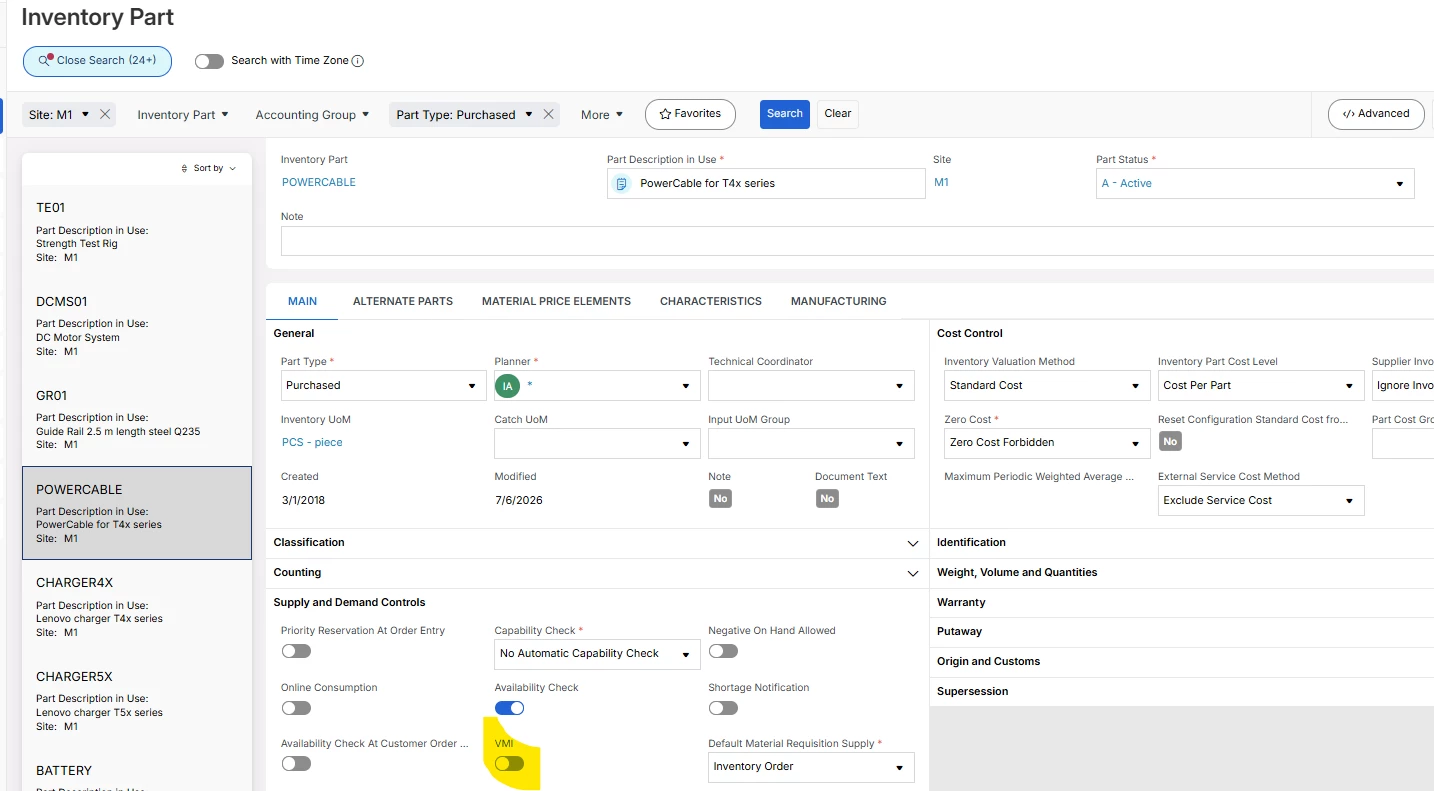
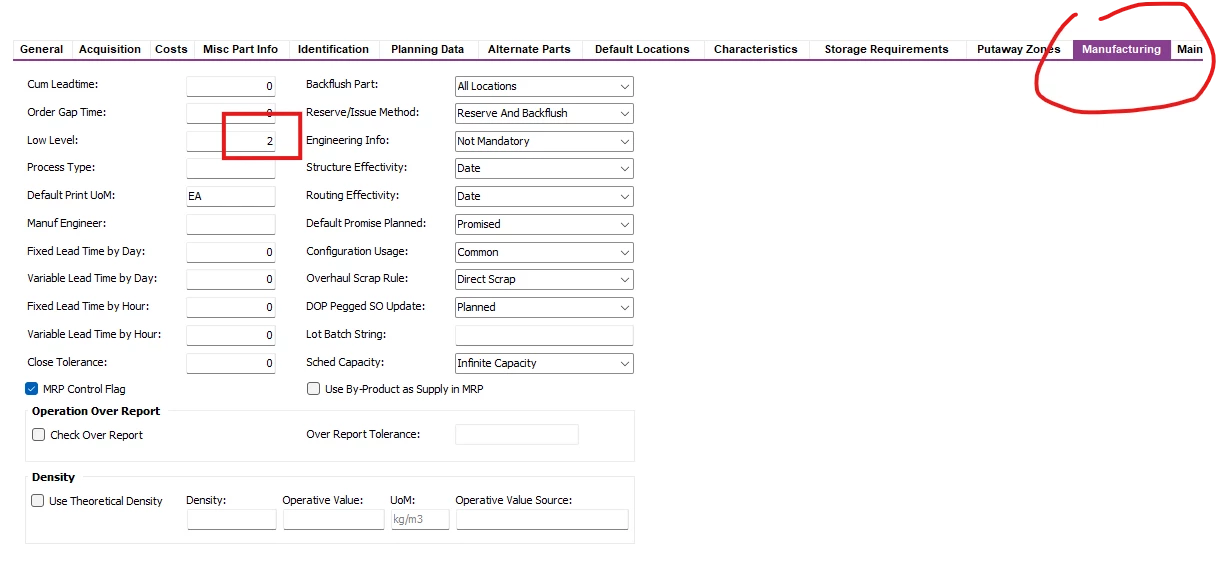
I came across below  set up in “ Inventory Part” Screen? 


What is the importance of this field ? is it auto populate by IFS or someone need to do manually?



10 replies

Yathartha Karunananda
Hero (Employee)
Forum|alt.badge.img+12

Hi ​@IFSFAN,

Is your structure in buildable status?


Forum|alt.badge.img+4
  • Author
  • Do Gooder (Customer)
  • July 9, 2026

@Yathartha Karunananda    Yes both Structure are buildable and Active also the phase in date also aligned so no issue on that side .


Forum|alt.badge.img+8
  • Hero (Partner)
  • July 9, 2026

When you say “here itemA1 is child part of itemA.”

Has this Structure definitely been set up as a Structure Type = Purchased (not manufacturing Structure)?

Is the Buildable Structure Alternate = ‘*’ 

I think some screenshots of the Product Structure could help in identifying the issue. 

You could also try checking the background job for MRP to see if there are any warning messages.

To answer your question about the “Low Level code”, it descibes the lowest Assembly level where the part exists on a BoM. E.g.

  • Level 0: Parent parts with no further parents (typically end items or sales parts).
  • Level 1: The immediate components that make up a Level 0 parent.
  • Levels 2+: Sub-components of a component.

Forum|alt.badge.img+4
  • Author
  • Do Gooder (Customer)
  • July 9, 2026

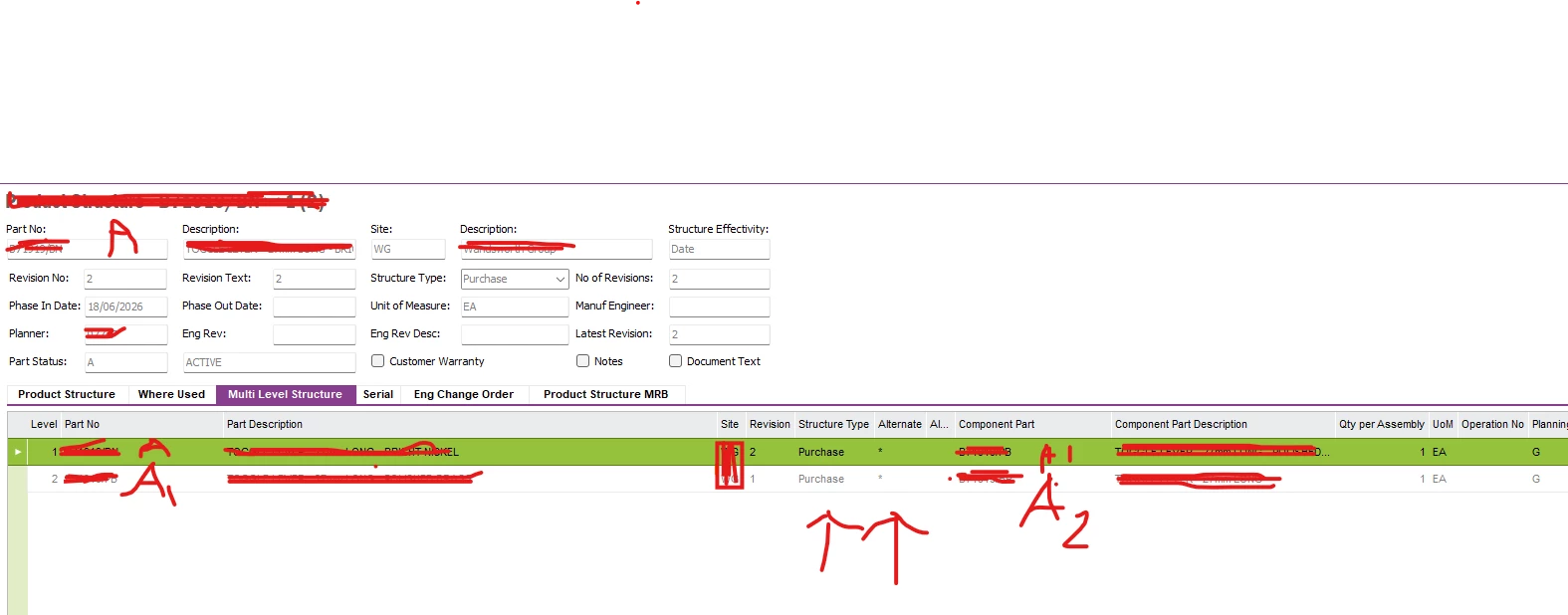
@Katie  The structure is correctly set up  as per the below screen shot. Apologies in advance as need to black out some of the part of it due to obvious reason.

Multi level structure you can see .. A toA1 and A1 to A2.

Thank you for your explanation on  “ BOM Level” .  Does IFS Calculate that automatically and fill it or someone has to do it manually.?

I need to check the MRP background msg if any error or warning msg there?


KeyBartlD
Sidekick (Partner)
Forum|alt.badge.img+3
  • Sidekick (Partner)
  • July 9, 2026

Please check inventory part planning setup for all parts to be planned by MRP  = field “Planning Method", most often  A, D, G. If you have other codes there (e.g. B or C) it will not be calculated by MRP.


Forum|alt.badge.img+4
  • Author
  • Do Gooder (Customer)
  • July 9, 2026

@KeyBartlD   Yes both part have correct planning method and rest of the other MRP parameter is also checked and looks okay.


Forum|alt.badge.img+8
  • Hero (Partner)
  • July 9, 2026

@Katie  The structure is correctly set up  as per the below screen shot. Apologies in advance as need to black out some of the part of it due to obvious reason.

Multi level structure you can see .. A toA1 and A1 to A2.

Thank you for your explanation on  “ BOM Level” .  Does IFS Calculate that automatically and fill it or someone has to do it manually.?

I need to check the MRP background msg if any error or warning msg there?

Thanks - the only thing I noticed here is your phase in date is quite recent (18th June). What is your purchasing lead time & demand date for Part A? If Demand Date = Today and Lead time > 3 weeks this could be the cause of the demand not flowing through to A1, as Demand date for part A1 would then be before its phase in date (assuming it also 18th June).


The Low Level value gets re-calculated & updated when you run MRP. If you see a “-1” in this field it indicates it’s not been calculated yet. I.e. product structure has been updated, MRP needs be re-run etc..


Forum|alt.badge.img+4
  • Author
  • Do Gooder (Customer)
  • July 10, 2026

@Katie  checked the lead time &  Demand date for both child and parent and the phase in date as well. All looks okay , Cant find anything which can stopped it from generating demand for it.


majose
Hero (Employee)
Forum|alt.badge.img+15
  • Hero (Employee)
  • July 10, 2026

Hi ​@IFSFAN,


Have you checked the screen MRP Part Information?

Can you see the components here? Does the information in Gross Requirement tab makes sense? For example, sometimes you can see it has been successful in creating an internal supply/demand inside MRP itself, but not managed to create a purchase requisition.

Do you see any MRP Part Action Messages for the components?


(Above is what I always checks first when having problems with MRP Result)

Then I check Background Jobs - Details for the specific job.

I also attach two other flags you can check. However I don’t think that is your problem since you say: “However “ ItemA1”  does not show any demand” 

The VMI flag should not be enabled in Inventory Part (well if the part is really Vendor Managed Inventory… then it is another story)


What about below flag - Proposal Release? It must be set to Release


Good Luck

-Mats


Forum|alt.badge.img+4
  • Author
  • Do Gooder (Customer)
  • July 13, 2026

@majose  hello Matt.. Just reviewed the MRP Part Information.

The finding is Strange.

I can see the demand for PART -A

I can see the demand for  PART- A2

but Part A1.. which is the Child part of Part A does not show any demand.( Also its not a Phantom)

Part is not VMI

Proposal “ Release”   & Default Supply type “ Order”  For both Part A & A1..

So, Some how system is not generating demand for A1 but  it has correct demand for both A and A2??