

Solved

Manual Purchase Requisitions and Safety Stock Affect for MRP Calculations

  • Nov 20, 2026 3:06 PM UTC
  • 5 replies
  • 73 views

Lakshan Thiranagama
Hero (Former Employee)
Forum|alt.badge.img+10

Hi,

Has the MRP functionality related to Safety Stock changed in recent IFS Cloud releases?

I'm reviewing several MRP scenarios involving Safety Stock and have observed the following behavior:

Scenario 1

  • Purchased part with a Safety Stock of 100 pcs.
  • MRP is run with Plan Supply Considering MRP Run Date = False.
  • Result: No supply proposals are generated for the Safety Stock.

This behavior appears to be correct.

Scenario 2

  • A manual Purchase Requisition (PR) for 1 pc is created and released for the same purchased part.
  • MRP is run with Plan Supply Considering MRP Run Date = False.
  • The PR is visible in the Inventory Part Availability Planning (IPAP) page. But not in MRP Part Information.
  • Result: No supply or demand is generated for the Safety Stock. MRP does not appear to consider the PR in this scenario.

Scenario 3

  • The PR is converted into a Purchase Order (PO).
  • MRP is run again with Plan Supply Considering MRP Run Date = False.
  • Result: MRP considers the 1 pc supply from the PO and generates an MRP Buy proposal for the remaining 99 pcs required to reach the Safety Stock level.

Question

Is the intended behavior that MRP only plans Safety Stock only when there is a recognized demand or supply transaction, even when Plan Supply Considering MRP Run Date = False?

If so, how is the behavior expected to change when Plan Supply Considering MRP Run Date is set to True?
What is the real functional improvement made when changing the command label in core solution?
(Earlier is was 'Plan Safety Stock ON MRP Run Date' Now it has renamed as 'Plan Safety Stock CONSIDERING MRP Run date' ) 

I would appreciate any clarification on whether this behavior is expected and whether any changes have been introduced in recent IFS Cloud releases.

Thanks.
Lakshan
Best answer by majose

Hello hello hello….

System works as designed when the flag “Plan Safety Stock Receipt considering MRP Run Date” is not enabled

What do we mean with “event”? Well, that is any open demand or even open supply that the MRP engine see. MRP does not for example not see all pegged and demand orders. It cannot act upon something it can’t see, even if that “something” is visible in IPAP. Normally we say: If we have a safety stock then that safety stock level becomes the new “0 level”, and MRP strive to maintain that new “0-level”. But with the flag setting above we can avoid inducing possible dead stock if there is no event in the future for the part. This came as customer request around 2004. If you want to be on the safe side, then enable the flag “Plan Safety Stock Receipt considering MRP Run Date”.

(Update after my initial answer: when digging more into this … we did it in Apps 9)

Thanks

-Mats

View original

5 replies

Forum|alt.badge.img+11
  • Hero (Employee)
  • Nov 20, 2026 8:58 PM UTC

Hi ​@Lakshan Thiranagama.  If you want a Req to be created for Safety Stock, you have to select Plan Supply Considering MRP Run Date = True.


Is there an on-hand Quantity?  What is the Projected Qty showing in the Inventory Part Availability Planning screen?


If you have a Safety Stock Quantity entered for a part and the on-hand quantity is less than the safety stock and any requirements, you have to select Plan Supply Considering MRP Run Date = True and then when MRP runs, Reqs should be created to replenish Safety Stock and provide Supply for the Demand.


If you are not seeing these results, please advise the Release - SU you’re testing in and I can do testing in a CORE environment for you.  Please advise when you can.  Thanks!  Jane


Lakshan Thiranagama
Hero (Former Employee)
Forum|alt.badge.img+10

Hi Jane,

As I already described in Scenario 3 above safety stock is generating even when Plan Safety Stock considering MRP Run date is false.
You just need to have a supply for the specific material.

On hand quantity is zero on this example. So MRP is not calculating any projected on-hand on first two scenarios.

I’m testing on 25R2 SU9.

Thanks!

Lakshan


Lakshan Thiranagama
Hero (Former Employee)
Forum|alt.badge.img+10

Hi Jane,

I feel this as a defect in MRP core logic. Issue appears in 26R2 as well. Just follow below shown steps and then you will know.

Scenario 1

  • Purchased part with a Safety Stock of 100 pcs. (On hand qty is zero)
  • Perform MRP with Plan Supply Considering MRP Run Date = False.
  • Result: No supply proposals are generated for the Safety Stock.

This behavior appears to be correct.

Scenario 2

  • A manual Purchase Order for 1 pc is created and released for the same purchased part.
  • MRP is run with Plan Supply Considering MRP Run Date = False.
  • Result: MRP considers the 1 pc supply from the PO and generates an MRP Buy proposal for the remaining 99 pcs required to reach the Safety Stock level.
  • If this PO qty is higher than 100PCS MRP is not generating any supplies here. 
  • If you cancel the PO then again no supplies to plan safety stock.

Therefore it is clear inconsistency in the functionality. ​@majose appreciate your valuable insights on this.

Thanks!

Lakshan


majose
Hero (Employee)
Forum|alt.badge.img+15
  • Hero (Employee)
  • Answer
  • Nov 23, 2026 6:28 PM UTC

Hello hello hello….

System works as designed when the flag “Plan Safety Stock Receipt considering MRP Run Date” is not enabled

What do we mean with “event”? Well, that is any open demand or even open supply that the MRP engine see. MRP does not for example not see all pegged and demand orders. It cannot act upon something it can’t see, even if that “something” is visible in IPAP. Normally we say: If we have a safety stock then that safety stock level becomes the new “0 level”, and MRP strive to maintain that new “0-level”. But with the flag setting above we can avoid inducing possible dead stock if there is no event in the future for the part. This came as customer request around 2004. If you want to be on the safe side, then enable the flag “Plan Safety Stock Receipt considering MRP Run Date”.

(Update after my initial answer: when digging more into this … we did it in Apps 9)

Thanks

-Mats


Lakshan Thiranagama
Hero (Former Employee)
Forum|alt.badge.img+10

Hello Mats,

Thanks! Then it is explainable as the first ‘event’. Not the first demand event. Even if there is a supply event still it fills up the missing quantity to cover up the 0-level of safety stock. 

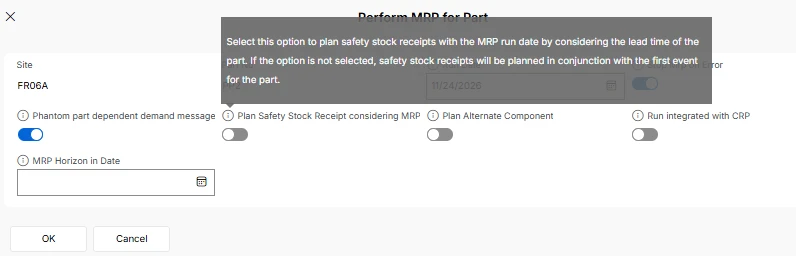
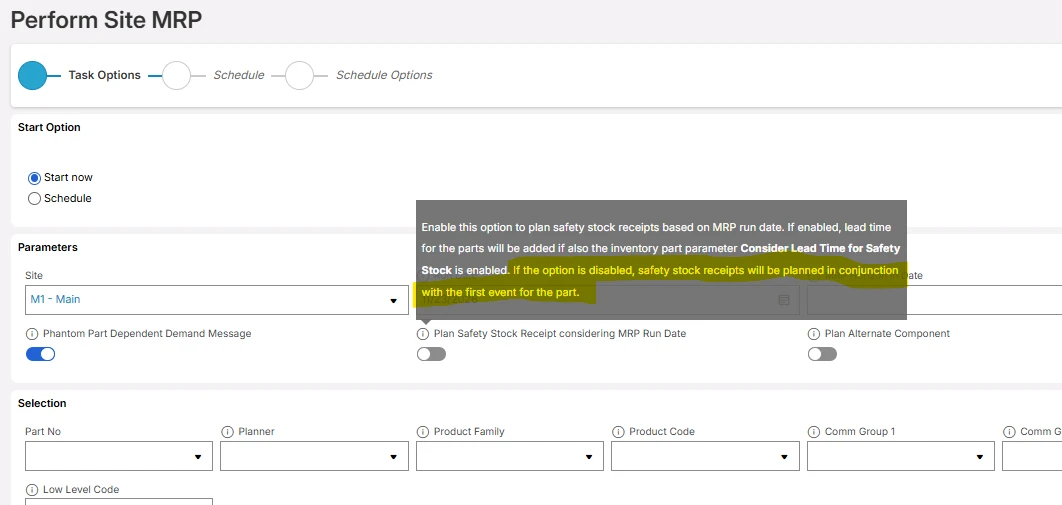
I’m seeing a shorter version of the field description seems functionality has improved further to control the part lead time consideration.

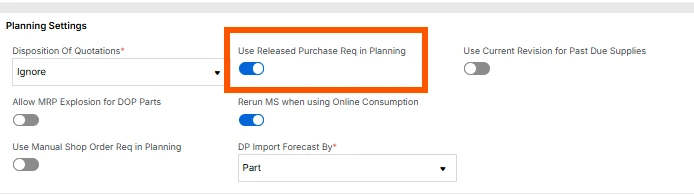
The Event is considered only when a released PO is there. And It is not considering as an event when a released PR is there. 

Then I found below setting under Site settings.

So there are parameters to control it to the way we want.

Thanks again!

Best Regards,

Lakshan