

Solved

KANBAN CIRCUIT

  • Jun 15, 2021 7:01 PM UTC
  • 5 replies
  • 792 views

Forum|alt.badge.img+6

I want to generate purchase requisition when the levels of some parts get to a certain level but first i have to activate a kanban circuit. Somebody know how can i active a kanban circuit i use IFS10.

Best answer by Naveena Nanayakkara

Hi @RoanyNF ,


You can RnB on the Kanban Circuit header> Active

This will make your circuit to Active state.
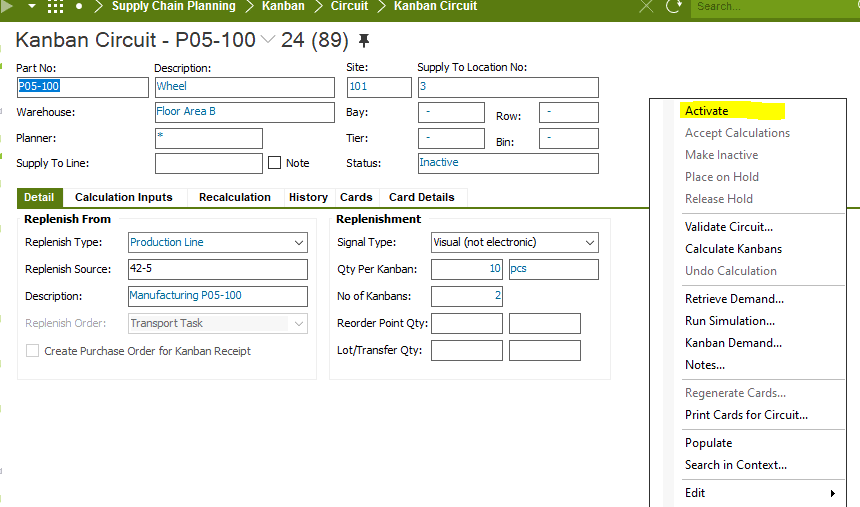
 

Regards,

Naveena

View original
This topic has been closed for replies.

5 replies

Forum|alt.badge.img+28
  • Superhero (Customer)
  • Jun 15, 2021 7:18 PM UTC

A Kanban circuit is not necessarily required.  You can do this using Planning Method B or C and using Order Point to generate your purchase requisitions.


Order Point
The point used to trigger the creation of an order proposal when the projected quantity on-hand falls below this point. Parts having planning method B or C are not processed by MRP. You can view order proposals for these parts in the inventory order report. Order point information is used by planning method B (Order Point Planning) and C (Order Up to Planning). The order point can be manually entered and may also be automatically calculated, i.e. using the Calculate Planning Data dialog box. If the IFS/INVPLA module is installed, for planning method B, the order point can only be calculated using the IPR (inventory planning and replenishment) solution. The order point is specified in the Inventory Part/Planning Data tab. The old value is automatically transferred to the Prev Order Point field.
 

Look at Planning Method B on Inventory part or on Order Point Planning Details for Inventory Parts.  There isn’t a ton of information on setup though in IFS help.


Forum|alt.badge.img+6
  • Author
  • Sidekick
  • Jun 15, 2021 7:34 PM UTC

thanks you, I just want to implemente kanban module because I want that it be automatic. with the method that you tell me I could do it?


Forum|alt.badge.img+9

Hi @RoanyNF ,


You can RnB on the Kanban Circuit header> Active

This will make your circuit to Active state.


Regards,

Naveena


Forum|alt.badge.img+6
  • Author
  • Sidekick
  • Jun 16, 2021 3:07 AM UTC

Thanks you so much


Forum|alt.badge.img+6
  • Author
  • Sidekick
  • Jun 17, 2021 7:55 PM UTC

DO YOU KNOW, WHY I DON’T HAVE THE ACTIVATE BUTTON, JUST APPEAR KANBAN DEMAND.

