


Solved

How to Load Orders and Schedule in APB using Finite Capacity on Manufactured Components

  • Mar 15, 2023 1:27 PM UTC
  • 10 replies
  • 413 views

matt.watters
Ultimate Hero (Partner)
Forum|alt.badge.img+26

There have been multiple posts in which the logic behind the Sched Capacity on the Inventory Part has been presented and what happens when Finite vs. Always Finite is used.

This post is questioning how a user is supposed to load data into the APB when manufactured components are either Finite or Always Finite.


Customer has the following product structure:

  • P/N 100
    • P/N 200 (QPA = 30)

P/N 200 is always manufactured in lot sizes of 8 and each shop order takes 1 day (8 hours) to process its lone operation.

5-day work week M-F, 8-hour days, 8 AM - 4 PM no breaks.

There are (4) shop orders for component p/n 200, and each is scheduled to end on Day1, Day2, Day3, and Day4 respectively. These have been APB Scheduled and saved to the database.

I have multiple shop orders for p/n 100 that consist of only one operation.

  • When loading and scheduling only the shop orders for p/n 100
    • If P/N 200 is set to Always Finite, APB does not schedule the orders for p/n 100. It is in Unscheduled status in APB, with the message "Not enough materials..." But there will be sufficient supply of p/n 200 to start p/n 100 on Day5.
  • When loading the shop orders for p/n 200 and p/n 100, but only scheduling Unreleased, Unscheduled, and Infinite operations (i.e., schedule p/n 100 and consider the schedule of the components)
    • If P/N 200 is set to Always Finite, APB returns all shop orders for p/n 100 as Scheduled.

In summary the findings by the customer are:

  • If a manufactured child component is set to  Sched Capacity = Always Finite, and only the parent shop orders are loaded into APB (even if child shop orders have been previously scheduled), APB will show the parent shop orders as Unscheduled.
  • If a manufactured child component is set to Sched Capacity = Always Finite, both parent and child shop orders must be loaded at the same time in APB to have APB actually use that Sched Capacity setting as a constraint.

Is this requirement of loading the child shop orders with the parent shop orders valid?

Best answer by Saman K

Yes Matt, You need to load. Otherwise Consuming parent shop orders will not see, the finite sub assembly  supply

Thanks and regards

Saman


View original

10 replies

Saman K
Hero (Employee)
Forum|alt.badge.img+9
  • Hero (Employee)
  • Answer
  • Mar 17, 2023 2:09 PM UTC

Yes Matt, You need to load. Otherwise Consuming parent shop orders will not see, the finite sub assembly  supply

Thanks and regards

Saman


matt.watters
Ultimate Hero (Partner)
Forum|alt.badge.img+26
  • Author
  • Ultimate Hero (Partner)
  • Mar 20, 2023 11:37 AM UTC

@Saman K in the scenario above, will the date when p/n 200 has sufficient on-hand quantity to supply the 30 required for p/n 100 (i.e., Day4) be used to schedule the shop order for p/n 100? Or will the shop order for p/n 100 be scheduled to start on Day2 as there is one shop order for p/n 200 in a scheduled status on Day1?


Forum|alt.badge.img+2
  • Do Gooder (Customer)
  • Nov 9, 2026 5:38 PM UTC

How does it work when there is not a child shop order?  Part A is the sellable part, the end result of the shop order.  The routing on the shop order is one production line made of three work centers.  All of the materials on the shop order are supply = invent order.  So there are no child shop orders.  Component Y on Operation 20 (a manufactured item) is short and not due for a week.  APB is scheduling Operation 10 for today as all of the parts for that operation are available and scheduling Operations 20 and 30 for after the supply date.  How do I get APB to schedule Operation 10 to line up with the date for Operations 20 and 30?  If the part is available in inventory on the 17th and Operation 20 can then be scheduled for the 18th, I want Operation 10 to line up and also be scheduled for the 18th. 


Lakshan Thiranagama
Hero (Former Employee)
Forum|alt.badge.img+10

How does it work when there is not a child shop order?  Part A is the sellable part, the end result of the shop order.  The routing on the shop order is one production line made of three work centers.  All of the materials on the shop order are supply = invent order.  So there are no child shop orders.  Component Y on Operation 20 (a manufactured item) is short and not due for a week.  APB is scheduling Operation 10 for today as all of the parts for that operation are available and scheduling Operations 20 and 30 for after the supply date.  How do I get APB to schedule Operation 10 to line up with the date for Operations 20 and 30?  If the part is available in inventory on the 17th and Operation 20 can then be scheduled for the 18th, I want Operation 10 to line up and also be scheduled for the 18th. 

Hi,

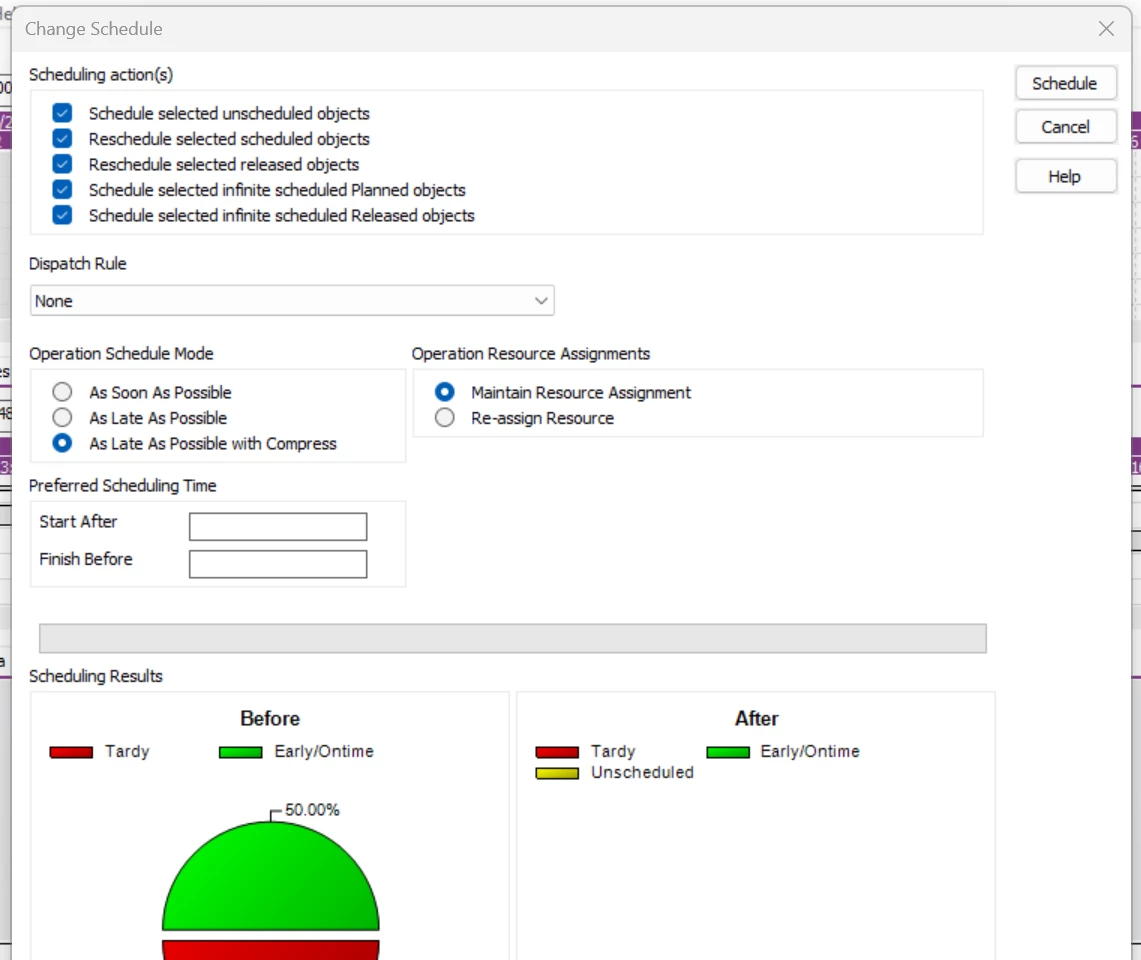
What is the scheduling direction that you are use in APB? As it seems it is forward scheduling (As soon as possible). You can try Backward scheduling with Compress (As Late as possible with Compress) for this requirement. 

Thanks!

Lakshan


Lakshan Thiranagama
Hero (Former Employee)
Forum|alt.badge.img+10

@Saman K in the scenario above, will the date when p/n 200 has sufficient on-hand quantity to supply the 30 required for p/n 100 (i.e., Day4) be used to schedule the shop order for p/n 100? Or will the shop order for p/n 100 be scheduled to start on Day2 as there is one shop order for p/n 200 in a scheduled status on Day1?

Hi Matt,

Accidentally seen your question after 3 years.

I hope your concern is already resolved. However I will write the answer here so that might be useful to someone in future. 
In that scenario, APB will follow the MRP method. That means if there is a supply for the sub assembly (P/N 200) of course it will be considered to schedule the parent shop order (P/N 100). But that will work some technical limitations because in case of the Parent shop order get unscheduled user will have to manually reschedule that order with additional schedule request because APB is not seeing the future supplies in case if it is identified before scheduling the child or in the dispatch rule based scheduling logic in APB. 

In MSO, you will not get this problem and it will ultimately consider the future supplies and schedule the parent demands accordingly in single re-schedule request.

Thanks!

Lakshan


Forum|alt.badge.img+2
  • Do Gooder (Customer)
  • Nov 10, 2026 2:06 PM UTC

We use backward scheduling for shop orders.  Part are attached to operations so the the bench assembler see only the portion of the parts list needed for that operation.  I’ve test both as late as possible with and without compress ending in the same result.


Lakshan Thiranagama
Hero (Former Employee)
Forum|alt.badge.img+10

We use backward scheduling for shop orders.  Part are attached to operations so the the bench assembler see only the portion of the parts list needed for that operation.  I’ve test both as late as possible with and without compress ending in the same result.

Hi,
You need to set it to scheduling dialog together with dispatch rule. If you are using automatic scheduling in APB you also need to mention the objects to reschedule.
Thanks!
Lakshan


Forum|alt.badge.img+2
  • Do Gooder (Customer)
  • Nov 10, 2026 2:31 PM UTC

I gave the screen when first going into APB and was focused on the portions mentioned and not getting the other set in the screen capture.  This attachment has the settings and post schedule results.  


Lakshan Thiranagama
Hero (Former Employee)
Forum|alt.badge.img+10

I gave the screen when first going into APB and was focused on the portions mentioned and not getting the other set in the screen capture.  This attachment has the settings and post schedule results.  

Hi Again,
Okay noted, When is the need date of your shop order? Is it past due one or in current date? as it seems yes.

Thanks!

Lakshan


Forum|alt.badge.img+2
  • Do Gooder (Customer)
  • Nov 10, 2026 5:27 PM UTC

Need Date = 11/3

OP 10 can schedule today because all parts for OP 10 are on-hand and available.

OP 20 is short a part set to arrive on 11/17.  IFS scheduled OP 20 for 12/7 which is after the supply and is fine.  Anything starting 11/18 is fine.

It seems that because OP 20 scheduled to 12/7 that IFS carried this into OP 30 but did not go back to OP 10 to reschedule it for 12/7 as well.