Question

How to get a list of all top level parts containing a part?

  • December 17, 2025
  • 1 reply
  • 24 views

NickPorter
Superhero (Customer)
Forum|alt.badge.img+18

This seems like a basic request but I cannot find any way to achieve this inside IFS (Apps10).

If we have a part shortage, how can we generate a list of all top level parts (manufactured units) that this part could go into?

With a lot of manual work/expanding of assemblies we can get there using the Complete Where Used and Component Where Used screens, but we have to expand all of the multiple level sub-assemblies in order to find all of the top level parts that are impacted.

Surely there has to be a better, quicker way to identify just a simple list of top level units (final assembly) that would require a specific part?
1 reply

Forum|alt.badge.img+14
  • Hero (Employee)
  • December 17, 2025

Hi Nick,

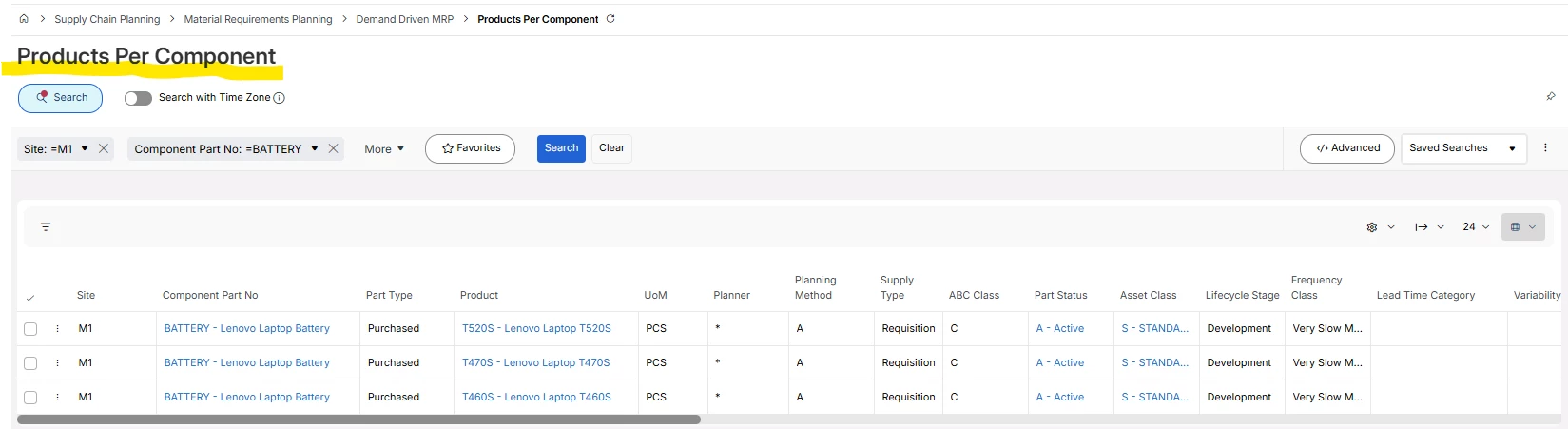
Below page and functionality should exist in Apps10 as well.

You don’t have to use DDMRP to use this screen, BUT you need to have “Copied Cost into Cost Set 1” !!!

So this function are using the BOM data structure that we have in Costing.

While looking at this screen, why not take a look at the Component Summarized Where Used screen. It has quite a few columns related to DDMRP, but there are also a lot of other useful information for inventory managers.

Hope this helps

Cheers,

-Mats at RnD