Question

How to enable and populate Sales and Operations Planning Load Analysis?

  • Sep 16, 2026 6:58 AM UTC
  • 5 replies
  • 134 views

Forum|alt.badge.img+3

Hello everyone,

I am currently testing Sales and Operations Planning in IFS Cloud and have successfully configured a basic Product Family and S&OP plan.

So far I have:

  • Created an MS Level 0 Product Family
  • Created the Planning Structure linking MS Level 1 parts
  • Created an S&OP plan
  • Successfully copied forecast and supply data from MS Level 1 using Copy S&OP Family

The S&OP Grid is populated correctly and I can work with forecast and supply data.

My next goal is to evaluate capacity using Sales and Operations Planning Load Analysis, but I am struggling to understand the required setup and prerequisites.

When opening Sales and Operations Planning Load Analysis, the screen remains empty and I am not sure:

  • What setup objects are required before Load Analysis can be used?
  • Is a Resource Routing required on the Product Family or on the MS Level 1 parts?
  • Does RRP need to be executed before data becomes available?
  • How are Capacity Scenarios created and connected to S&OP?
  • What is the recommended setup to demonstrate Load Analysis in a simple test environment?

Any guidance, setup steps, or examples would be greatly appreciated.

Thank you in advance!
Pavel K.

5 replies

majose
Hero (Employee)
Forum|alt.badge.img+15
  • Hero (Employee)
  • Sep 16, 2026 9:20 AM UTC

Hi Pavel,

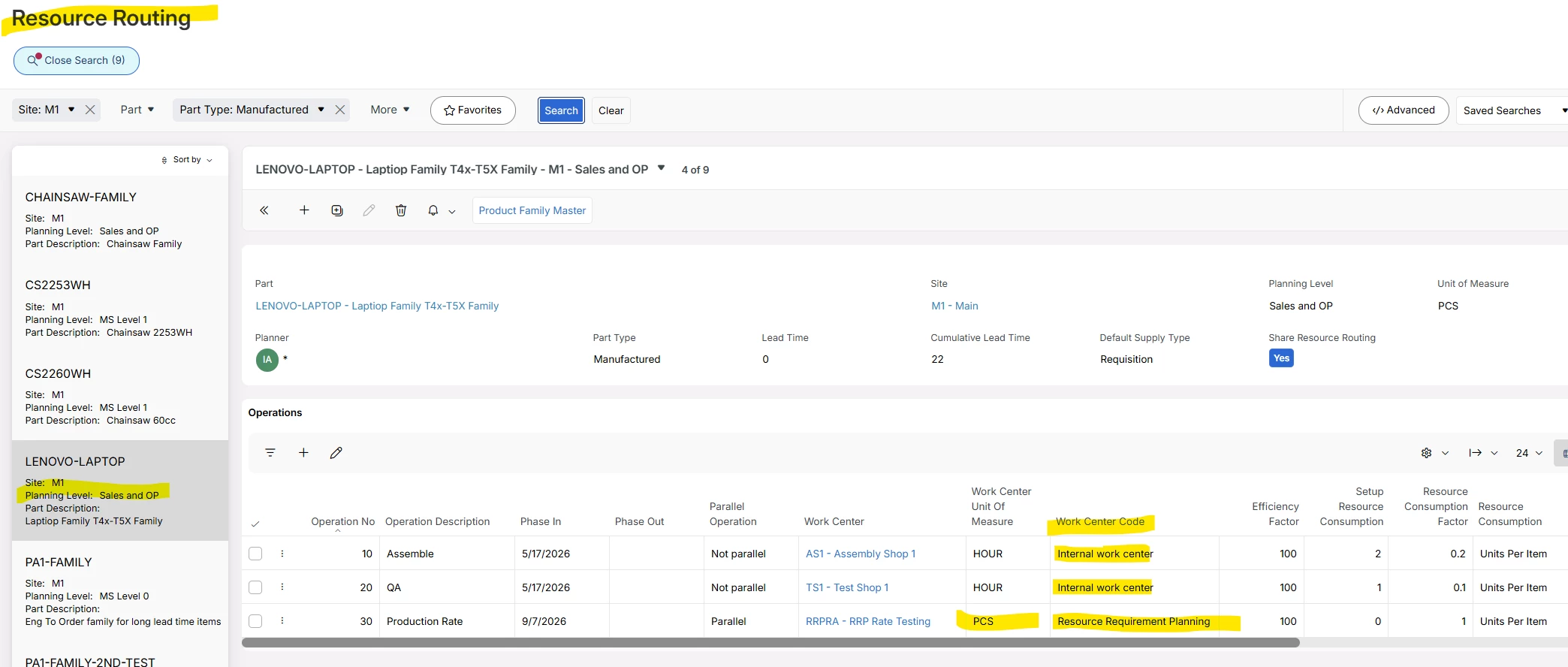
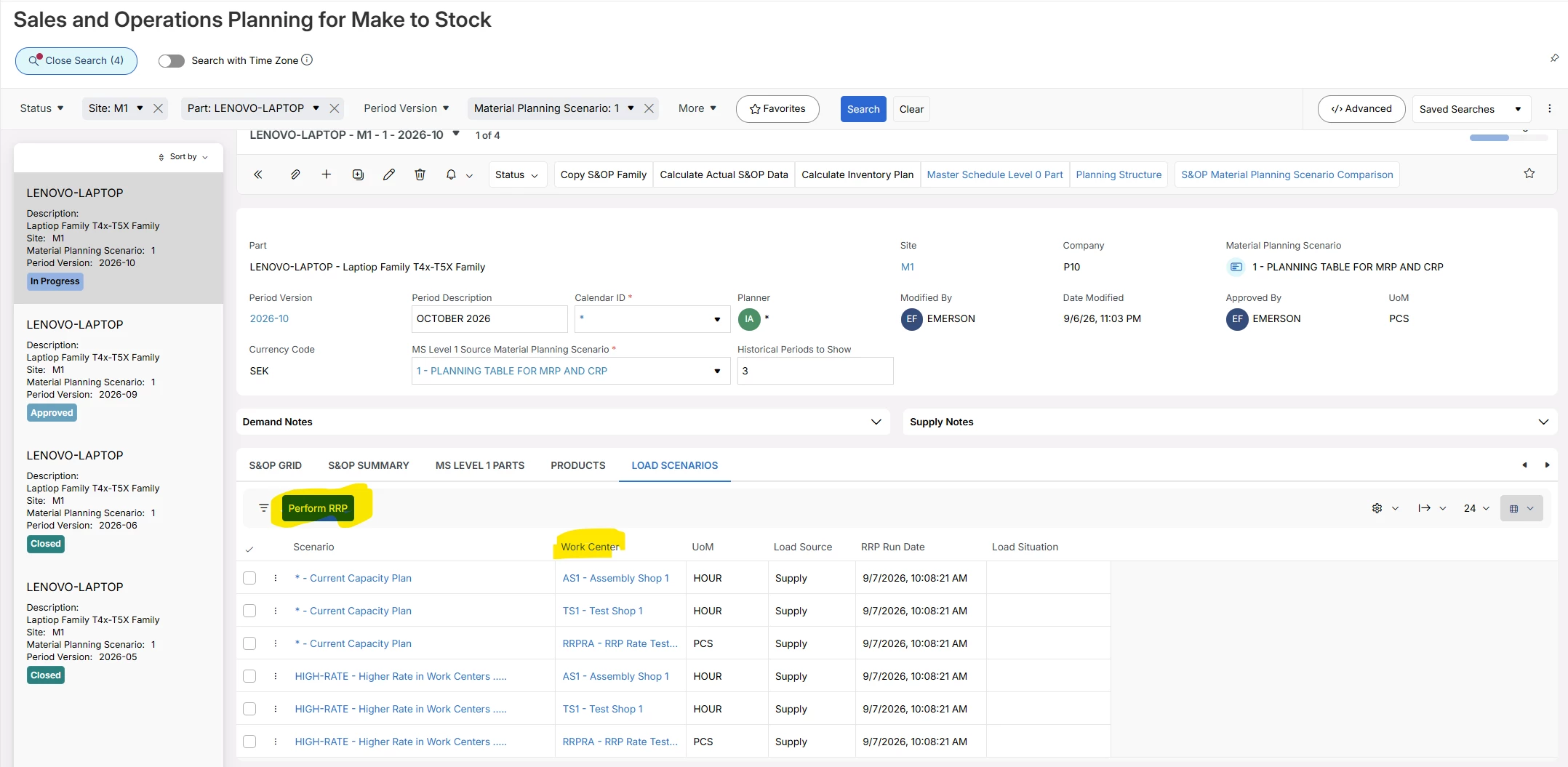
I think one or two screen dumps explains a lot here :-)


Let me know if you have more questions.

Good Luck

-Mats


Forum|alt.badge.img+3
  • Author
  • Sidekick (Partner)
  • Sep 17, 2026 9:53 AM UTC

Hi Pavel,

I think one or two screen dumps explains a lot here :-)


Let me know if you have more questions.

Good Luck

-Mats

Hi Mats,

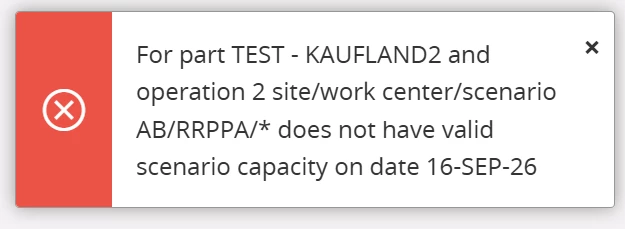
Thank you for your help! This helped a lot, can you advise one more thing? I am getting this error:
 

I tried to create my own work center as well as my own calendar, but nothig helped.

Thank you in advance.


majose
Hero (Employee)
Forum|alt.badge.img+15
  • Hero (Employee)
  • Sep 18, 2026 3:00 PM UTC

Hi Pavel,

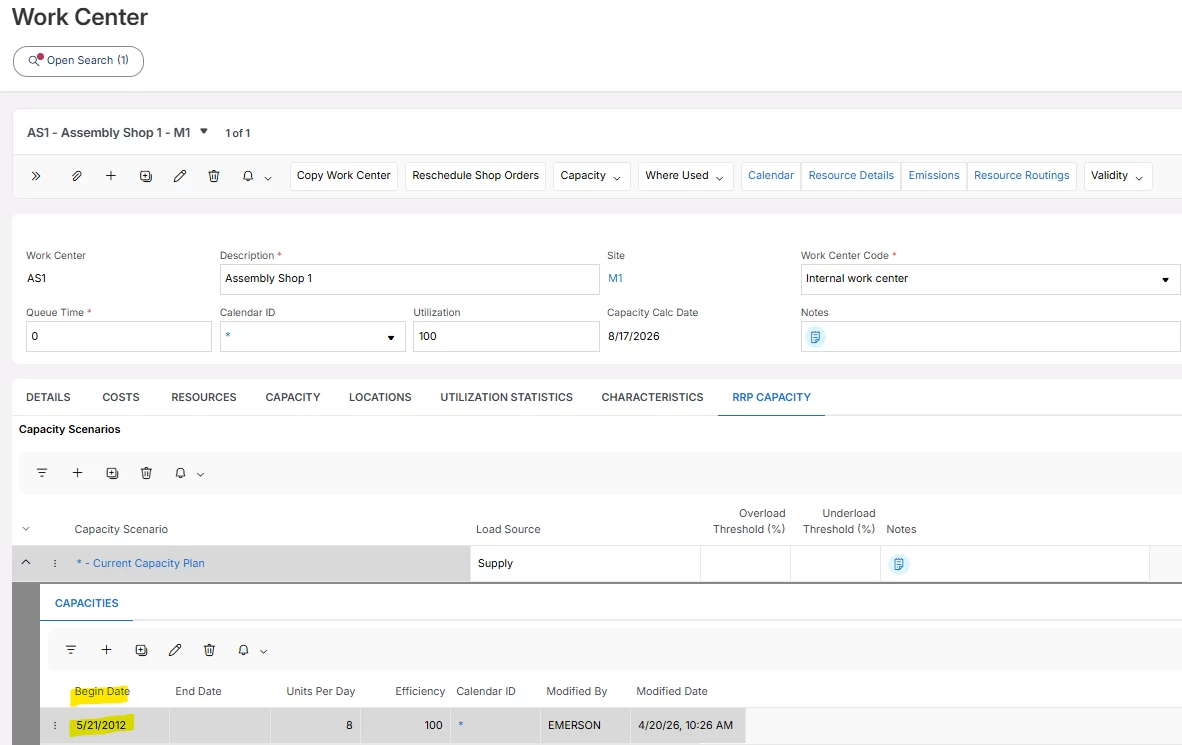
I think you should try to remove and recreate the “Capacity Line” below and then recreate the line BUT with a Begin Date… let say August 1st.

Or increase Units Per Day.

RRP uses more or less the backward scheduling loading logic that we use in Shop Floor scheduling. Not that complex, but similar.

When a part is requiring more than 8 hours for the Production Plan, it start going backwards.

Next Product Family part will also load 8 hours for the same date, and then going backwards.

So each part does not create overload, but the aggregated picture for all parts could create an overload situation.

There are pros and cons of the simple backward scheduling technique we use. Actually in some cases it would be better with even more simple load algorithm.


Forum|alt.badge.img+3
  • Author
  • Sidekick (Partner)
  • Oct 12, 2026 6:51 AM UTC

Hi Pavel,

I think you should try to remove and recreate the “Capacity Line” below and then recreate the line BUT with a Begin Date… let say August 1st.

Or increase Units Per Day.

RRP uses more or less the backward scheduling loading logic that we use in Shop Floor scheduling. Not that complex, but similar.

When a part is requiring more than 8 hours for the Production Plan, it start going backwards.

Next Product Family part will also load 8 hours for the same date, and then going backwards.

So each part does not create overload, but the aggregated picture for all parts could create an overload situation.

There are pros and cons of the simple backward scheduling technique we use. Actually in some cases it would be better with even more simple load algorithm.


Hi Mats,

thank you again for your help so far. I managed to get S&OP and Load Analysis working in my test environment, which helped me understand the functionality much better.

After presenting the solution to the customer, two follow-up questions came up that I am still trying to answer.

Unconstrained vs. constrained demand

The customer's main goal is to allow Sales to maintain the full unconstrained forecast, while Production and Procurement should plan only against a realistic, capacity-constrained plan.

How do customers typically handle this in practice?

Do they keep the unconstrained forecast in Demand Planner and use S&OP as the place where the constrained Operations Plan is agreed? If so, how is the constrained plan typically transferred into the planning process without losing visibility of the original sales forecast?

S&OP automation

We were also discussing how much of the S&OP process can realistically be automated.

Are there any common best practices around automating activities such as:

  • Copy S&OP Family
  • refreshing S&OP data
  • RRP calculations
  • forecast exports
  • creation of new period versions

or are these steps usually performed manually as part of the monthly S&OP cycle?

Any advice from real customer implementations would be greatly appreciated.

Thanks again for your help!
Pavel K.


majose
Hero (Employee)
Forum|alt.badge.img+15
  • Hero (Employee)
  • Oct 30, 2026 3:10 PM UTC

Hi Pavel,

Excuse me for not answering earlier.

At this point in time (30 October), if I was working with S&OP I would soon start to prepare for my December period version for all my product families.

Typically I will search for my November period version and then family by family:

  1. Press duplicate and update version to 2026-12
  2. Save
  3. Execute command Copy S&OP Family from either previous S&OP version or from MS Level 0 or from MS Level 1, and here I also choose from which MS Set I would like to copy from.

I have to do above steps for all my, let say, 15 product families. A bit boring right :-(

I think that it would be great if we can have a command that does this bulk work in one go, for all product families.

Would be great if someone could create an idea for above :-)

Then Calculate Actual S&OP Data and Calculate Inventory Plan is more on demand and kind of fun. Similar with RRP. (You know that you can schedule that job?)

And please bear in mind, you should really try your best to not have too many product families. In the books you often read 15-20 product families in S&OP.

***

Unconstrained Forecast versus Constrained Forecast

Hmmm well at the end of the day it has to be constrained coz we can’t make/ship and infinite qty. Future revenue will not come from what we theoretically can sell, it comes from what we actually do sell and ship.

We have support for keeping an Unconstrained Forecast in S&OP FYI. And Unconstrained Forecast can often be good for motivation.

***

Final word: When it comes to the S&OP you have to have the energy to continue working with the S&OP process over several months (and longer of course). You need top managers support. It will not pay off the first months, but then…. :-) And of as you know, much of S&OP process is “thought-ware” and not software.

-Mats