Solved

How to Collapse the Shop Floor Workbench Site Selector by Default

  • Nov 11, 2026 12:54 PM UTC
  • 7 replies
  • 55 views

Forum|alt.badge.img+7

Is it possible to have the Shop Floor Workbench Site Selector collapsed by default? I cannot find a collapsed property for shopfloorworkbenchsiteselector in Page Designer.


Kind regards, 

Willem 

Best answer by Björn Hultgren

I don’t think there’s any property for this. However, in 26R2, the record selector will stay collapsed once it has been collapsed once.

View original

7 replies

Björn Hultgren
Hero (Employee)
Forum|alt.badge.img+25

I don’t think there’s any property for this. However, in 26R2, the record selector will stay collapsed once it has been collapsed once.


PhillBronson
Hero (Customer)
Forum|alt.badge.img+13
  • Hero (Customer)
  • Nov 16, 2026 7:16 PM UTC

​@Björn Hultgren that is welcomed improvement.


​@12gWilleD for customers that will only have a single site I was able to implement a very simply solution that removes the selector completely. This gained so much useable real-estate for our end-users.


Björn Hultgren
Hero (Employee)
Forum|alt.badge.img+25

​@PhillBronson  if you could implement such solution without a modification. Feel free to share it with the community! 


PhillBronson
Hero (Customer)
Forum|alt.badge.img+13
  • Hero (Customer)
  • Nov 16, 2026 8:21 PM UTC

​@Björn Hultgren definitely with mod. But it was a two line change.


Forum|alt.badge.img
  • Do Gooder (Partner)
  • Nov 18, 2026 1:42 PM UTC

​@PhillBronson could you possibly share the change you made? I have a customer dealing with this issue. Thank you!


PhillBronson
Hero (Customer)
Forum|alt.badge.img+13
  • Hero (Customer)
  • Nov 18, 2026 2:59 PM UTC

​@NayoKris ​@Björn Hultgren obviously, this isn’t advice, but it does work. This requires an overtake of the page in the client since we are going to be removing something not just adding or modifying.

The “trick” is to use a page top-level client control that allows binding and commands but only deals with a single item at a time. This is basically a Singleton.


1. 
In order to not change all the places the selector is mentioned, I just override ShopFloorWorkbenchSiteSelector definition and change it to a singleton instead of selector. Even though it is a separate client control type SCA still wants you to override.


In my environment I actually put all the page level commands inside the singleton definition to simplify the code in the page definition. I visually disable all of them but the RefreshCommand
 

2.
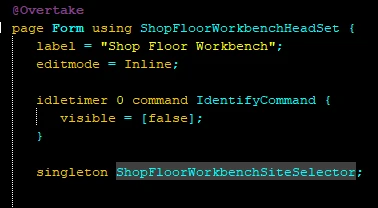
Then in the Overtaken page definition change out the selector for the singleton. The selectionchanged command is unneeded since this solution is built to only deal with a single selection ever.


3.
I can’t remember if the context with the Company and Site will handle getting the default Site or not for the entityset on page load. If not, you can also override the entityset in the projection to add a where clause. In my solution to make validation easier in the buildplace, I’ve added a where clause on the entityset with my actual contract or a contract that only exists in the dummy data in the buildplace environments.


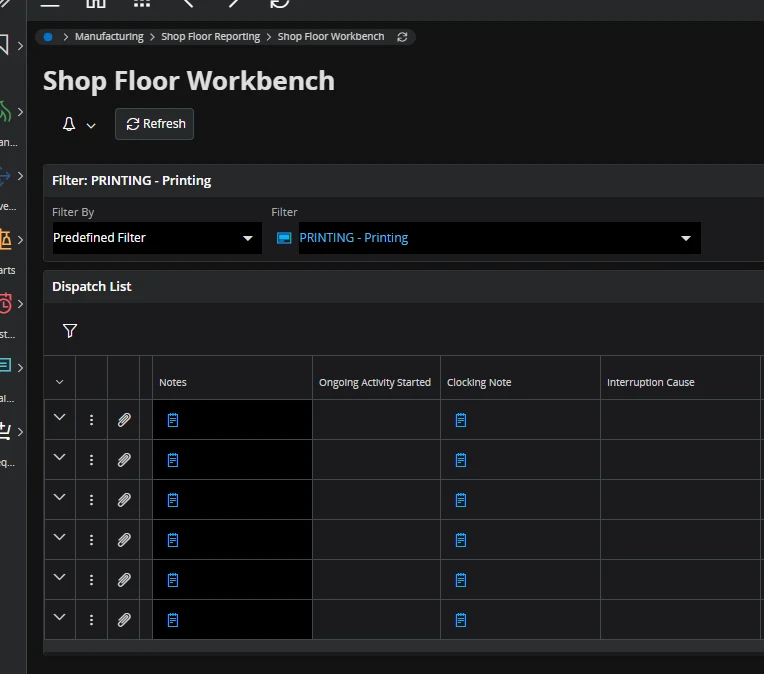
The result on the frontend.


While there is more code involved with the overtake, we only really changed 2-3 lines.


Forum|alt.badge.img
  • Do Gooder (Partner)
  • Nov 18, 2026 3:07 PM UTC

​@PhillBronson thank you!!