Question

GTIN - Default Selection Problem

  • Jan 18, 2024 11:21 AM UTC
  • 7 replies
  • 173 views

YEmreBol
Sidekick (Customer)
Forum|alt.badge.img+3

We are using IFS Cloud 22R2

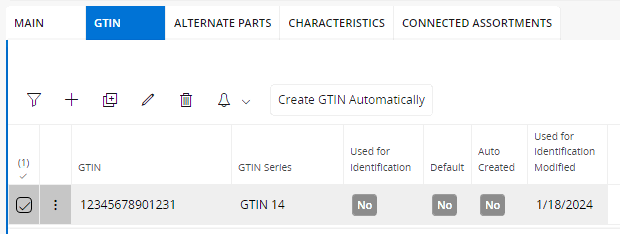
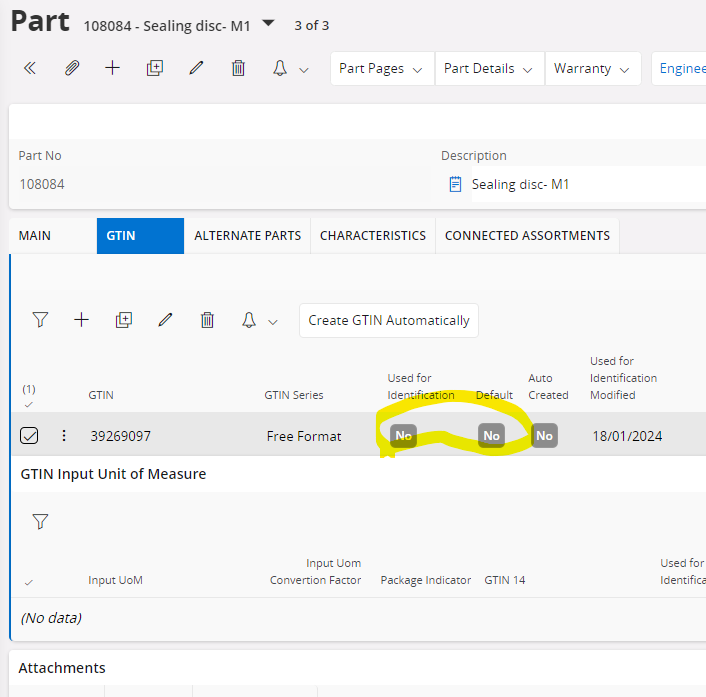
I’m trying to set a GTIN for a part as default. But there is no possibilty without selecting “Used For Identification”.

 Is there a way to change it like ;

Used For identification : No

Default :Yes
 

7 replies

MikeCH
Superhero (Employee)
Forum|alt.badge.img+13
  • Superhero (Employee)
  • Jan 18, 2024 12:29 PM UTC

Hi,

No, that’s not possible. The logic is such that you can set several GTINs as Used for Identification = Yes. And one of these GTINs must then be Default = Yes.

What kind of use case do you have where you want Used for Identification = Yes and Default = No?


YEmreBol
Sidekick (Customer)
Forum|alt.badge.img+3
  • Author
  • Sidekick (Customer)
  • Jan 18, 2024 12:33 PM UTC

Hi,

No, that’s not possible. The logic is such that you can set several GTINs as Used for Identification = Yes. And one of these GTINs must then be Default = Yes.

What kind of use case do you have where you want Used for Identification = Yes and Default = No?


We are using same GTIN for multiple parts.

and  need Default:Yes to have GTIn printed on documents, sent in messages, shown in the application 


The case we nned is Used For identification : No Default :Yes



Buddhika Kurera
Superhero (Employee)
Forum|alt.badge.img+15

@YEmreBol As mentioned by MikeCH this is not possible as per the existing logic. It is not possible to check “Used for Identification” as it validates the GTIN in use by the other parts and as it is not possible to check “Used for Identification”, it is not possible to set the GTIN as the default so that it cannot be used in the communications.

Encountered a scenario where the GTIN is used in combination with another identifier so this makes sense from the business PoV. 

Either the approach of using same GTIN should be changed (make it a truly Global ID) or a customization/ configuration is required to set the Default flag by-passing the validation.

Hope this helps !


MikeCH
Superhero (Employee)
Forum|alt.badge.img+13
  • Superhero (Employee)
  • Jan 18, 2024 2:14 PM UTC

Hi @YEmreBol,

If you save it this way, you do not officially have it as Used for Identification in IFS. But if you only ever have 1 GTIN per part, with configurations in the report design you can still have it printed or send it in messages. This is then purely a matter of configuration. 😉


Forum|alt.badge.img+8
  • Sidekick (Customer)
  • Oct 28, 2026 1:33 PM UTC

​@MikeCH : How do you configure it to send in messages? Particularly outgoing dispatch advice messages and invoices


MikeCH
Superhero (Employee)
Forum|alt.badge.img+13
  • Superhero (Employee)
  • Oct 28, 2026 1:38 PM UTC

​@leadingzeros: I’m afraid I don’t know much about that. But perhaps someone else here in the community might know. 🤞🏻


Forum|alt.badge.img+8
  • Sidekick (Customer)
  • Oct 28, 2026 1:49 PM UTC

Thank you for the quick reply ​@MikeCH. I did work through the configuration at the part level you mentioned and the outgoing dispatch advice was showing a GTIN of null. 

Every time we have tried to get information on the outgoing dispatch advice that is not on the shipment, the answer has come back that a modification is required. 

Is there someone you were working with on the configuration side two years ago in the original post I could follow up with to help with it? We are interested in solving this problem.

We are on 25R2.