I'm facing an issue when i want to delete some inventory parts from IFS V10 or Aurena.
I get the following message and i don't understand why. "Cross Ref Fci Acq Origin".
An idea about the exact meaning and reasons?
Thanks a lot for your help

 +1
+1I'm facing an issue when i want to delete some inventory parts from IFS V10 or Aurena.
I get the following message and i don't understand why. "Cross Ref Fci Acq Origin".
An idea about the exact meaning and reasons?
Thanks a lot for your help
Best answer by KethakaG
Hi
You can access FCI Cross Reference window through Financials> Fiscal Note> Part and Charge Setup> FCI - Imported Content> FCI Cross Reference
Please see the screen capture below
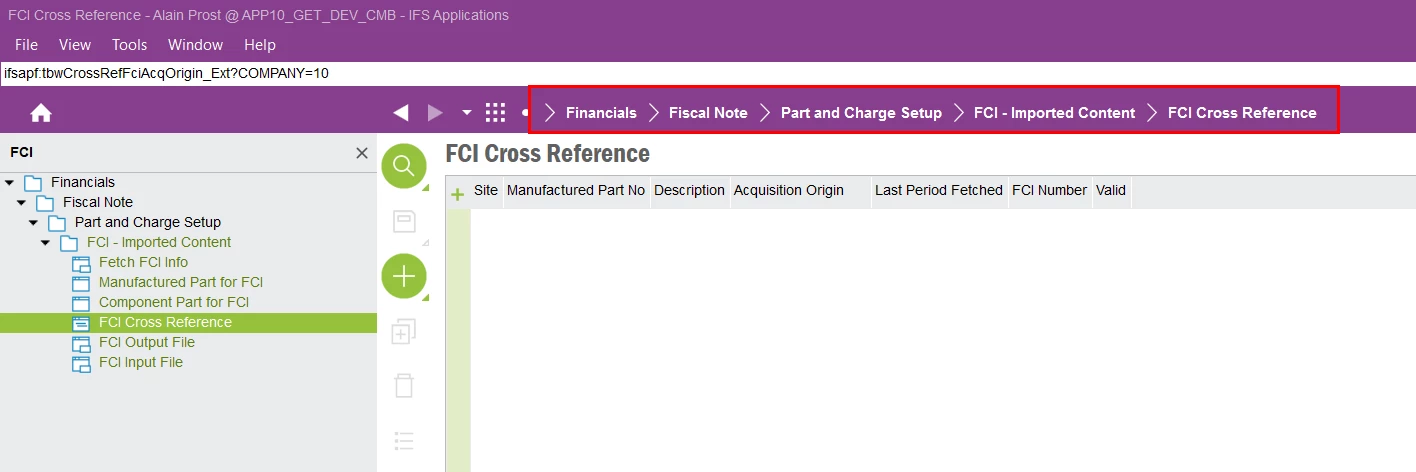
Regards,
Kethaka
Enter your E-mail address. We'll send you an e-mail with instructions to reset your password.