Question

EDI Orders Set To Auto Approval but Still Requires Approval

  • July 29, 2026
  • 1 reply
  • 8 views

  • Do Gooder (Customer)

We have recently moved to a REST API connection with our EDI data in IFS. With this move, we have started to experience issues with Auto Approving Customers in the Incoming Customer Order screen.


We have the Customer profile set up to be Automatic for the Incoming Order / Schedule Approval however it will stop in Incoming Customer Order screen with the Status of “RequiresApproval”. With this, there is no error message or stopped message error. Once you RMB click “Approve” it creates the order with no issues.


Has anyone encountered this before or have solution to ensure our auto approving Customer’s truly come through IFS Incoming Customer Orders and automatically approve?


1 reply

Kanishka Dilana
Superhero (Employee)
Forum|alt.badge.img+16

Hi ​@mtrow , In IFS Applications Online Documentation, under Enter Message Defaults, it says,

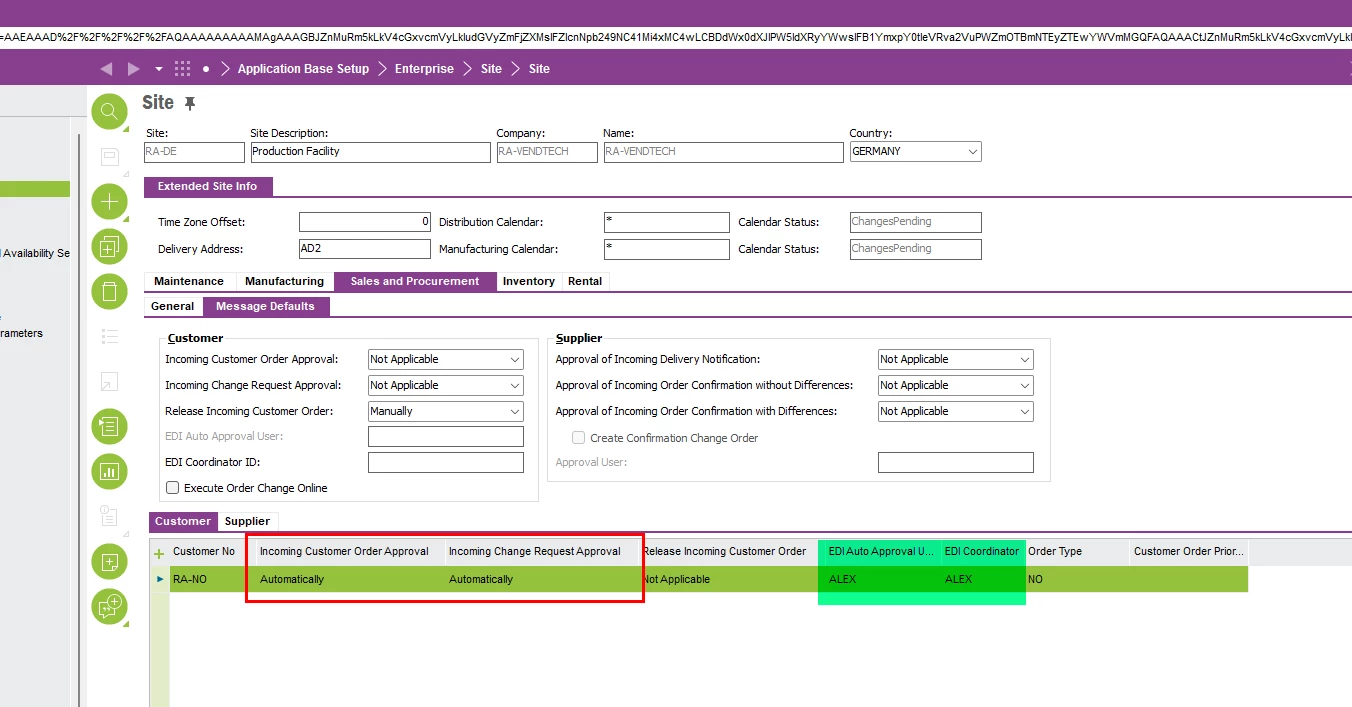
‘..Note: Automatic approval for an incoming order/schedule and incoming change request is defined on the Site/Extended Site Info/Sales and Procurement/Inter-Site Defaults and has the highest priority when approving the messages.’


So, apart from setting your Customer profile to be Automatic for the Incoming Order / Schedule Approval, I suggest you check the above setting as well. If it is not set to Automatic there, add a line for your Customer No and set it for Automatic Approval from there and see,