We are considering use of DOP for our MTO parts. We have been experimenting with the DOP features and are stumped with the netting.
Part X is DOP.
In our scenario, we have 1000 units of part X in inventory that is not reserved or pegged to any order.
My demand for part X is 5000 units.
When I check in DOP, the system is still telling me to create 5000 units, and the DOP system has generated a shop order for this quantity as well.
How do I get the order for part X to net against existing inventory and only release an order for 4000 units?
I am currently working in IFS Apps 10, moving to cloud in early 2026.
Thank you!
Robin
Best answer by matt.watters
Netting in DOP is controlled by a few attributes.
On the Inventory Part > Acquisition tab, you establish the netting parameter (DOP Netting) for each DOP part. This will be inherited to the DOP header and/or DOP orders for the part.
On the DOP Header and DOP Orders, the setting for Netting can be changed per the requirements for that DOP.
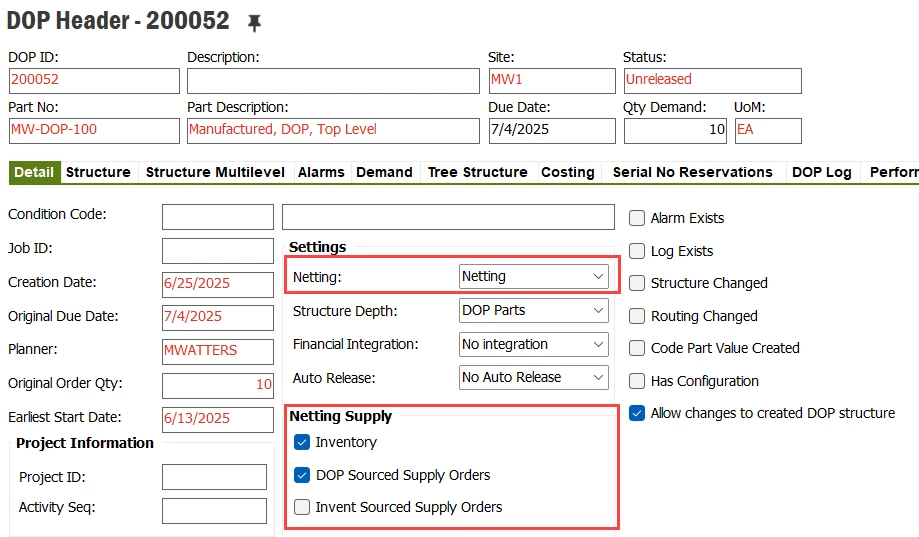
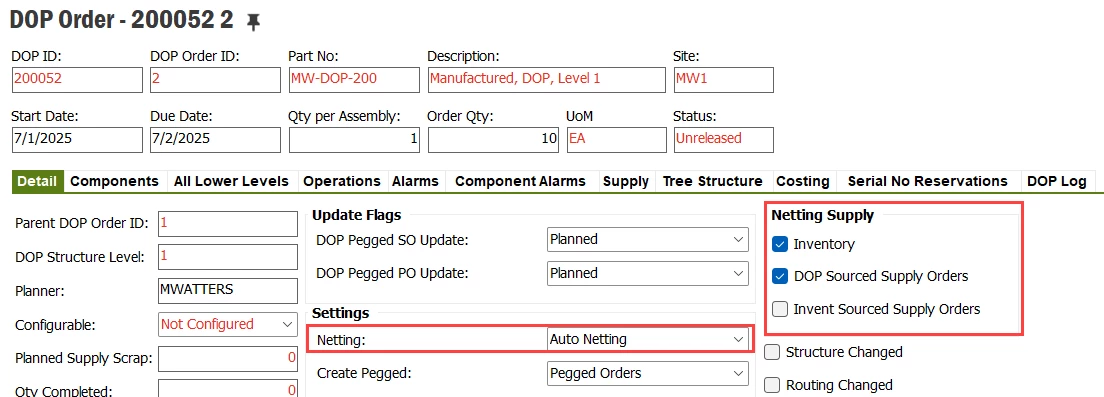
On the DOP Header and DOP Orders, the settings in the Netting Supply group determine from where will the system net the inventory. This can be changed per DOP Header/Order.
Settings for DOP Netting
Netting - DOP orders with this setting can be manually netted or will be netted if a netting process is run for the order or for a parent DOP order.
No Netting - DOP orders with this setting are not allowed to net excess quantities.
Auto Netting - DOP orders with this setting will, apart from the functionality of Netting DOP orders, automatically get netted when they are released. When automatically initiated the netting processes on a DOP order, the total branch of the DOP orders will also get automatically netted.
Example settings on DOP Header:
Example settings on DOP Order:
Recommendation to try:
Set the DOP Header part, the FG, to Netting so that the settings in the Netting Supply group on the DOP Header flow to the lower-level DOP orders when the DOP structure is created.
Set the lower-level DOP parts to either Netting or Auto Netting based on how you would want the inventory to be netted; Netting for the parts you plan to manually net prior to releasing the DOP order/branch, Auto Netting for the parts you want the system to net when you release the DOP order/branch.
On the Inventory Part > Acquisition tab, you establish the netting parameter (DOP Netting) for each DOP part. This will be inherited to the DOP header and/or DOP orders for the part.
On the DOP Header and DOP Orders, the setting for Netting can be changed per the requirements for that DOP.
On the DOP Header and DOP Orders, the settings in the Netting Supply group determine from where will the system net the inventory. This can be changed per DOP Header/Order.
Settings for DOP Netting
Netting - DOP orders with this setting can be manually netted or will be netted if a netting process is run for the order or for a parent DOP order.
No Netting - DOP orders with this setting are not allowed to net excess quantities.
Auto Netting - DOP orders with this setting will, apart from the functionality of Netting DOP orders, automatically get netted when they are released. When automatically initiated the netting processes on a DOP order, the total branch of the DOP orders will also get automatically netted.
Example settings on DOP Header:
Example settings on DOP Order:
Recommendation to try:
Set the DOP Header part, the FG, to Netting so that the settings in the Netting Supply group on the DOP Header flow to the lower-level DOP orders when the DOP structure is created.
Set the lower-level DOP parts to either Netting or Auto Netting based on how you would want the inventory to be netted; Netting for the parts you plan to manually net prior to releasing the DOP order/branch, Auto Netting for the parts you want the system to net when you release the DOP order/branch.