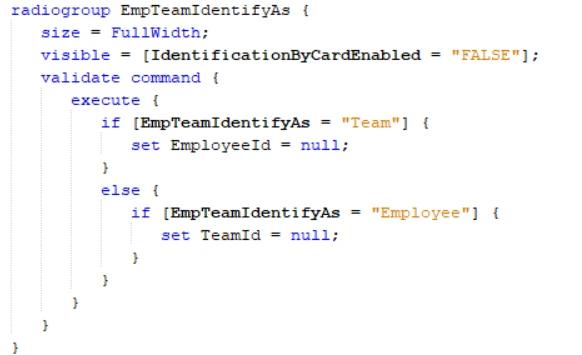


Question

Default Team selection in Shop Floor Workbench

  • Nov 11, 2026 10:39 AM UTC
  • 5 replies
  • 21 views

Forum|alt.badge.img+7

Is it possible to configure identifyas to default to Team when opening the Shop Floor Identification dialog, without a customization?

Now as a default employee is selected in the dialog, and need to change this to team every time when identify is selected on the S F W. 


Kind regards, 

Willem 

5 replies

Björn Hultgren
Hero (Employee)
Forum|alt.badge.img+25

I believe it will default the previous value. Hence, if you selected Team the previous time, this will be the default value next time.


Forum|alt.badge.img+7
  • Author
  • Sidekick (Partner)
  • Nov 12, 2026 7:37 AM UTC

Hello Björn, 


Unfortunally it is not saving the last chosen option. Also there is no option to select this in page designer. Perhaps there is another handy trick to change this default to team…? 


Kind regards, 

Willem 


Björn Hultgren
Hero (Employee)
Forum|alt.badge.img+25

When I tested it does default to Team if a team was previously identified in Workbench. One question though, do you have two or three options in the radio button list? I.e., do you see just Team and Employee or also Employee Card?


Forum|alt.badge.img+7
  • Author
  • Sidekick (Partner)
  • Nov 12, 2026 7:55 AM UTC

There are 2 options, employee and team. 


Björn Hultgren
Hero (Employee)
Forum|alt.badge.img+25

The code is there to set the default value based on whether a team or employee is currently identified in workbench. If it doesn’t work, create a support ticket.