

Question

Customer Order Wanted Delivery Date and Transport/Picking Leadtimes

  • March 10, 2026
  • 3 replies
  • 34 views

eknock007
Do Gooder (Customer)
Forum|alt.badge.img+5

We get a lot orders where customers do not indicated exactly when they want the product delivered because only really indicate they want the product shipped using the cheapest shipment code (i.e. Ground), so they just simply submit the order and the order is entered into IFS. These orders are either entered manually or done electronically. The issue is that we cannot have customer service reps go through every single order to determine what the Wanted Delivery should be for these orders, so IFS calculates the Wanted Delivery Date the same date as the Created Date. We don’t will call or do same day delivery, so the Wanted Delivery Date should never be the same as the Created Date.

We have created pick and external transport leadtimes for all customer ship-to’s in the Customer Supply Chain Matrix. However, these only work if the Wanted Delivery is not the same same date as the Created Date. Some customers do indicate future Wanted Delivery Dates in which case the leadtimes in the Customer Supply Chain Matrix become relevant, but if customers do not specify a Wanted Delivery Date that becomes the same date as the Created Date, then these Supply Chain Matrix values are useless.

My question is: how can we make IFS push out the Wanted Delivery Date based on the Supply Chain Matrix leadtime values when the Wanted Delivery Date is the same as the Created Date.   

3 replies

Rasika Lakmal
Superhero (Customer)
Forum|alt.badge.img+18
  • Superhero (Customer)
  • March 11, 2026

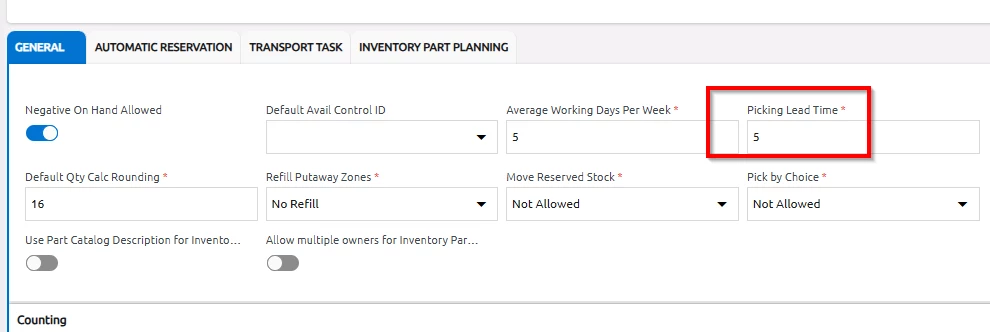
@eknock007 if you define the Picking Lead Time on the site, wanted delivery date will be pushed out. Site> Warehouse Management > General Tab


If this is not resolve your issue, you can simply developed a scheduled quick report so customer service team get an email every day where Wanted Delivery Date=Created Date. 


eknock007
Do Gooder (Customer)
Forum|alt.badge.img+5
  • Author
  • Do Gooder (Customer)
  • March 12, 2026

@eknock007 if you define the Picking Lead Time on the site, wanted delivery date will be pushed out. Site> Warehouse Management > General Tab


If this is not resolve your issue, you can simply developed a scheduled quick report so customer service team get an email every day where Wanted Delivery Date=Created Date. 

Thanks for your response. We have already defined Picking Leadtimes in the Customer Supply Chain Matrix for every customer’s ship to address. Because this is a global setting, I don’t know if this will work, because it would essentially add more time to the internal processing of the customer order. What we need is to add more time to the Wanted or Promised Delivery Date after after the Planned Ship Date when the Create Date and Wanted Delivery Date are the same. And I had assume that would come from the External Transport Leadtime we defined in the Customer Supply Chain Matrix.

Question is: does IFS have logic that will consider External Transport and Picking Leadtimes before calculating the Wanted Delivery Time, regardless of what Wanted Delivery Date a customer may or may not specify on the customer order.  


Forum|alt.badge.img+13
  • Hero (Partner)
  • March 12, 2026

@eknock007 To your last question, my answer would be “sort of”.  Since you’re using the External Transport Lead Time already, IFS will use this in your Wanted Delivery Date calculation, but it’s possible for this to be overridden by the user.

For example, if my customer’s external transport LT is 4 days and I enter a Customer Order today, my default Wanted Delivery Date is 3/16/26, but it’s possible for me to override this to 3/12/26, if I so choose.  

If you perform the latter, a toast message should appear indicating that you’re selecting a date sooner than possible.