


Question

Changing Inventory Location Group with Different Location Types

  • December 17, 2025
  • 1 reply
  • 11 views

Forum|alt.badge.img

Is there a way to change an Inventory Location from one Location Group to another one that has a different Location Type?

For example, suppose there are two Location Groups: A which has a Location Type of Picking and Location Group B which has a Location Type of Floor Stock. If Inventory Location 01-01-01-001 has a Location Group of A, is there a way to change it so that it has Location Group B?

We tried changing it manually, but we ran into the following error: 
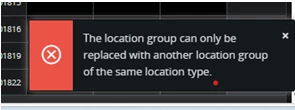
As such, we’re curious if it is possible at all to change the Inventory Location Group for an Inventory Location if the Location Types are different.


1 reply

imkhin
Sidekick (Employee)
Forum|alt.badge.img+8
  • Sidekick (Employee)
  • December 18, 2025


Key Points from Documentation

  • Inventory Location Structure:
    Each inventory location must be connected to a Location Group, and each Location Group is tied to one Location Type. This means all locations within a group share the same type.

    “The purpose of a location group is to group several locations with the same location type. Therefore, you can specify one location type for each location group.”

  • Changing Location Group:
    The system does not allow changing the Location Group of an existing Inventory Location if the new group has a different Location Type. This is a structural restriction because the location type defines operational rules (e.g., picking vs. floor stock).
    There is no standard function to override this validation.

  • What Can You Do?

  • Recommended Approach:

    1. Create a new Inventory Location under the desired Location Group (with the correct Location Type).
    2. Move stock from the old location to the new one using Move Inventory Part or Transport Task functionality.
  • Why?
    This ensures compliance with system design and avoids data integrity issues. Direct modification of Location Group is not supported in standard IFS Cloud.
