

Question

CAPA, NCR and Product Structure Approval Workflow

  • July 27, 2026
  • 3 replies
  • 54 views

Tharindu Illangasinghe
Superhero (Partner)
Forum|alt.badge.img+16

Hi,


The question I'm asking is not relevant only to CAPA objects, but also to a number of other objects as well.


What we want is to configure approvals for each status of an object/line. In CAPA Actions, the line gets promoted through multiple statuses.
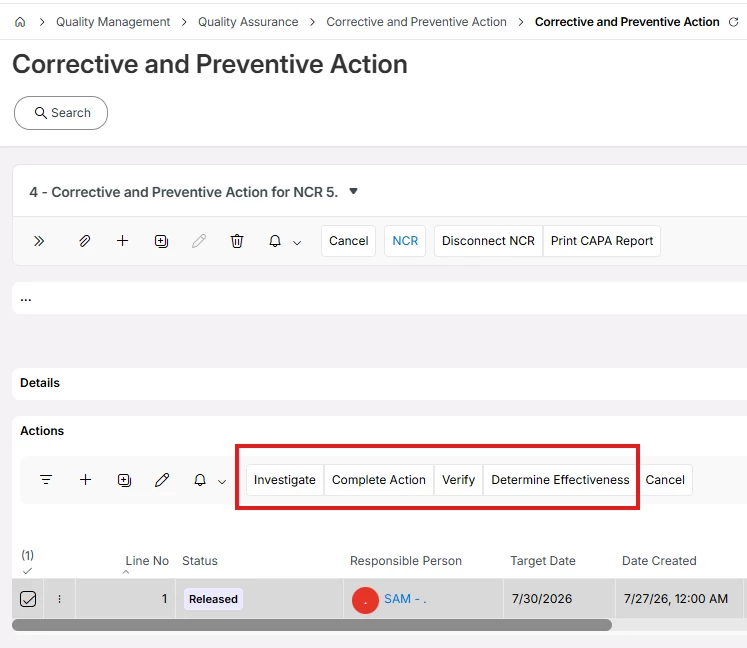
 

The requirement is to set two persons as approvers (Person A and Person B) for the "Investigate" status. So, when a user clicks on "Investigate," the system should check whether Person A and Person B have provided their approval, and allow/disallow user accordingly.

Similarly, for the other statuses shown in the image, there will be 2, 3, or more approvers set, with the same validation to be done before promoting the line to that status.

It is true that this can be done through customization, but is there a standard/configuration way to do this more simply?


Version: IFS Cloud 25R2


  1. S. Already tried with attaching Approval Routings but no effect it seems.

3 replies

Abdul
Superhero (Partner)
Forum|alt.badge.img+20
  • Superhero (Partner)
  • July 27, 2026

Hi ​@Tharindu Illangasinghe,

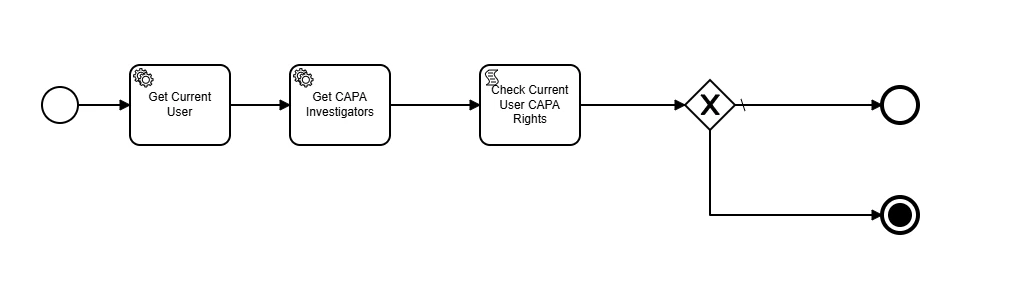
I had also come across this requirement in last implementation and handled by creating a Person Group (specifically for Capa Investigators) and SQL type custom event.

Where custom event checks whether current logged-In user added in CAPA Investigators Person Group.

I mapped the same logic through validation type Workflow (though it took me some time to write logic in JavaScript 😊). 

Attaching workflow for your reference, please check if it is working as per requirement.

Pre-requisite: Define a Person Group with Group Id CAPAINVST since this is hard coded in workflow.


Tharindu Illangasinghe
Superhero (Partner)
Forum|alt.badge.img+16

Hi ​@Tharindu Illangasinghe,


I mapped the same logic through validation type Workflow (though it took me some time to write logic in JavaScript 😊). 


Thank you for the input and the shared workflow ​@Abdul.

But this is not what we are actually looking for.  We need to assign Persons as approvers to each Status, and once the required approvals are given then the user should be able to promote to the state. It is not really necessary for the current user to be in a group.


Abdul
Superhero (Partner)
Forum|alt.badge.img+20
  • Superhero (Partner)
  • July 28, 2026

@Tharindu Illangasinghe, if I understood correctly, there will be more than one level of approver before allowing users to set CAPA Action line(s) status to Investigated and likewise for other statuses.

I don’t think it is configurable for CAPA Actions line since single line have multiple different statuses, and it is not possible to configure more than one Approval process per line for each status. Though, Approval process configuration is possible for a specific status only

Workflow that I shared, will check who is allowed to set CAPA Action lines status.