Question

Annual inventory count report

  • Oct 30, 2026 4:48 PM UTC
  • 3 replies
  • 52 views

Forum|alt.badge.img+2

Hello,

I am trying to create a count report for all parts in the warehouse for quarterly and annual physical counts. We use count reports for daily cycle counts so when I try to create a report for the quarterly where we will count everything, regardless of the last time the part was counted. When I try to create the quarterly/annual count reports, nothing populates because the parts were recently counted for cycle counts so they aren’t due to be counted. Has anyone found a way around this, and are able to create quarterly/annual count reports with all parts, on time of daily cycle counts, and if so, how? We are using cloud.


3 replies

PhillBronson
Hero (Customer)
Forum|alt.badge.img+13
  • Hero (Customer)
  • Oct 30, 2026 4:55 PM UTC

​@katie.zweifel can you share the settings you used when creating the count report?


Forum|alt.badge.img+2
  • Author
  • Do Gooder (Customer)
  • Nov 5, 2026 1:46 PM UTC

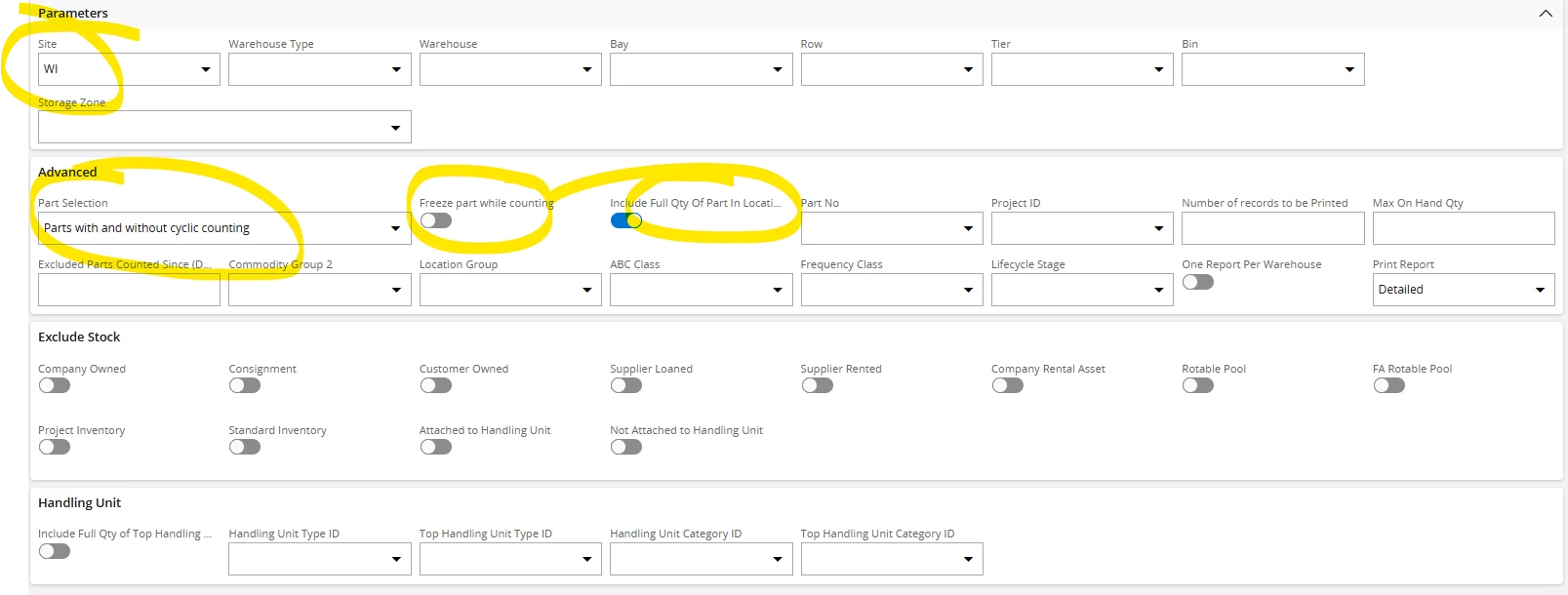
I left it very open and just entered the site, let part selection at Parts with and without cyclic counting, do not freeze part while counting and include full qty of part in location.


richardwoods
Do Gooder (Partner)
Forum|alt.badge.img+6
  • Do Gooder (Partner)
  • Nov 24, 2026 10:05 PM UTC

Short answer: the count report only picks up a part if it passes a handful of tests, and one of them is the next count date for parts set up for cyclic counting. For a quarterly or annual full count, the useful move is to work through those tests on the parts that are missing and then run the report as its own run (ideally split by warehouse), separate from the daily cycle count job.

What decides whether a part lands on the report

  • Location type: counting is only possible for picking, floor stock and production line locations. Stock sitting in other location types will never appear.
  • Planning method: parts with planning method O, K or T cannot be counted.
  • Cycle Counting option: on the inventory part, in the Counting section, the Cycle Counting option decides whether the part is treated as a cyclic part. For those parts, the next count date (driven by the cyclic period) decides whether it is time to count them. You can see that date on Quantity per Location Details, which is a quick way to see why a recently counted part is not due.
  • Stock must be received into a location, and customer owned, supplier loaned, project or handling unit stock can be excluded by the Exclude Stock selections, so check those are not switched on.

A setup along these lines

  1. Open Warehouse Management, Counting, Create Count Report and use the Advanced section rather than Default, so you can see every selection.
  2. Enter the site and, for a quarterly run, set One Report Per Warehouse so each warehouse team gets its own sheet and the report is a manageable size.
  3. Leave the Exclude Stock options clear unless you really want to leave those stocks out of the count.
  4. Decide on freezing. For a full count you will normally want the parts frozen while counting, so nothing moves between the count and the posting. Daily cycle counts can stay unfrozen if that is what you do today.
  5. Create the report directly, or schedule it as a background job. A recurring quarterly job with the same selections keeps the full count repeatable.
  6. Print from the Report Archive, then report the counts on Count per Count Report.

The awkward case

If a full run still comes back empty for parts you know are in stock, look at one of those parts on Quantity per Location Details first. The next count date and the location type will usually tell you whether it is the date test or the location test that is leaving it out. If it is the date, the part is set up for cyclic counting, so a run restricted to non-cyclic parts and a separate run for the cyclic ones is a way to split the job while you work it out.

Things to know

  • A count report freezes stock only if you tick it to, but a rejected count result will freeze that stock record until it is approved or cancelled, when the site option for that is on.
  • Counting limits on the site mean results outside the limit are rejected and need approving manually, which matters more on a full count where there are many differences.
  • Reporting a count updates the last count date, so expect the quarterly count to move the next cyclic date for those parts.

Worth a look: the IFS Cloud documentation for Create Count Report (Advanced selections and prerequisites) and for Handle Counting.

When the quarterly run returns nothing, is it nothing at all, or only the parts that have Cycle Counting switched on? And do those parts show a future date as next count date on Quantity per Location Details?

Created with the help of Ask Olive.