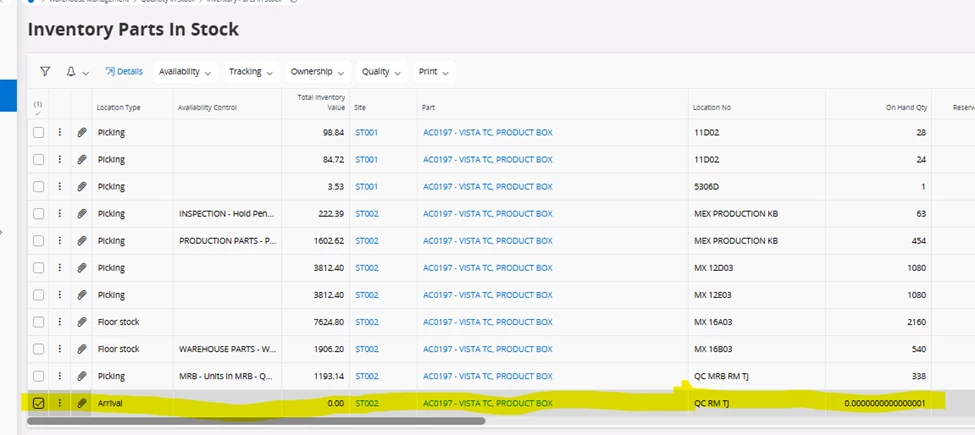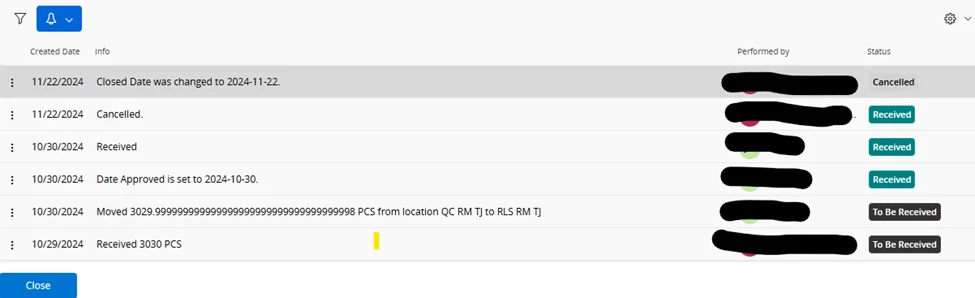


So we have a situation where we are trying to adjust the On Hand Qty of a part that is sitting in an Arrival type location. Somehow after this part was received and subsequently moved out of the arrival location, a very small quantity than 1 (see 1st screenshot) remained in the Arrival location and now we cannot adjust it out. We have tried doing an inventory issue as well as a count per inventory part but the arrival location does not show up as a location we can do the adjustment for. We have tried backing out that quantity from the PO which was somehow cancelled, but we couldn’t do it. As you can see from the second screenshot, somehow IFS performed a move for 3029.xxxxxx. And I kinda why the On Hand Qty that was left behind is what it is. This part in Inventory Part had the Qty Calc Rounding set at 16. How do we get rid of the 0.0000000000000001 qty.