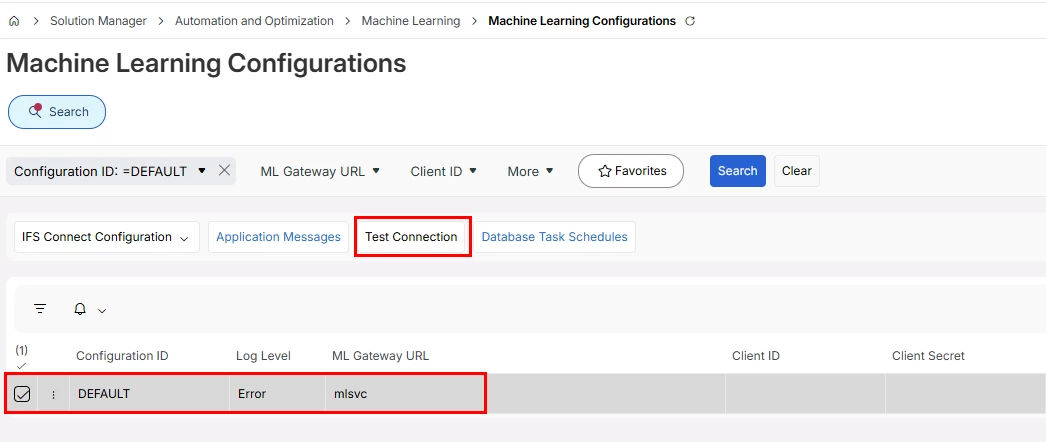
We’d like to enable the Machine Learning Service too but for a different pre-trained model - Customer Order Automation. How do you enable the Machine Learning Service please?
The URL will be provided to the customer from the the start, if they have bought use case(s) that uses the IFS Machine Learning Service. So we embed the AI capabilities within the solutions. Customers would not build anything on their own here, since we provide the IFS Machine Learning service for those purposes.
Do you have access to a demo environment? In such case this should already have been provided (if that’s a part of the agreement).
Thank you for this information, Anna. It helped us!
We didn’t have access to the video but our implementation consultant did, so I watched it.
Here’s some more that we learned (in IFS Cloud version 23R1):
Navigate to the Scheduling Optimization and Machine Learning Configuration page.
Add a new ML Configuration. Choose an arbitrary Configuration ID. Enter your PSO RESTful Gateway URL. You get this by downloading Remote PSO Deployment from Download Artifacts on your IFS Build Place.
Enter ‘ML2.0’ as your PSO Account ID.
Enter the IAM Client Secret and a password.
Navigate to the Object Properties page in IFS Cloud.
Filter the Property Name column by ‘%SCAN%’ to find relevant records. You should find a record with an Object LU of ‘CustomerOrder’. Edit that record to match the configuration in steps 3. So Property Value is ‘ML2.0’.
You should now be able to navigate to Scan Customer Order and use it.
Here's why the above didn't work for us, in case anybody runs into the same difficulty
To perform step 2, you need to have purchased the Planning, Scheduling and Optimization (PSO) engine within the Service and Maintenance module. This is the module where you plan routes for engineers visiting customers on various sites/locations, so you might think it's a strange place to put the Scan Customer Order functionality, but that's the way it is!
Hope this helps the next person to have this question.
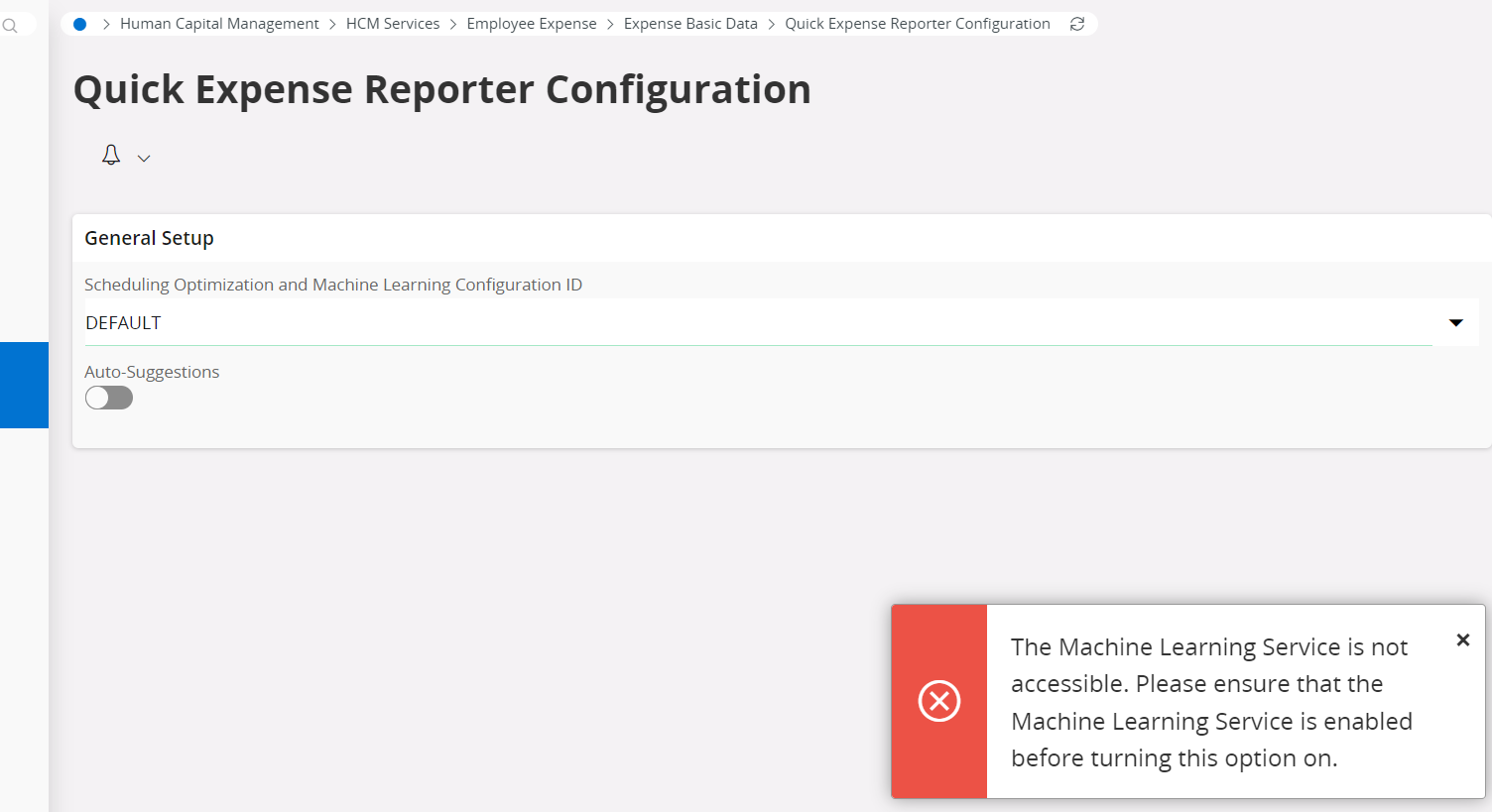
We are trying to put in place the expense management (expense sheet), and like any other solutions, and I would like to know if IFS is able to read my receipt information and enter all information automatically (scanning) into application.
I am trying to use the machine learning model to reach this goal, and when I am tried to activate my quick expense report, I got the same error.
Is IFS trip tracker able to achieve this goal? If yes, Is it really using machine learning?
As an IFS customer, how can we get started with and utilize ML Services? We would like to use the Travel Expense Reporter configuration available in IFS Cloud 24R2.
Subscribe to and enable ML Services. - This capability should be enabled through IFS nexus platform. Perhaps you can contact IFS sales team member as a staring point. If it’s unsuccessful, send a case to MLZ support project. @vidurathegeek is there anything public document?
Configure and set up the Travel Expense Reporter functionality in IFS Cloud 24R2. - You can refer to 22R1 news ppt. Screens are slightly changed over the years, but the flow is same (Attached the QER part)
Understand any licensing, Azure/Microsoft AI service requirements, or additional configurations that may be needed.- For using any AI feature, IFS.ai Activation Pass (IC19000) to be purchased.
Thank you very much for the useful information. I have a few additional questions that I would like to clarify, as we are planning to upgrade to IFS Cloud 26R1 in the near future and are currently using an On-Prem Azure Cloud deployment model.
Does this deployment model support IFS Machine Learning (ML) services? Also, to what extent can we utilize the AI and ML features available in IFS Cloud with an On-Prem Azure deployment?
Apart from Quick Expense Reporter, what other business areas or use cases can leverage the IFS Machine Learning service? If there are any relevant reference documents or implementation guides available, I would greatly appreciate it if you could share them.
Thank you in advance for your support and guidance.
Thank you very much for the useful information. I have a few additional questions that I would like to clarify, as we are planning to upgrade to IFS Cloud 26R1 in the near future and are currently using an On-Prem Azure Cloud deployment model.
Does this deployment model support IFS Machine Learning (ML) services? Also, to what extent can we utilize the AI and ML features available in IFS Cloud with an On-Prem Azure deployment?
Apart from Quick Expense Reporter, what other business areas or use cases can leverage the IFS Machine Learning service? If there are any relevant reference documents or implementation guides available, I would greatly appreciate it if you could share them.
Thank you in advance for your support and guidance.
Best Regards,
Charuka
Hi,
For your first question, Better to sync with someone from ML team. @Erani @Anna Sarbring @vidurathegeek Hope you’d be able to take this one.
Regarding your 2nd questions, better reach out to your IFS pre-sales memeber / IFS Success Manager for detailed answer as ML is used in many AI use cases. Also see if you could access IFS.ai Starter Pack related documents which explains AI uses cases.
Thank you very much for the useful information. I have a few additional questions that I would like to clarify, as we are planning to upgrade to IFS Cloud 26R1 in the near future and are currently using an On-Prem Azure Cloud deployment model.
Does this deployment model support IFS Machine Learning (ML) services? Also, to what extent can we utilize the AI and ML features available in IFS Cloud with an On-Prem Azure deployment?
Apart from Quick Expense Reporter, what other business areas or use cases can leverage the IFS Machine Learning service? If there are any relevant reference documents or implementation guides available, I would greatly appreciate it if you could share them.
Thank you in advance for your support and guidance.
Best Regards,
Charuka
Hi,
For your first question, Better to sync with someone from ML team. @Erani @Anna Sarbring @vidurathegeek Hope you’d be able to take this one.
Regarding your 2nd questions, better reach out to your IFS pre-sales memeber / IFS Success Manager for detailed answer as ML is used in many AI use cases. Also see if you could access IFS.ai Starter Pack related documents which explains AI uses cases.
_________________ Hi @HPDPATABENDI ,
1. The on-prem deployment option is supported through what we refer to as a Remote-Hybrid Deployment model. This allows customers to leverage the IFS.ai capabilities available for their licensed release while keeping the core application deployed in their own Azure environment. You can read more here:
2. Regarding AI and Machine Learning capabilities, IFS Cloud includes a broad range of AI-powered use cases across prediction, recommendation, automation, generative AI, Copilot experiences, and machine learning services.
A comprehensive list of the AI use cases currently available in 26R1, including those powered by the IFS Machine Learning Service, can be found here:
All of these can also be found in the IFS Cloud User Documentation; how to get going and any other prereqs needed.
And as an additional note, if you are interesting in the AI Agents (like the Digital Workers) we offer, you can get more information here: https://kb.theloops.io/
If you are evaluating specific AI scenarios for your deployment, your IFS Success Manager or pre-sales team can help map the available capabilities to your business processes and deployment model.



 +8
+8