Question

Empty BR report

  • April 19, 2024
  • 5 replies
  • 168 views

Forum|alt.badge.img+13

Hi BR experts,

I'm preparing a report in Business Reporter, and I've encountered an issue. 
When the customer orders the report, they receive an empty one, but when I order the same report, I receive a report with data.
I tried to recreate this issue, but I couldn't do it until I turned on the debugger.
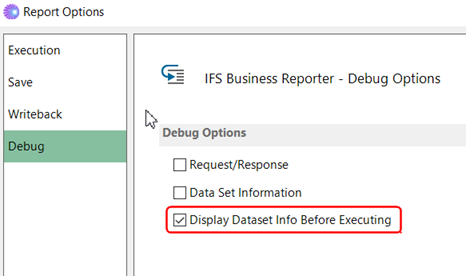
When I turned it on, I received an empty report.

Have you ever encountered an issue like this?
Do you have any suggestions how to solve it, I mean how to ensure that when the customer orders a report using their credentials, they receive a report with data.
I would be grateful for your assistance.
Best regards,
Adam


5 replies

NiyomalN
Hero (Partner)
Forum|alt.badge.img+11
  • Hero (Partner)
  • April 19, 2024

Hi @Adam Mazurczak ,

hope this is IFS cloud  and customer is ordering the report from order report window ?

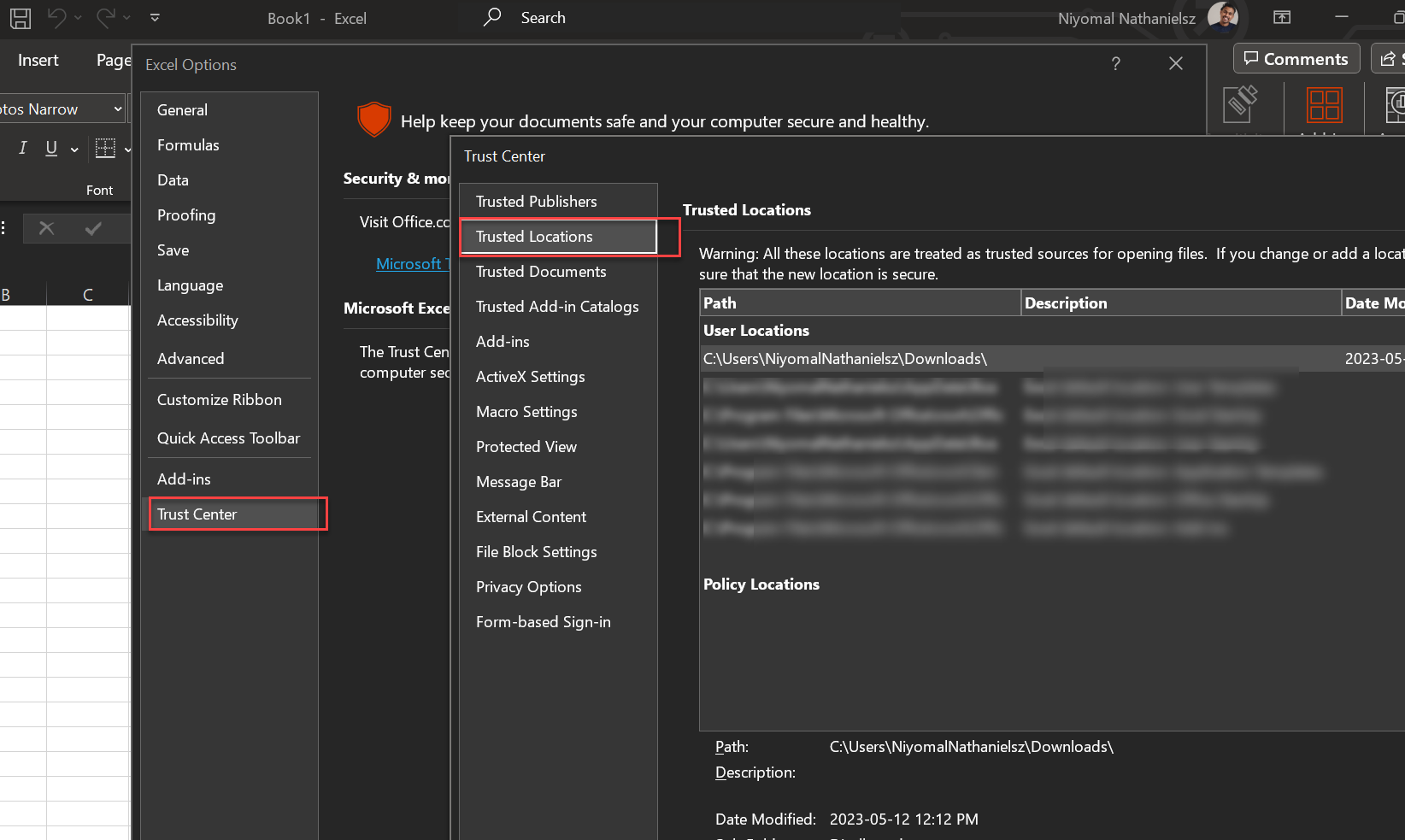
if that is the case, you need to set the download folder as a trusted location in the user machine. what happen is unlike in apps 10, in cloud when you order the report from aurena client, report will be downloaded into downloads folder and if the location is not a trusted location then the report comes empty.


Hope this helps.

Kind Regards!
Niyomal.


Forum|alt.badge.img+13
  • Author
  • Superhero (Employee)
  • April 19, 2024

Hi @NiyomalN 
Thank you for answer.
Yes, this IFS Cloud, I'm not sure how customer is ordering the report.
I'm ordering the report from Business Report.
Do these settings need to be configured separately for each report? 
I'm asking because the customer uses multiple reports, and the problem occurs only for this particular one.

BR,

Adam


Dharshankumaar Mahendran
Superhero (Partner)
Forum|alt.badge.img+16

Hi @Adam Mazurczak 

Did you find a way solution for this issue? Im facing the same issue and appreciate if you could let me know how to solve this.


Best Regards,

Dharshan.


Forum|alt.badge.img
  • Do Gooder (Partner)
  • February 8, 2026

any updates for this same issue for me


ChanakaEA
Do Gooder (Partner)
Forum|alt.badge.img+4
  • Do Gooder (Partner)
  • March 22, 2026

HI ​@Adam Mazurczak ,

Display Data sets before execution option is a debug option which shows you how the data sets are created and combined before sending them to the server. It gives you some idea about what type of SQL queries are getting executed in the server when running the report. 

The data displayed in the report depends on the security configuration of the end user running the report. You need to check if the end user actually allowed to see the data according the configuration in the application such as Company level access, project grants, etc.

I don’t think Switching on the Display Data sets before execution option is a way to recreate the issue customer is having. 
There are debug options in IFS Business Reporter where you can get the actual SQLs generated in the server side when running a report. You will be able to investigate this issue further by looking at those queries. 

Please let me know if you need help on how to access those SQL statements.

Best regards,

Voshitha