Solved

BPA Workflow: Error while processing the request

  • July 21, 2026
  • 6 replies
  • 43 views

Link
Superhero (Customer)
Forum|alt.badge.img+23
  • Superhero (Customer)

Dear community

I created a user interface workflow for training purposes only. It prompts the user to fill in the "Customer RF" field for a specific customer.

But I get the following error message:
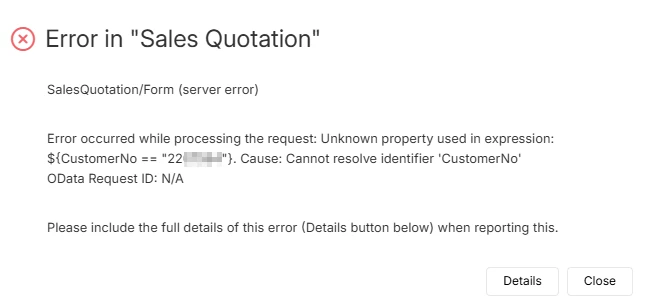
 

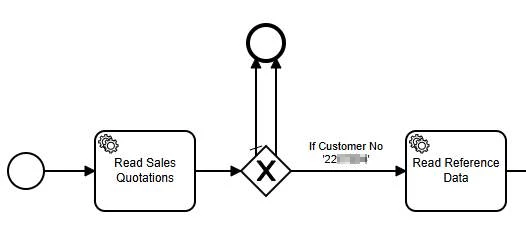
Here is my workflow:
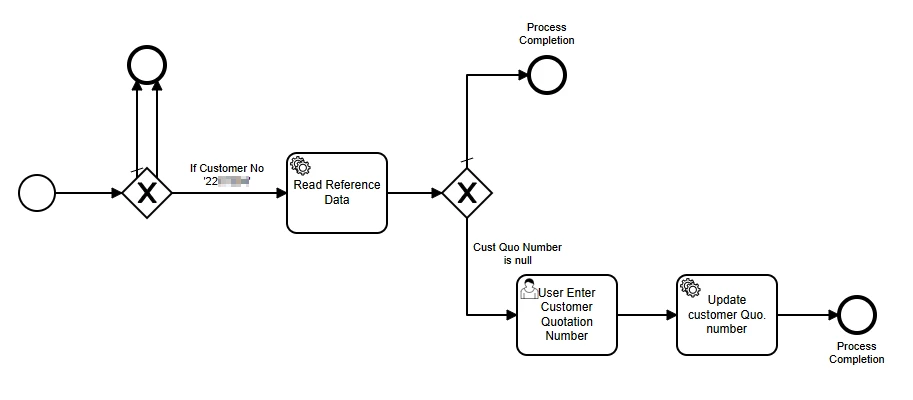
Where am I going wrong?

Best answer by TheoB

Hi ​@Link,

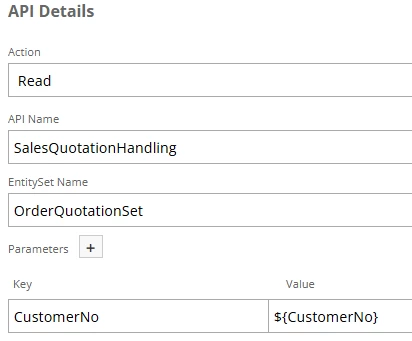
In the list of keys, you just need to add:
- QuotationNo: ${QuotationNo}
- $select: QuotationNo, CustomerNo

It retrieved a different quotation because you only specified the customer ID in the search criteria.

After the correction, your workflow should meet your expectations.

Best Regards.

6 replies

Forum|alt.badge.img+14
  • Hero (Partner)
  • July 21, 2026

Hi ​@Link,

For the workflow to function, the "CustomerNo" key must be passed to the BPA.
I recommend enabling "Start Watch" mode and checking the values ​​transmitted to the BPA during execution.
It is also possible that "CustomerId" is being passed instead of "CustomerNo".


Link
Superhero (Customer)
Forum|alt.badge.img+23
  • Author
  • Superhero (Customer)
  • July 21, 2026

Hi ​@TheoB 

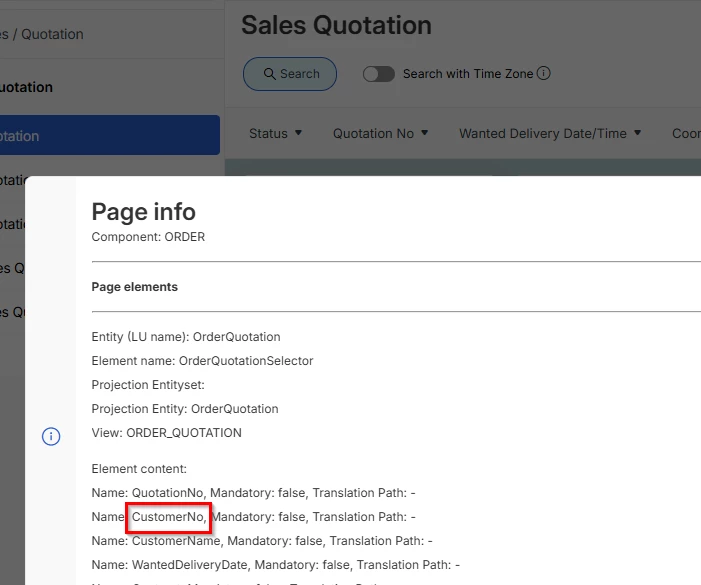
but in Sales Quotation I have CustomerNo parameter only:


Forum|alt.badge.img+14
  • Hero (Partner)
  • July 21, 2026

Hi ​@Link,

Does the workflow trigger when the Sales Quotation is created?
If it triggers only when a field is modified, only the value of the modified field will be passed.

I think adding an "IFS API" task as the first step of the BP, to retrieve the "CustomerNo" directly from the quotatio, should solve the problem.


Link
Superhero (Customer)
Forum|alt.badge.img+23
  • Author
  • Superhero (Customer)
  • July 21, 2026

Hi ​@TheoB 

It triggers when a sales quotation is created. 

It solved the problem but it changed the field “Customers REF” of another sales quotation of this customer, not the created one.

Thank you a lot.


Forum|alt.badge.img+14
  • Hero (Partner)
  • Answer
  • July 21, 2026

Hi ​@Link,

In the list of keys, you just need to add:
- QuotationNo: ${QuotationNo}
- $select: QuotationNo, CustomerNo

It retrieved a different quotation because you only specified the customer ID in the search criteria.

After the correction, your workflow should meet your expectations.

Best Regards.


Link
Superhero (Customer)
Forum|alt.badge.img+23
  • Author
  • Superhero (Customer)
  • July 21, 2026

I got it. Thank you a lot.

I appreciate your support!

Have a nice day.