Question

Unable to create Read only Attribute Reference

  • September 11, 2024
  • 11 replies
  • 204 views

Forum|alt.badge.img+5

Hello,

I am using this guide to try and create a read-only attribute reference on our instance of IFS Cloud.


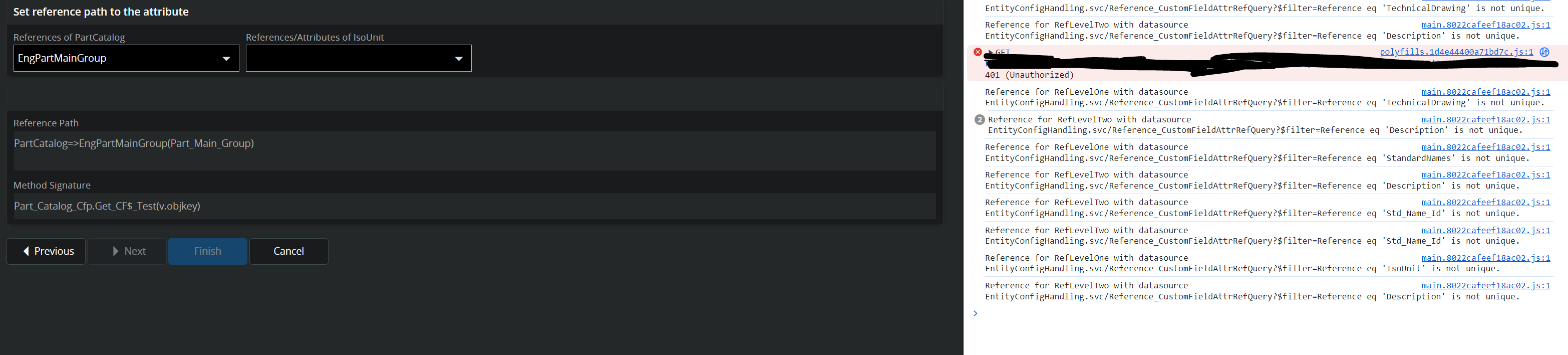
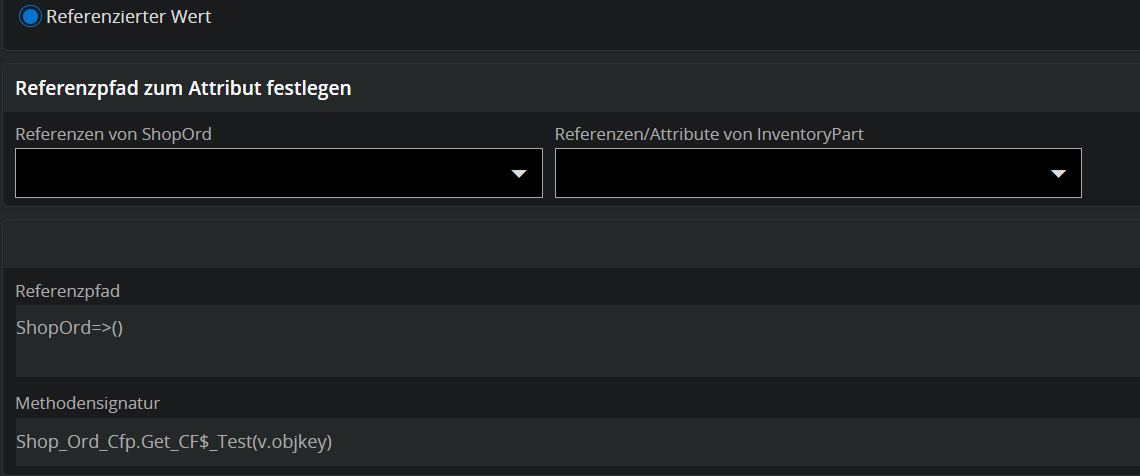
I am following the Instructions to the letter, yet every time i select a related LU, the Reference Path stays “empty”/broken and the (value of) the dropdown returns to it’s empty state.

Reference Path looks like “ShopOrd=>()” after selecting a Relation.

The browser Console gives me the following Error.

Reference for RefLevelTwo with datasource EntityConfigHandling.svc/Reference_CustomFieldAttrRefQuery?$filter=Reference eq 'Abc_Class' is not unique.
This problem occurs with any entity or relation, no matter which ones i try.

I couldn’t find anything about these Errors as Administrator user either.

Does anyone have any ideas where i could find a possible solution for this?

Thanks in advance.

Best Regards,

-Alex

11 replies

Forum|alt.badge.img+10
  • Hero (Partner)
  • September 12, 2024

Perhaps there’s something wrong with the caches? If this is a non-production environment, it’s safe to run a refresh. (For production that’s best during a scheduled maintenance window or similar.)

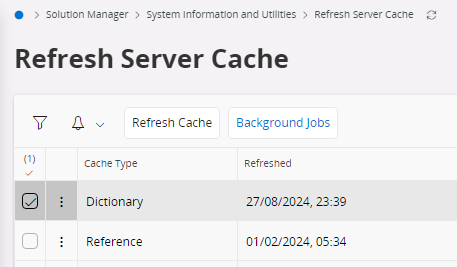
  1. Open Solution Manager > System Information and Utilities > Refresh Server Cache.
  2. Select the record for Dictionary and click [Refresh Cache].
  3. Click [Background Jobs].
  4. Monitor the created background job and make sure it goes from status Posted to Executing and Ready. This may take several minutes.
  5. Go back and repeat steps 2 to 4 for the Reference cache.


Forum|alt.badge.img+5
  • Author
  • Sidekick
  • September 12, 2024

I cleared both caches and the problem persists. :(


Forum|alt.badge.img+10
  • Hero (Partner)
  • September 12, 2024

Hmm, strange. Does that happen for any custom field? Which entity are you trying to put that attribute on? ShopOrd? What’s your version?


Forum|alt.badge.img+5
  • Author
  • Sidekick
  • September 12, 2024

Any Entity and any Reference.


It has worked before, if i try to edit the ones created back then, the same phenomenon occurs.


Forum|alt.badge.img+10
  • Hero (Partner)
  • September 12, 2024

That sounds like an environment problem. I hate to say it, but perhaps try the old restart of the environment (whomever has access to do that). A customer of mine had problems editing lobby elements in a use-place environment, until the environment was restarted.


Forum|alt.badge.img+5
  • Author
  • Sidekick
  • September 12, 2024

Our “Partner” is at this for over a week now and very slow to react, in only have IFSAPP access and a deadline.

Is there a way i can do or force that restart on my own?


Forum|alt.badge.img+10
  • Hero (Partner)
  • September 13, 2024

Restart has to be done from the backend, I’m afraid. It’s only a hunch anyway. It might have nothing to do with it. (In case of that lobby problem I mention, someone else had already experienced the problem, and posted the resolution here on the Community, and the resolution that time was a restart.)

I have not experienced that custom field problem myself, and came up with nothing after a (shallow) search here. I’m always on the lookout for anything different. Again, it might have nothing to do with it, but if you’re desperate it might be worth changing language from German to English.

What’s your IFS Cloud version.


Forum|alt.badge.img+5
  • Author
  • Sidekick
  • September 13, 2024

Nope, Reference Path stays empty “PartCatalog=>()” and the “not unique” error keeps popping up, even on english.


Thanks for your time and effort, i hope our Partner manages to somehow find the reason behind this, i might suggest a restart tomorrow.


Forum|alt.badge.img+10
  • Hero (Partner)
  • September 13, 2024

For what it’s worth, that projection reference queries the database view Custom_Field_Attributes_Ref. Maybe there somehow are some duplicate records in there?

Also, at what point to you get the call to EntityConfigHandling.svc/Reference_CustomFieldAttrRefQuery in the browser console? I don’t get it, so maybe there are some version differences. I’m running on 23R1 (23.1.0) here.


Forum|alt.badge.img+5
  • Author
  • Sidekick
  • September 13, 2024

Custom_Field_Attributes_Ref doesn’t seem to have any duplicates, i checked for “SELECT * FROM Custom_Field_Attributes_Ref WHERE LU = 'PartCatalog';” and there were none.

The calls seem to happen every time a JS onChange event is triggered on the Dropdowns allowing you to select the Reference and the Reference Attribute.

The “Reference Path” being filled, is something i haven’t seen before, the last couple of References i selected were different ones, though, as you can see from the console.log()


Forum|alt.badge.img
  • Do Gooder (Customer)
  • October 22, 2024

We noticed a similar issue in one of our environments as well. Were you able to find a solution for this?