Solved

Unable to change supply code to Purchase Order Direct

  • January 21, 2026
  • 3 replies
  • 50 views

Forum|alt.badge.img+10

We have a purchase part with the following setup:

  • Inventory part Part Type = Purchased
  • Sales part Sourcing = Inventory

When the part is added to a customer order line, the Supply Code defaults to “Inventory.” However, sometimes there is a need to change the Supply Code to “Purchase Order Direct” and have a PO automatically created and pegged. However, we have been unable to do that. 


Here is the scenario:

  • Customer order Status is “Planned”.
  • Part is added to a customer order line.
  • Supply code defaults to “Inventory”.


  • Change the Supply Code to “Purchase Order Direct”.
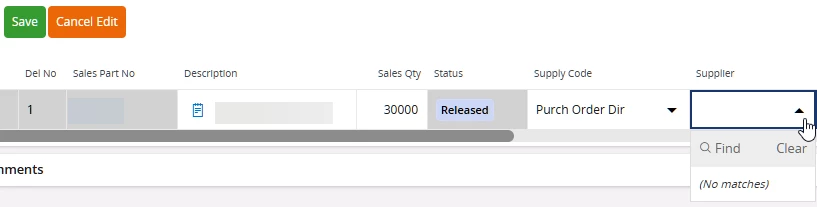
  • No Supplier’s appear in the list to select.
 

  • On Save, receive the following message:
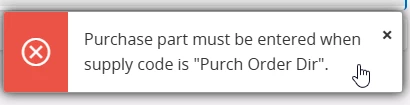
 

  • Not allowed to save the Supply Code change to “Purchase Order Direct”.


Question:

Is there a way to change the Supply Code on the customer order line from “Inventory” to Purchase Order Direct”?


Thank you for your assistance.

Best answer by Mikko K.

Hi ​@hmccabe


the reason why no list of Suppliers are referenced on the CO Line is that IFS can’t ”see” a connection to a Purchase Part and therefore no SfPP records either.

After checking ​@Arcfarazt’s point first and if you do have a Purchase Part, then check also the following:


Go to ”Sales Parts” overview page and query for the Sales Part in question.

Find column ”Purchase Part”.


Is it empty or does it refer to a Purchase Part record?


Br,

Mikko

3 replies

Forum|alt.badge.img+12
  • Hero (Partner)
  • January 21, 2026

Hi ​@hmccabe.  Can you confirm that a Purchase Part is still created for this part (Part Master Data/Purchase Part)?

If the Purchase Part has been deleted, this error message is received.  

Once created, you can change the Supply Code to Purchase Order Direct.  


Mikko K.
Hero (Employee)
Forum|alt.badge.img+7
  • Hero (Employee)
  • Answer
  • January 22, 2026

Hi ​@hmccabe


the reason why no list of Suppliers are referenced on the CO Line is that IFS can’t ”see” a connection to a Purchase Part and therefore no SfPP records either.

After checking ​@Arcfarazt’s point first and if you do have a Purchase Part, then check also the following:


Go to ”Sales Parts” overview page and query for the Sales Part in question.

Find column ”Purchase Part”.


Is it empty or does it refer to a Purchase Part record?


Br,

Mikko


Forum|alt.badge.img+10
  • Author
  • Sidekick (Customer)
  • January 26, 2026

Thank you for the suggestions. The sales part was not connected to the purchase part.