Question

Transport Task Lines - Lobby Navigation. No Search Only Filter

  • June 6, 2025
  • 9 replies
  • 129 views

Forum|alt.badge.img+5

Hi,


I’m trying to create a lobby element that navigates to the transport task lines screen that’s based on transport task line status as well as transport task line creation date.


Because of how the page is configured (native IFS), there is no search capability, just a filter. In the filter, there’s no option for date created, even though it’s there in the columns.


I’m looking for assistance on how to pass the date created parameter through the navigation.

And maybe also an explanation as to why there’s no entity associated with the transport task lines page.


I’m in IFS Cloud 24R2.5


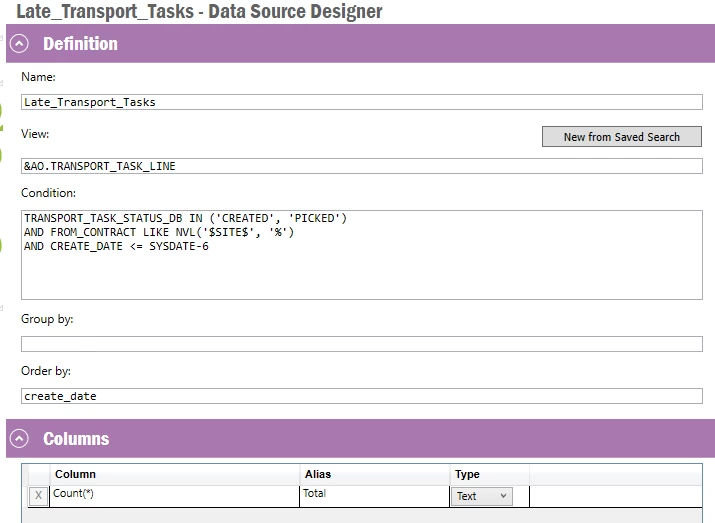
This is my datasource designer:

Transport Task Lines Page - No Entity, Only Filter, No Search


9 replies

ashenfdo
Sidekick (Customer)
Forum|alt.badge.img+8
  • Sidekick (Customer)
  • June 7, 2025

Hi ​@mlambert  to get your requirement clear do you want to show the transport line in the transport lines window when you select the line from the lobby? do you want to show the certain line or do you want to show all the lines for that created date?


Forum|alt.badge.img+5
  • Author
  • Do Gooder (Customer)
  • June 9, 2025

Hi ​@ashenfdo , I’d like to see all lines for that created date.


Forum|alt.badge.img+5
  • Author
  • Do Gooder (Customer)
  • June 18, 2025

Hi ​@ashenfdo any update?


Forum|alt.badge.img+1
  • Do Gooder (Customer)
  • July 7, 2025

Hi ​@mlambert
Do you always have a backlog on transport tasks that goes back 6 days?
I’m not sure if your request is possible with an easy solution since the create date includes time which is needed for the navigation and grouping on dates can be tricky without manipulating the date column which then makes it unusable for navigation. 

Can you provide what the use case would be for this element?


Forum|alt.badge.img+5
  • Author
  • Do Gooder (Customer)
  • July 11, 2025

Hi ​@Jarmo Kukka,

Typically our transport task lines get processed within a day or two, but we don’t consider them ‘late’ until they are 6 days old.


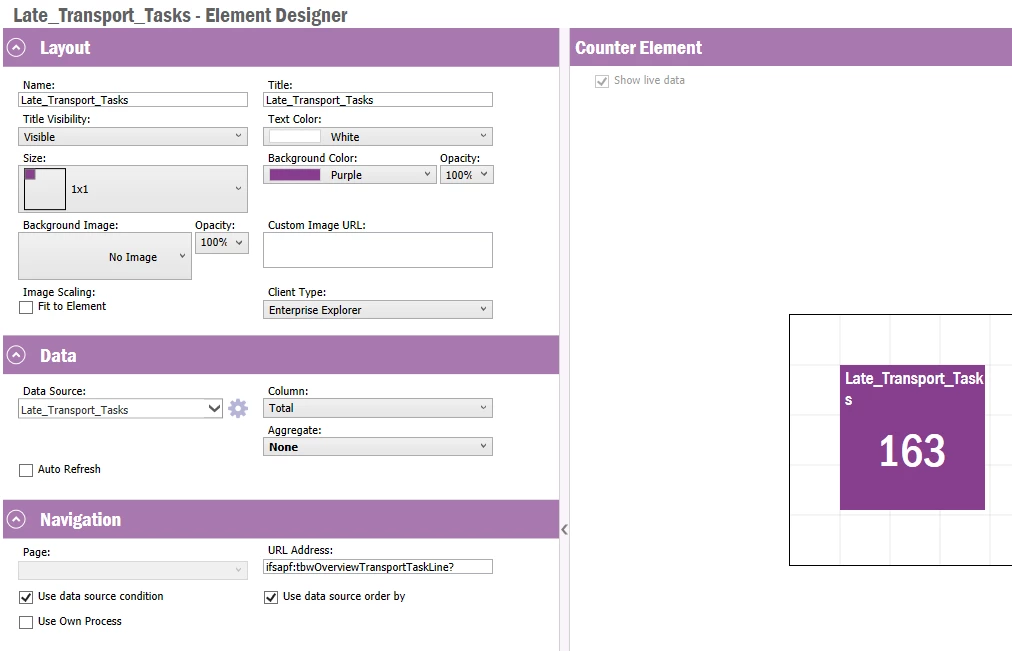
We want to display a number of how many late transport task lines, as wells as a link to the transport task lines screen so that users can tackle late transport task lines and process them.


The element we have created displays the correct number, the navigation is what I’m having issues with.


Forum|alt.badge.img+5
  • Author
  • Do Gooder (Customer)
  • September 30, 2025

@Jarmo Kukka  - curious if you had a chance to think through my use case?


Forum|alt.badge.img+1
  • Do Gooder (Customer)
  • October 20, 2025

Hi ​@mlambert,
Is this what you are looking for?
Pressing it will take the user to all transport tasks that were created 6 days ago or earlier


Forum|alt.badge.img+5
  • Author
  • Do Gooder (Customer)
  • October 20, 2025

Hi Jarmo,


I’m in 24R2 - can you describe how you’re passing the date parameters through the navigation?


Forum|alt.badge.img+1
  • Do Gooder (Customer)
  • October 20, 2025

Hi, 

I’m unfortunately not on that environment so i can’t test but if  you use a Counter element you should be able to go to transport task lines and copy the url and paste this into “URL Address” on the element.
You don’t navigate with a set column from the select statement in your data source in this type of lobby element. The filtering is done in the where clause in your data source. 
 

Link to documentation on navigation,
Lobby Navigation Guideline - Technical Documentation For IFS Cloud