I need some help to understand if there is a document upload threshold to the customer internal data lake for IFS.ai.
As I've started to use the IFS.ai features and use cases in 25R1 and 25R2, i have already uploaded few documents to the internal data lake.
Based on the “Best Practices for Co-Pilot” 25R1 guide, I’ve come to believe the limitation is only on the number of documents (which is capped at 200 docs) but there was no mention on the size/doc nor upload capacity cap.
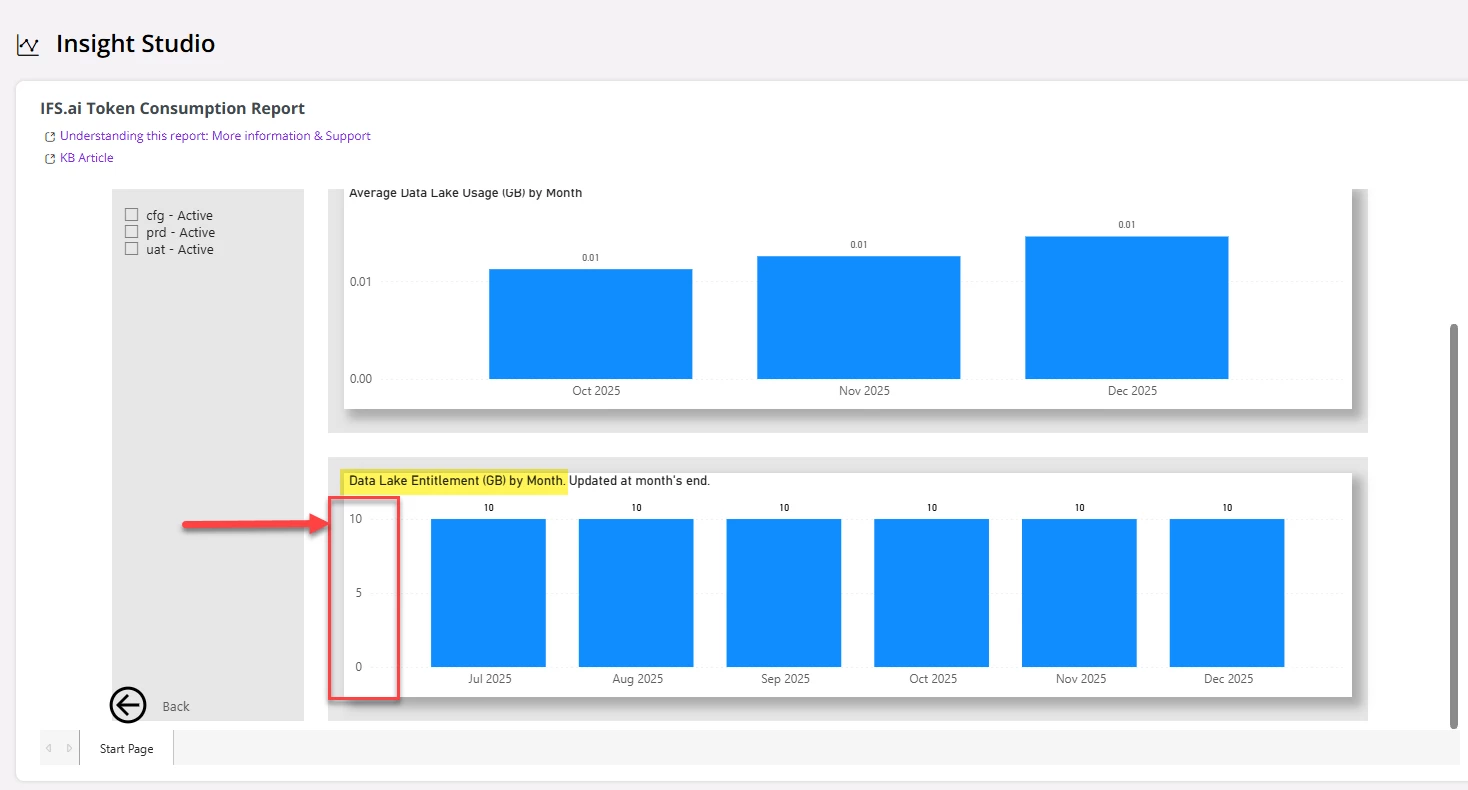
However, upon checking the “IFS.ai token consumption report” > “Data Lake Usage” page in LEC I noticed a cap of 10 GB per month (?) (please see below).
However, i am not 100% if I’ve grasped the content of the following graph correctly, so I am wondering if there is such a limitation on the upload capacity for the internal data lake?
Thanks for your support.
Cheers! Sachitha D
Best answer by desilvasachitha
For anyone following this thread, here’s is what I've found that answers aforementioned question.
It has to be noted that the 10 GB shown in the IFS.ai Token Consumption Report > Data Lake Entitlement (GB) by Month(as shown in the bard chart with blue bars above) represents the “total Data Lake storage entitlement at the tenant level”. Also note that this is a cumulative storage limit, not a monthly or recurring allocation.
Moreover, there is no system configuration or self-service option available to increase the IFS.ai Data Lake storage capacity beyond the allocated entitlement. This behavior is by design and does not represent a system issue.
Hence, the bottom-line is you can only upload documents(via “Documents for Co-Pilot” page) to the internal data lake up to 10GB storage capacity (which will then be accessed by Co-Pilot when users ask specific questions to which answers are contained in the same documents).
For anyone following this thread, here’s is what I've found that answers aforementioned question.
It has to be noted that the 10 GB shown in the IFS.ai Token Consumption Report > Data Lake Entitlement (GB) by Month(as shown in the bard chart with blue bars above) represents the “total Data Lake storage entitlement at the tenant level”. Also note that this is a cumulative storage limit, not a monthly or recurring allocation.
Moreover, there is no system configuration or self-service option available to increase the IFS.ai Data Lake storage capacity beyond the allocated entitlement. This behavior is by design and does not represent a system issue.
Hence, the bottom-line is you can only upload documents(via “Documents for Co-Pilot” page) to the internal data lake up to 10GB storage capacity (which will then be accessed by Co-Pilot when users ask specific questions to which answers are contained in the same documents).