

Solved

GRAFANA dashboard details for POD CPU & Memory usage.

  • September 15, 2023
  • 6 replies
  • 865 views

Dilshan Aththanayake
Sidekick (Employee)
Forum|alt.badge.img+5

Hi Experts;

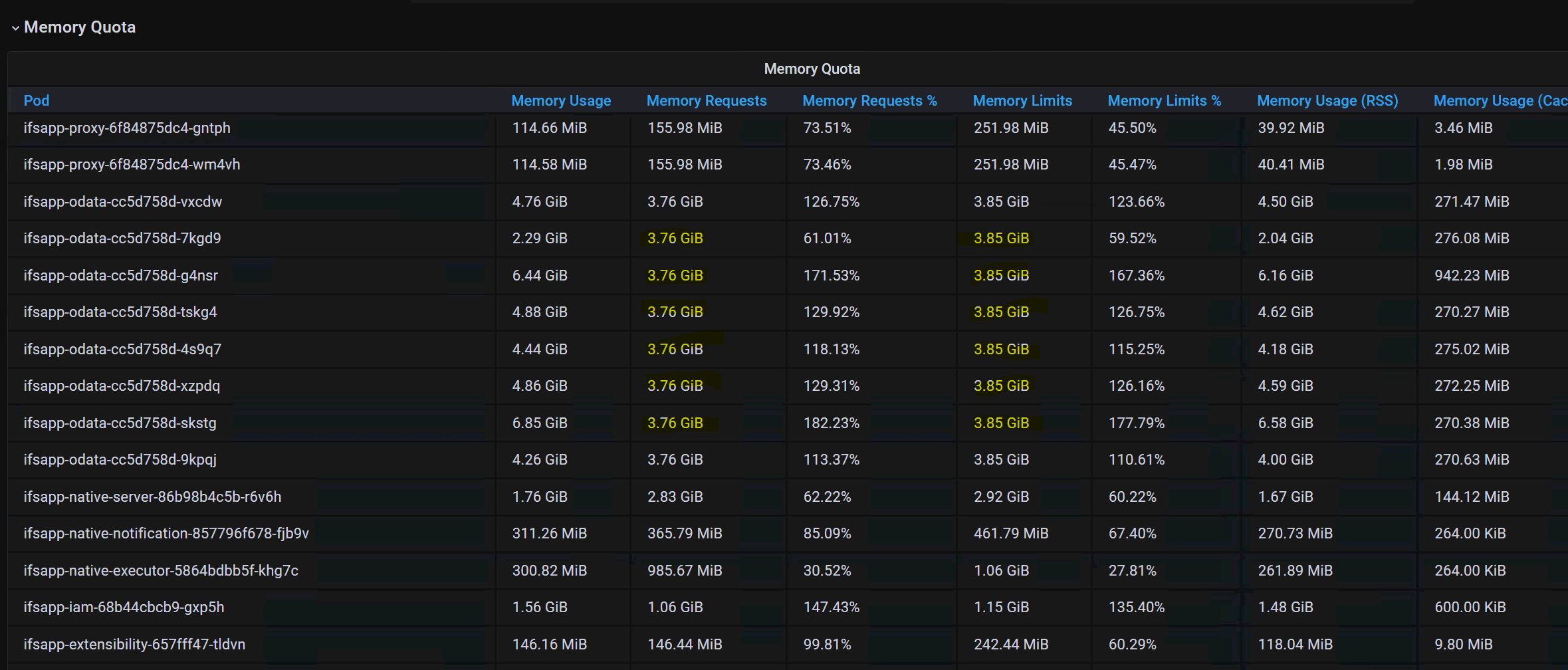
  • When we check Middle Tier Server performances using GRAFANA dashboards to check POD wise CPU & Memory utilization , below were observed


Dashboard used : 

  • Even under normal conditions, some PODs have  ‘MEMORY REQUESTS ~ MEMORY LIMITS’  as in above image.

QUESTION :-

  • Does that mean these pods are fully utilized [memory] even under normal conditions ?
  • Here MEMORY USAGE is always higher than MEMORY REQUESTS & MEMORY LIMITS.Is that a cumulative value or else?
  • Should we mention that as a concern to consider when we give recommendations/ suggestions based on these details/behavior.


BR!

Dilshan

Best answer by TheofilLepschy

Hi @Dilshan Aththanayake,

Memory Request - defined value which the pod reserve for him self

Memory Limit - max value of memory which can be used.

To your Questions:

  1. Memory Usage is the value what the pod is really using;
  2. Strange that in your example Memory Usage > Memory Limit. Theoreticaly should not be allowed to be used more as the limit. I would say, this is a indication to start more ifsapp-odata pods. 
  3. Yes

More explanation about Memory Requests & Limits:

Resource Management for Pods and Containers | Kubernetes

BR

Theo


6 replies

TheofilLepschy
Sidekick (Partner)
Forum|alt.badge.img+7
  • Sidekick (Partner)
  • Answer
  • March 12, 2024

Hi @Dilshan Aththanayake,

Memory Request - defined value which the pod reserve for him self

Memory Limit - max value of memory which can be used.

To your Questions:

  1. Memory Usage is the value what the pod is really using;
  2. Strange that in your example Memory Usage > Memory Limit. Theoreticaly should not be allowed to be used more as the limit. I would say, this is a indication to start more ifsapp-odata pods. 
  3. Yes

More explanation about Memory Requests & Limits:

Resource Management for Pods and Containers | Kubernetes

BR

Theo


AveTonitM
Hero (Partner)
Forum|alt.badge.img+10
  • Hero (Partner)
  • November 5, 2024

In case that some POD memory usage is closing the memory limit value, should one consider to start a new POD replica or add more resources for the POD to increase the limit? 


TheofilLepschy
Sidekick (Partner)
Forum|alt.badge.img+7
  • Sidekick (Partner)
  • November 5, 2024

I would start a new pod replica. It’s easier and you remain in IFS standard configuration for the pods.

Theo


Forum|alt.badge.img+10
  • Hero (Customer)
  • February 2, 2025

@TheofilLepschy ​@AveTonitM   is there any documentation on replicating pods or augmenting a pod capacity please?


Forum|alt.badge.img+15
  • Superhero (Employee)
  • February 3, 2025

is there any documentation on replicating pods or augmenting a pod capacity please?

Please refer to the "replicas" and "scale" parameters here.


TheofilLepschy
Sidekick (Partner)
Forum|alt.badge.img+7
  • Sidekick (Partner)
  • February 3, 2025

kubectl describe pod <podname> -n <namespace>    give you more details, include CPU and Memory requests and limits.