Answer

filter this year only in IFS cloud Lobby - Shop orders

  • July 22, 2025
  • 4 replies
  • 101 views

Forum|alt.badge.img+7

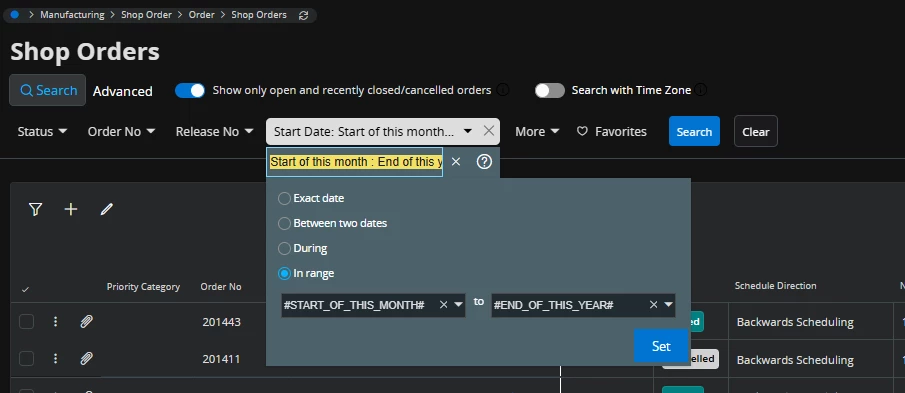
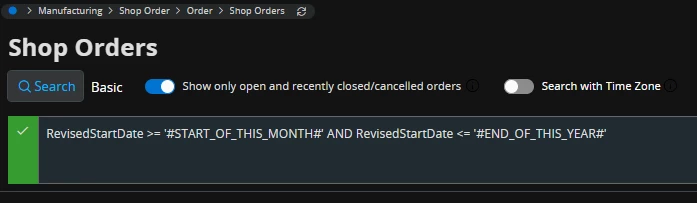
Please see my images below. I am trying to filter Start Date column and  in Lobby Element Designer using url like below. 

page/ShopOrders/List?$filter=RevisedStartDate ge #START_OF_THIS_MONTH# and RevisedStartDate le #END_OF_THIS_YEAR#   or page/ShopOrders/List?$filter=(RevisedStartDate ge ‘#START_OF_THIS_MONTH#’ and RevisedStartDate le ‘#END_OF_THIS_YEAR#’) , but kept getting and error. Not sure what could be the issue. Thank you very much in advance. 

 

Best answer by Mohamed Asjath

Hi ​@jgrace,

Following are the date related CSV (Context Substitution Variable) values for searching dates available in IFS Cloud Web so far;

  • #TODAY#, #TOMORROW#, #YESTERDAY#
  •  YEAR, MONTH, WEEK
    #START_OF_THIS_#
    #END_OF_THIS_#
    #START_OF_LAST_#
    #END_OF_LAST_#
    #START_OF_NEXT_#
    #END_OF_NEXT_#

However, there have been some issues observed when using these variables in Lobby Datasource WHERE clauses or in navigation URLs. These issues have been acknowledged by the IFS Product Development team and a fix has been provided in version 25.2E.0 (25R2 EA).


Best Regards,
Asjath.


4 replies

matt.watters
Ultimate Hero (Partner)
Forum|alt.badge.img+26
  • Ultimate Hero (Partner)
  • July 23, 2025

@jgrace not sure what format is required in Lobby Element Designer, but in the Shop Orders page this would be the format


Abdul
Superhero (Partner)
Forum|alt.badge.img+20
  • Superhero (Partner)
  • July 23, 2025

Hi ​@jgrace,

I tested this out, and I am also facing the same error. There is no issue with the URL formatting -page/ShopOrders/List?$filter=(RevisedStartDate ge ‘#START_OF_THIS_MONTH#’ and RevisedStartDate le ‘#END_OF_THIS_YEAR#’) since the system is accurately creating RevisedStartDate parameter values on the destination page.

Better raise a support ticket with IFS.


Regards

Abdul Rehman


Mohamed Asjath
Do Gooder (Employee)
Forum|alt.badge.img+4
  • Do Gooder (Employee)
  • Answer
  • July 24, 2025

Hi ​@jgrace,

Following are the date related CSV (Context Substitution Variable) values for searching dates available in IFS Cloud Web so far;

  • #TODAY#, #TOMORROW#, #YESTERDAY#
  •  YEAR, MONTH, WEEK
    #START_OF_THIS_#
    #END_OF_THIS_#
    #START_OF_LAST_#
    #END_OF_LAST_#
    #START_OF_NEXT_#
    #END_OF_NEXT_#

However, there have been some issues observed when using these variables in Lobby Datasource WHERE clauses or in navigation URLs. These issues have been acknowledged by the IFS Product Development team and a fix has been provided in version 25.2E.0 (25R2 EA).


Best Regards,
Asjath.


Forum|alt.badge.img+6
  • Sidekick (Customer)
  • November 23, 2025

Hi ​@jgrace,

Following are the date related CSV (Context Substitution Variable) values for searching dates available in IFS Cloud Web so far;

  • #TODAY#, #TOMORROW#, #YESTERDAY#
  •  YEAR, MONTH, WEEK
    #START_OF_THIS_#
    #END_OF_THIS_#
    #START_OF_LAST_#
    #END_OF_LAST_#
    #START_OF_NEXT_#
    #END_OF_NEXT_#

However, there have been some issues observed when using these variables in Lobby Datasource WHERE clauses or in navigation URLs. These issues have been acknowledged by the IFS Product Development team and a fix has been provided in version 25.2E.0 (25R2 EA).


Best Regards,
Asjath.


Hi ​@Mohamed Asjath 
Apologies for replying to a 4-month old post, but I saw this and thought I’d check if the same issues are possibly applied to other Datasource clauses? I’ve been struggling to get a BETWEEN clause to work with “AND TRUNC(CREATED) BETWEEN '$DateFrom$' AND '$DateTo$”, where a near identical clause works in another datasource that was created a year ago.


This could also be due to conflicting data types, but I’ve tried casting the date to the parameter and the created column both with no success.


There was another thread created as well here that might be related?


Best regards,

Joona