Solved

Error trying to user SHOP_ORD.ORDER_NO as argument.

  • September 12, 2024
  • 14 replies
  • 140 views

Forum|alt.badge.img+5

I am trying to run a rather simple SQL query in ifs cloud as datasource for a custom field, yet seem to be unable to specify the ORDER_NO field as an argument.
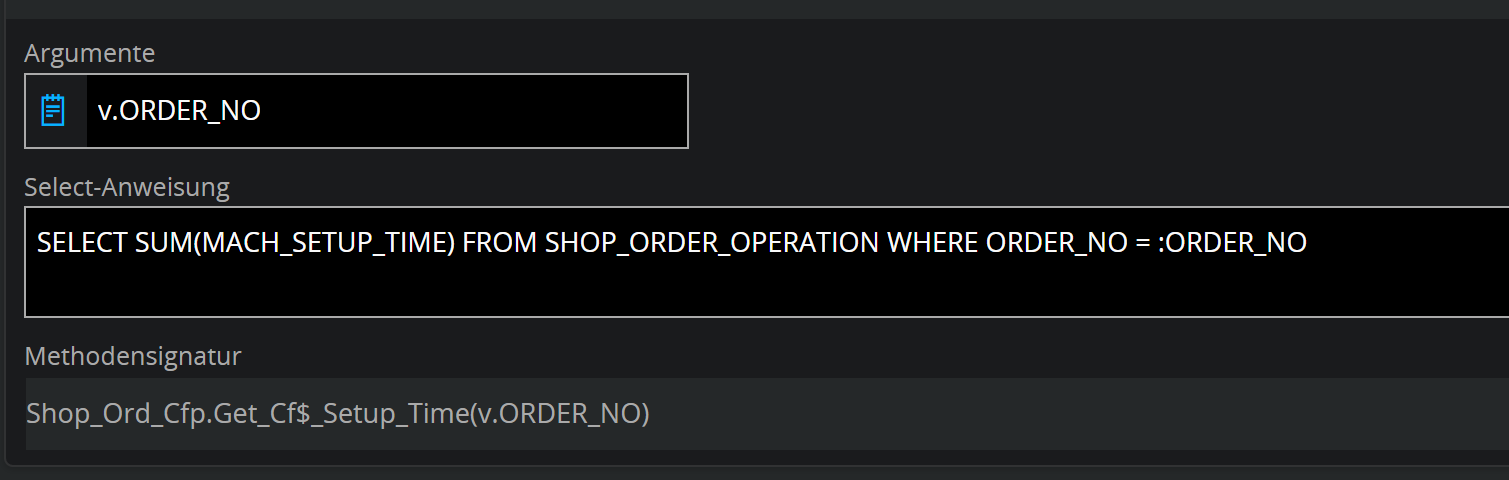
The Error message says the referenced colum is not an approved persistent custom attribute.

Am i misunderstanding something here?
Best answer by JoDe

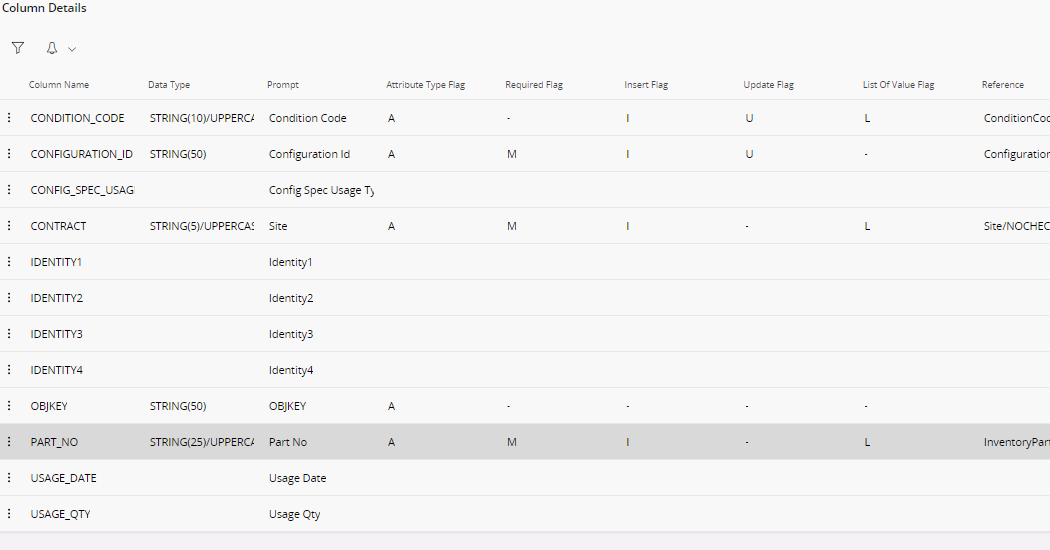
Shop_order_config_usage definitely is an issue (not containing the ORDER_NO):

for the SHOP_ORD_PUB it this also doesn't seem to have ANY columns.

14 replies

Forum|alt.badge.img+11
  • Hero (Customer)
  • September 12, 2024

Hi @APA, could you give some more information?

This query in itself does not seem wrong.

Could you try to make a expression out of it and just putting “v.ORDER_NO” in it to see if that IS accepted?

This will rule out if that is the actual issue or something else is in play. 


Forum|alt.badge.img+5
  • Author
  • Sidekick
  • September 12, 2024

Thanks for your answer, Jode!

Apparently ORDER_NO was not available, neither in v, nor in t, so i rewrote the statement to use ROWKEY from the custom field table (SHOP_ORD_CFT, which appears to be t).


SELECT SUM(OP.MACH_SETUP_TIME) FROM SHOP_ORDER_OPERATION OP JOIN SHOP_ORD O ON OP.ORDER_NO = O.ORDER_NO WHERE O.OBJKEY = :ROWKEY


This now leaves me with the problem, that this query fails if there is no value for any custom field for the current row.

Is there any way to reference values from the actual entity, not just the custom field table?


Forum|alt.badge.img+5
  • Author
  • Sidekick
  • September 12, 2024

I fixed this by using v.OBJKEY, even though i don’t know which table v is. 😂


Thanks!


Forum|alt.badge.img+11
  • Hero (Customer)
  • September 12, 2024

Hi @APA, for your info (and anyone checking this question in the future) ​​​​​​

  1. = view (in this case, SHOP_ORD)
  1. = Custom Field Table (SHOP_ORD_CFT)

This is in case you want to do a lookup on a database value of a custom attribute you have added in the past on this entity.


Forum|alt.badge.img+5
  • Author
  • Sidekick
  • September 12, 2024

If v is SHOP_ORD, then i do not understand why my initial query failed, since the column definitely exists there.


Forum|alt.badge.img+11
  • Hero (Customer)
  • September 12, 2024

it is quite weird that v.ORDER_NO is not present in the SHOP_ORD view though! could you check if any additional views are active? These might not have this column defined causing this issue in one of the views. 


Forum|alt.badge.img+5
  • Author
  • Sidekick
  • September 12, 2024

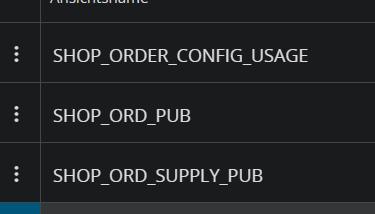
These 3 i activated (rather blindly) after my initial failure in an attempt to make it work.


COVJAMIEB
Hero (Partner)
Forum|alt.badge.img+11
  • Hero (Partner)
  • September 12, 2024

I have just executed the same and get no issues.


Forum|alt.badge.img+11
  • Hero (Customer)
  • Answer
  • September 12, 2024

Shop_order_config_usage definitely is an issue (not containing the ORDER_NO):

for the SHOP_ORD_PUB it this also doesn't seem to have ANY columns.


COVJAMIEB
Hero (Partner)
Forum|alt.badge.img+11
  • Hero (Partner)
  • September 12, 2024

Ignore. Just added the additional views and have the same error. As @JoDe  states some of these additional views done actually contain order_no!!


Forum|alt.badge.img+5
  • Author
  • Sidekick
  • September 12, 2024

@JoDe correctly identified the original issue.


The additional view seems to have overridden v and since it did not contain ORDER_NO, the validation failed.

I confirmed this by disabling it and reverting to my original statement, which now works flawlessly!


Thank you very much, everyone.


Forum|alt.badge.img+11
  • Hero (Customer)
  • September 12, 2024

One last note, 

when you try to synchronize, it tries to check if the custom attributes work for ALL active views.

the v. isn't replaced by another view, it just tries to compile all selected ones!


Forum|alt.badge.img+5
  • Author
  • Sidekick
  • September 12, 2024

One last note, 

when you try to synchronize, it tries to check if the custom attributes work for ALL active views.

the v. isn't replaced by another view, it just tries to compile all selected ones!

So if any view fails it fails, or the reverse?


Forum|alt.badge.img+11
  • Hero (Customer)
  • September 12, 2024

correct, if one doesn't pass everything fails!