Solved

Customization Options for Standard IFS Cloud Operational Report Definitions

  • January 22, 2026
  • 8 replies
  • 77 views

Forum|alt.badge.img+1

Hello Community,
Can the logic of a standard IFS Cloud operational report definition be modified? Is it possible to customize the existing report, or is it recommended to create a new custom report instead? Any guidance on this would be greatly appreciated.

                                                         

Best answer by asanka1055

Hi ​@Mahendra Remata 

No need to create a custom module. Use existing modules. I just add the summery below.


As an example let think if you’re going to change the ‘CustomerOrderConfRep’ in ORDER module.

1.Create the folder structure for the .report file(CustomerOrderConf.report) in cust layer and copy standard .report file to Cust\workspace\order\model

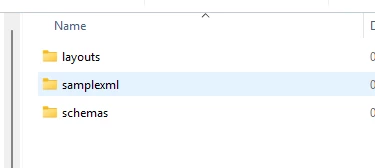
2.Create the below folder structure in cust layer for server files. workspace\order\server\reports. Copy and paste .layout (CustomerOrderConfRep.rdl) and .xsd (CustomerOrderConfRep.xsd) files here.
3.Copy and paste database files (CustomerOrderConf.rdf) to Cust\workspace\order\source\order\database

4.Do your new changes in .report, .rdf and layout changes using IFS Report Designer.

8 replies

asanka1055
Hero (Partner)
Forum|alt.badge.img+9
  • Hero (Partner)
  • January 22, 2026

Hi ​@Mahendra Remata 

It’s not possible to customize the standard reports directly, but what you can do is, make the same folder structure in Cust layer and copy the standard .report, .xsd and .rdf files in same structure and do your changes.
For the layout you can edit the standard layout or you can go with your custom layout.

Thanks & Regards,
Asanka.


Forum|alt.badge.img+9
  • Hero (Customer)
  • January 22, 2026

@Mahendra Remata 

If you have access to the report definition files and the IFS developer studio, you technically can modify the IFS operational reports. If you are hosting your IFS cloud instance, you can deploy the modified report definitions directly from the developer studio, or by creating a delivery through the build place and installing the delivery.

Regardless if you do modify any reports, ensure you check them into your customer solution repository so that whenever you do service updates or release updates you can see that your changes are being overwritten. 

Otherwise you can just copy all the report files to create your custom version, and then you don’t have to worry it being overwritten.

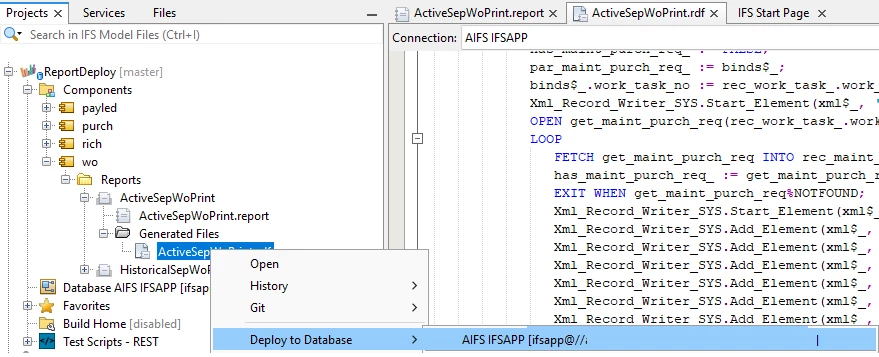
Deploying a modified Work order report RDF to database via IFS developer studio


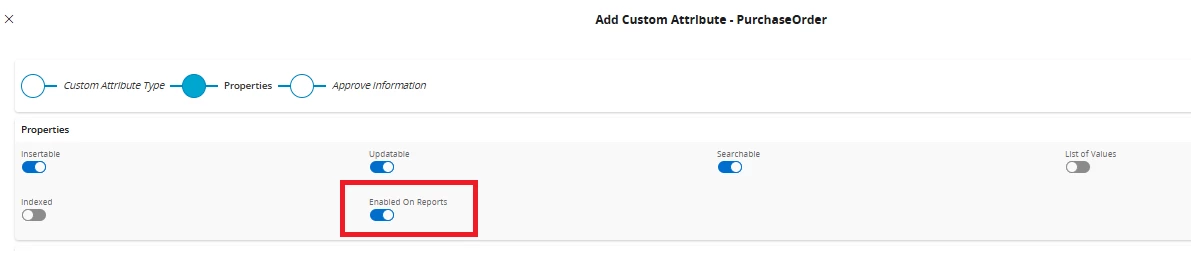
There are also other options depending on the extent of changes you require in your report. For example many reports allow you to add custom fields if the report contains the entity containing the field and it is built to expose custom fields. Theres a flag in the entity configuration attribute creation that will say you want the field visible on reports. (The field still needs to manually be added to the report layout). This is the least invasive way to add things to the report, so if you can get away with custom fields thats a good option.


But if you need more complex logic changes to the report doing it via the dev studio is the way to go. I recommend the IFS academy course on IFS reports if you have not taken it discussing the different report files, their roles, and how to maintain them.

Thanks, 

LEDWARDS


Forum|alt.badge.img+9
  • Hero (Customer)
  • January 22, 2026

Do you have any specific idea of the changes you’d like to make? Maybe with more detail the community can recommend a targeted approach that would be best for you


Forum|alt.badge.img+1
  • Author
  • Do Gooder (Customer)
  • January 23, 2026

Hi  ​@Edwards  and ​@asanka1055 ,

Thank you very much for your information.

I’m working on the reporting area as part of an IFS Cloud upgrade project. We are upgrading from IFS 7 to IFS Cloud, and over the years several custom changes were made to the standard operational report definitions.

I would appreciate your guidance on the recommended approach to handle these modifications during the upgrade—whether they can be adapted to the standard reports in IFS Cloud or if it is better to create new custom reports.

Best regards,
Mahendra Remata


asanka1055
Hero (Partner)
Forum|alt.badge.img+9
  • Hero (Partner)
  • January 23, 2026

Hi ​@Mahendra Remata 

Because of the version gap (from IFS 7 to IFS Cloud). I would recommend re-designing with IFS Cloud.

Thanks & Regards,
Asanka.


Forum|alt.badge.img+1
  • Author
  • Do Gooder (Customer)
  • January 23, 2026

Hi ​@asanka1055 ,

Thank you for your recommendation.

Could you kindly share the process steps you would suggest as best practice for this redesign?

I have experience creating new custom reports using IFS Developer Studio, but I haven’t done a full redesign of standard operational reports in IFS Cloud before.

At a high level, I would like to understand the correct approach to follow. For example:

  • Should I create a new custom module (e.g., CUSTREP) and create new report definitions there for all the required reports?

  • Or is it possible to copy the existing report files into the same folder structure and modify them?

In cases where only a new field is needed, I can use custom fields. However, for core logic enhancements or modifications, what would be the recommended approach?

I would really appreciate your guidance on the best-practice approach for this scenario.

Thank you in advance.
Mahendra Remata


asanka1055
Hero (Partner)
Forum|alt.badge.img+9
  • Hero (Partner)
  • Answer
  • January 23, 2026

Hi ​@Mahendra Remata 

No need to create a custom module. Use existing modules. I just add the summery below.


As an example let think if you’re going to change the ‘CustomerOrderConfRep’ in ORDER module.

1.Create the folder structure for the .report file(CustomerOrderConf.report) in cust layer and copy standard .report file to Cust\workspace\order\model

2.Create the below folder structure in cust layer for server files. workspace\order\server\reports. Copy and paste .layout (CustomerOrderConfRep.rdl) and .xsd (CustomerOrderConfRep.xsd) files here.

3.Copy and paste database files (CustomerOrderConf.rdf) to Cust\workspace\order\source\order\database

4.Do your new changes in .report, .rdf and layout changes using IFS Report Designer.


Forum|alt.badge.img+1
  • Author
  • Do Gooder (Customer)
  • January 23, 2026

Thank you, ​@asanka1055 , for the detailed guidance. I will follow this approach.

Best Regards,

Mahendra Remata