Solved

Attributes "Column Visible” and “Visible” in Page Designer tool

  • March 18, 2024
  • 4 replies
  • 291 views

Forum|alt.badge.img+7

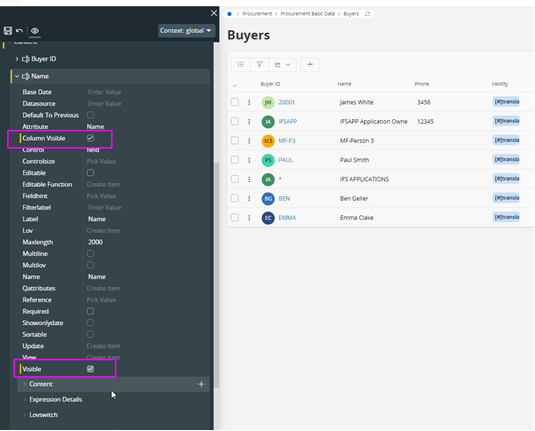
There are two attributes called as “Column Visible” and “Visible” in the Page Designer tool.  

  • Is there any difference between them? 
  • Is there any recommendations on choosing either value on certain scenarios? 
 

Thank you!

Bhagya

Best answer by Mayura Wasantha

Hi Bhagya, by observing the behavior, my best understanding is one (column visible) os applicable to List Pages whereas the other (visible) applicable to detail pages. 

I hope this would help?

4 replies

Mayura Wasantha
Superhero (Employee)
Forum|alt.badge.img+19
  • Superhero (Employee)
  • Answer
  • March 18, 2024

Hi Bhagya, by observing the behavior, my best understanding is one (column visible) os applicable to List Pages whereas the other (visible) applicable to detail pages. 

I hope this would help?


Mayura Wasantha
Superhero (Employee)
Forum|alt.badge.img+19

Check the technical documentation for client control properties, that has the same referencing.

https://docs.ifs.com/techdocs/23r2/060_development/022_user_interface/030_aurena_dev/140_resources/client_control_properties/


Forum|alt.badge.img+7
  • Author
  • Sidekick (Employee)
  • March 18, 2024

Thank you, Mayura, your observation is correct.

I checked and the   control “Column Visible” only worked against Lists and  the   Visible” did not apply any changes when checked against a List.


Forum|alt.badge.img+10
  • Hero (Partner)
  • July 17, 2024

Nothing like having two flags when one would do. 
(Yes, Bhagya, I’m still a cynic. ;)