Solved

Report Designer - Custom Field - First Page

  • June 9, 2025
  • 3 replies
  • 135 views

ZTC ZTC JGOTA
Hero (Customer)
Forum|alt.badge.img+14

Hello IFS Community,

I have a question regarding Report Designer. I'm trying to add a custom field to the first page of a report, but it doesn't allow me to do so. Interestingly, I can add the same custom field without issues on the repeating pages.

Has anyone encountered this behavior before? Is there a way to enable or work around this to display the custom field on the first page as well?

Any guidance would be appreciated.


Best answer by asahin

Hello;The reason for adding to repeating pages is that you associate the data with the table. You can add it to the main page as a function

3 replies

ZTC ZTC JGOTA
Hero (Customer)
Forum|alt.badge.img+14
  • Author
  • Hero (Customer)
  • June 10, 2025

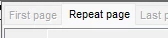
Is there a way to hide the First Page from printing? I only want the Repeat Page to be printed.

I tried right-clicking on the First Page and selecting 'Hide', but the report still prints the first page.


asahin
Do Gooder (Customer)
Forum|alt.badge.img+4
  • Do Gooder (Customer)
  • Answer
  • June 10, 2025
Hello;The reason for adding to repeating pages is that you associate the data with the table. You can add it to the main page as a function

Forum|alt.badge.img+8

Is there a way to hide the First Page from printing? I only want the Repeat Page to be printed.

I tried right-clicking on the First Page and selecting 'Hide', but the report still prints the first page.

Hi,


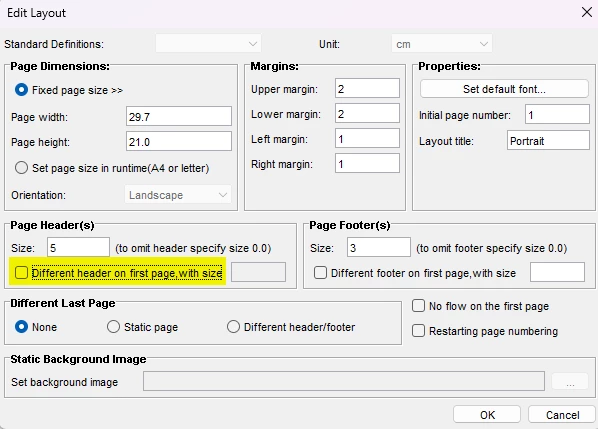
You can hide/deactivate the first page by changing the Page Settings (Page - Page Settings) and unticking “Different header on first page”


Best regards

Johan