
Answer

IFS Aurena - Grant the Law

  • April 20, 2020
  • 3 replies
  • 203 views

Forum|alt.badge.img+4

How qucik I can add many laws in Projections of IFS Aurena? I add one-by-one right but is horrible way. If exist better way?

Best answer by anmise

Which update are you on? I recommend you do it from permission sets in Aurena itself. You can grant all, grant by page or by navigator. You can also control commands from there. 

Could you show me on the screens?

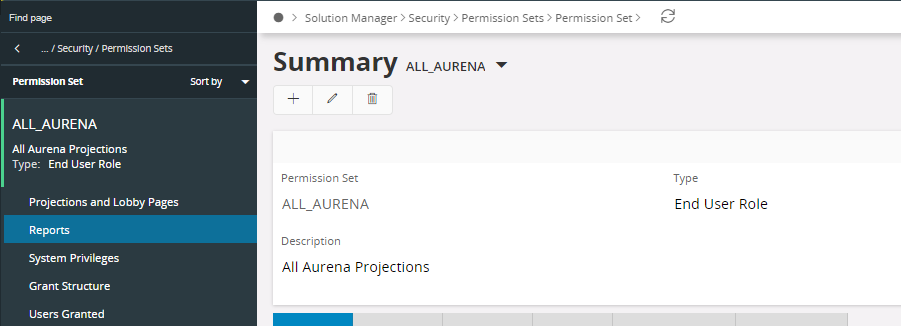
The permission set screen is found under Solution Manager / Security / Permission Sets / Permission Set


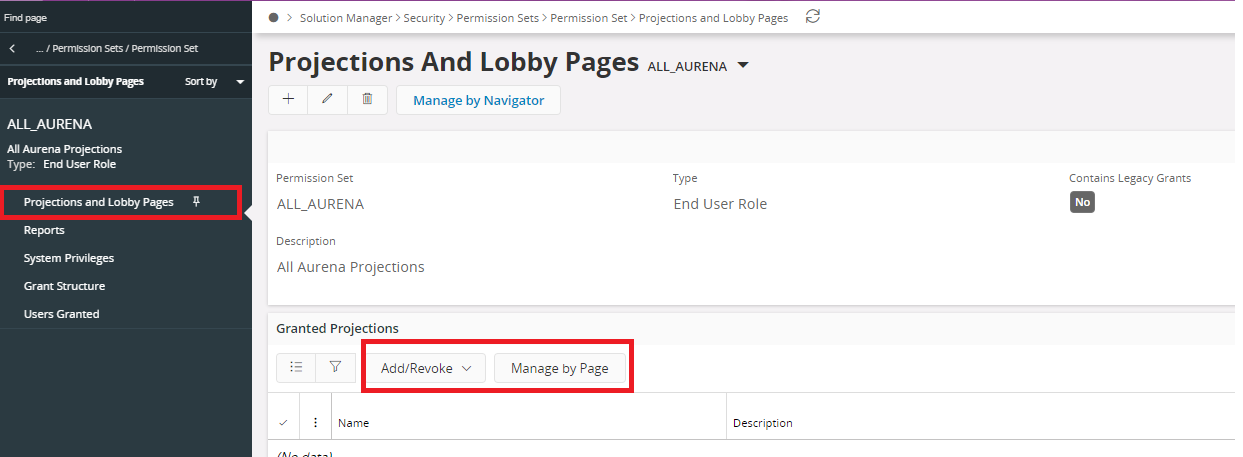
In the navigator you have a number of sub-menus. Select ‘Projections and Lobby Pages and then use either Add/Revoke or Manage By Page to grant the projections you want.



3 replies

  • Superhero (Employee)
  • April 20, 2020

Which update are you on? I recommend you do it from permission sets in Aurena itself. You can grant all, grant by page or by navigator. You can also control commands from there. 


Forum|alt.badge.img+4

Which update are you on? I recommend you do it from permission sets in Aurena itself. You can grant all, grant by page or by navigator. You can also control commands from there. 

Could you show me on the screens?


  • Superhero (Employee)
  • Answer
  • April 21, 2020

Which update are you on? I recommend you do it from permission sets in Aurena itself. You can grant all, grant by page or by navigator. You can also control commands from there. 

Could you show me on the screens?

The permission set screen is found under Solution Manager / Security / Permission Sets / Permission Set


In the navigator you have a number of sub-menus. Select ‘Projections and Lobby Pages and then use either Add/Revoke or Manage By Page to grant the projections you want.
