Question

Day Type Extra Time Wage Code not counted

  • June 5, 2026
  • 6 replies
  • 82 views

RUTALRAUS
Do Gooder (Partner)
Forum|alt.badge.img+4

A Day Type was created to allow for ½ hour lunch period that is not auto-deducted. The intent is that Employees are required to clock in and out for lunch and that ½ hour would be counted towads time if they did not. It also allows the expected start time and end time of the scheduled day to display correctly. 
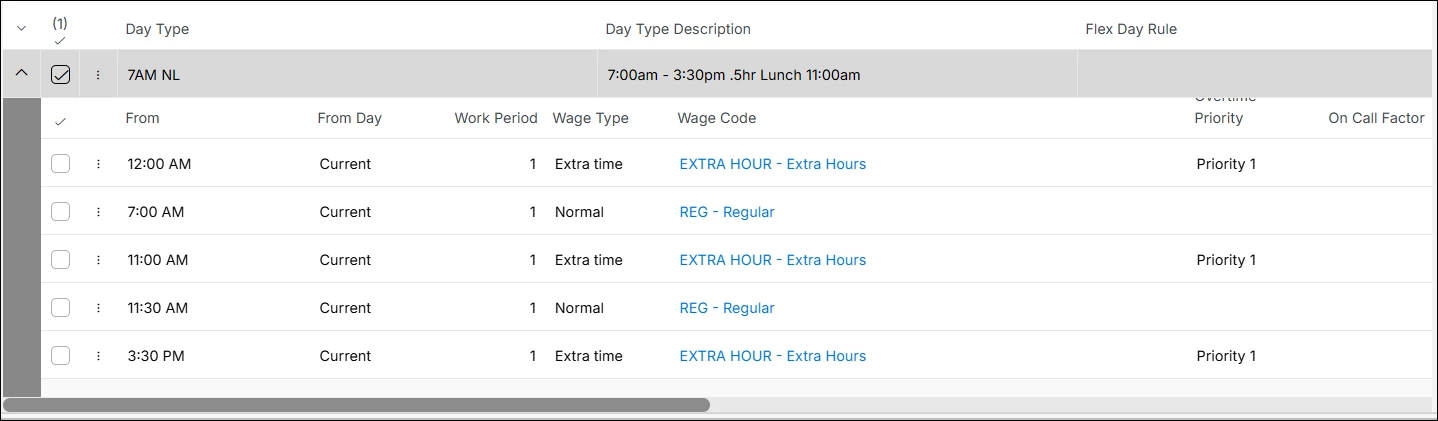


The result is that the ½ hour extra time between two normal time periods is not counted. Only the extra time before the start of the normal time period at 7am and the end of the normal time period at 3:30pm are counted if the Employee clocks in at 7am and out at 4pm yielding 8.5 hours instead of the expected 9 hours of reported time. Why is the extra time from 11- 11:30 not included?

6 replies

Forum|alt.badge.img+1

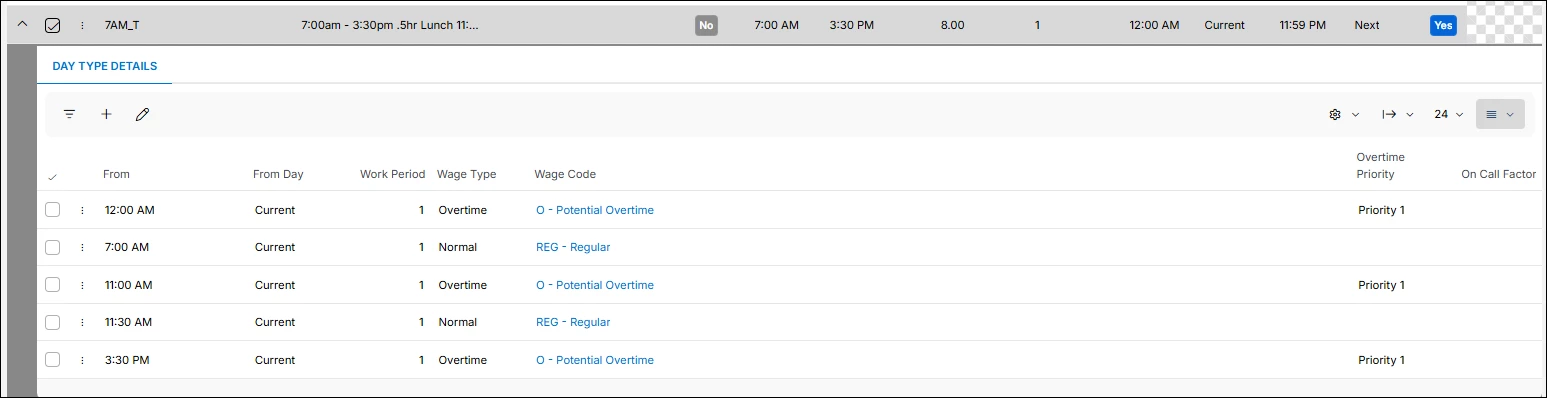
Hi Alexis, because the wage code is of wage type “Extra time” it is not counted. I would reccomend changing the wage code to be wage type “Overtime”.


RUTALRAUS
Do Gooder (Partner)
Forum|alt.badge.img+4
  • Author
  • Do Gooder (Partner)
  • July 21, 2026

Thank you, I will try your suggestion, but I think your reasoning seems flawed. Wage Type Extra Time codes are counted and, in this example, the Extra Time Type hours before the first Normal Type Wage Code period are counted and so are the hours after the second Normal Type Wage Code period. Only the Extra Time Type defined between the two Normal Type Wage Code periods is not counted. The logic escapes me.


Forum|alt.badge.img+11
  • Hero (Partner)
  • July 23, 2026

can you post the full screen shot showing the sum of hours based on your day type details 


RUTALRAUS
Do Gooder (Partner)
Forum|alt.badge.img+4
  • Author
  • Do Gooder (Partner)
  • September 20, 2026

Goal is to display the correct Start and Stop times for the day in the Schedule, but show 8 hours scheduled. Employee is required to Clock In and Clock Out for Lunch. If they do not then the time should be included in the recorded hours.

Day Type Details ( I have used both Wage Type - Extra Time and Wage Type - Overtime with the same results)

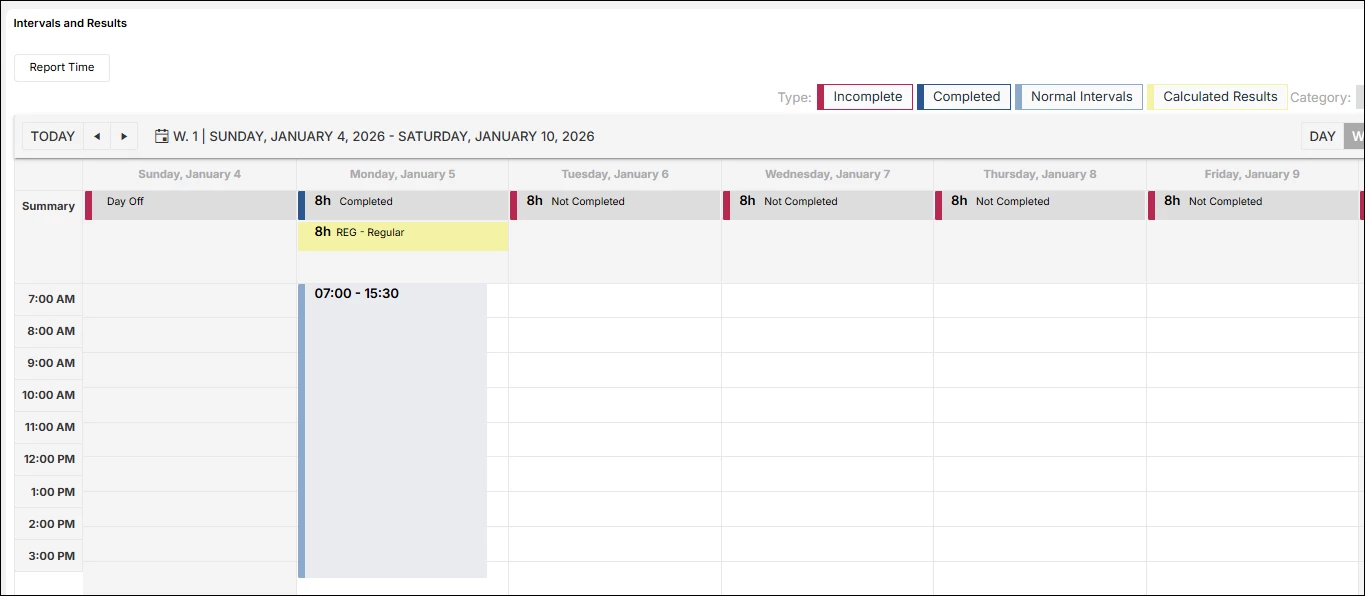
Time Card Results - ( I want to see 8h REG and .5h O. Currently the half hour from 11 - 11:30am is not included in the attendance hours )


Forum|alt.badge.img+11
  • Hero (Partner)
  • September 21, 2026

Hi

07:00 - 15:30 is 8.5 hours without any break.  

As soon as you apply a break this will reduce to 8 hours which is what you want.

If you then want the system to take give back 30 mins if this is not used as a break try using the flexible break rule instead of applying the break in the day type and also you will need an additional result rule.

I am not sure what else you are trying to achieve to get it to 9 hours as it is not clear 


kind Regards

rachel 


RUTALRAUS
Do Gooder (Partner)
Forum|alt.badge.img+4
  • Author
  • Do Gooder (Partner)
  • September 21, 2026

Thank you for your response. I guess I was not clear what I want.

I am attempting to set up a Day Type so that there are 8 hours of Normal time defined within a time frame greater than 8 hours. I am trying to set up a Day Type that does not auto deduct any hours being entered as presence.

In the past I have been able to insert a block of time as Extra or Overtime in between two blocks of Normal Time and have the hours calculated include that Wage code inserted between two Normal time periods. 

As an example a Day Type is defined like the one in my response above, 4 hours of Normal time then .5 hours of Overtime and then 4 hour of Normal time. If an Employee is Clocking Controlled and Clocks In and Out at the beginning of the Schedule, 7am, and at the end of the Schedule, 3:30pm without Clocking Out and In for a lunch break, their hours should display for the day as 8 Normal hours plus .5 Overtime hours. Currently the system ignores the Overtime hours between the two Normal time blocks of time.

I am clearly not understanding why this is the case. Why deduct those hours when there are Wage Codes of Lunch Type and Break Type that are specifically meant for that scenario.

I will try using the Flexible Break Rule but personally I think this is a flaw in the design. If the Flexible Break Rule works, it just adds unneccesary complexity to something that should be straight forward.

I would appreciate any additional ideas.