Question

Is it possible to create stock movements by external file or other way ?

  • March 17, 2026
  • 9 replies
  • 42 views

Forum|alt.badge.img+5

Hi,

I’d like to create stock movements by external file or other way in IFS V10.


Is it possible ? 


BR.

Julien.

9 replies

martin.surasky
Sidekick (Customer)
Forum|alt.badge.img+9
  • Sidekick (Customer)
  • March 17, 2026

Hello ​@Julien T. 


big disclaimer before answering: Nothing I’m suggesting here as been proven in real life. I’m pretty sure when you implement this you will stumble on roadblocks I’m not anticipating. All I’m giving you here is a starting point for you to get going on solutioning this requirement, but you will have to do some work because this is not a step-by-step kind of response. Having said this, I think this approach should work.

After clarifying this I would say that the way I would go solving this requirement is to create a PL/SQL using a call to Receive_Inventory_Part_SVC.Do_Receive_Inventory_Part_In_Create() in a Loop for each Part you have in a file. 

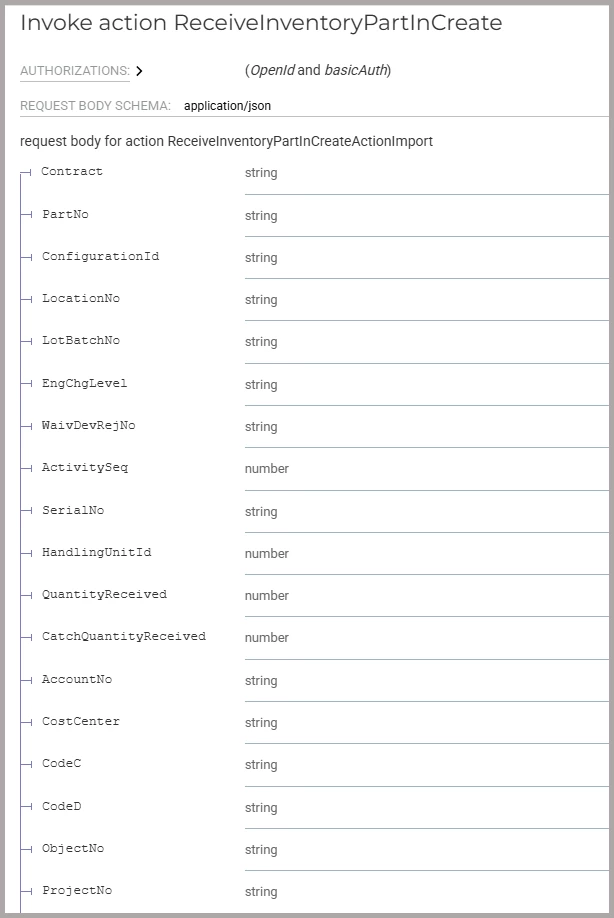
Step one would be to move that file into the Oracle Database server using a migration job (CREATE_TABLE_FROM_FILE). The data you need on that file includes: Contract, PartNo, ConfigurationId, LocationNo, LotBatchNo. There are other parameters that Do_Receive_Inventory_Part_In_Create needs. For the full list use the API Explorer (here is an excerpt of the API explorer entry for this call, notice there are other things such as Serial No that are conditional to the type of parts you are moving). You can also use literal values for those parameters that are Constant to all entries.


Once you have an Oracle Table with the parts and all parameters to make a Receive_Inventory_Part_SVC.Do_Receive_Inventory_Part_In_Create() call, you need to create a PL/SQL that will loop for each record of that table and call the API. The skeleton for such code would be something like this:

-- Use IFS API repeatedly to perform some action
-- (In this case receive inventory parts)

DECLARE
p0_ VARCHAR2(32000) := ''; -- Contract
p1_ VARCHAR2(32000) := ''; -- PartNo
p2_ VARCHAR2(32000) := 'YOUR_CONFIGURATION_CONSTANT_HERE'; -- ConfigurationId
p3_ VARCHAR2(32000) := ''; -- LocationNo
p4_ VARCHAR2(32000) := ''; -- LotBatchNo
p5_ VARCHAR2(32000) := ''; -- EngChgLevel
[etc...]

loop_ INT := 0;

BEGIN

FOR part_received IN (
SELECT CONTRACT, PART_NO, LOCATION_NO, LOT_BATCH_NO, ENG_CHG_LEVEL, [etc...]
FROM your_table_created_from_inport
ORDER BY CONTRACT, PART_NO, LOCATION_NO, [etc...]
) LOOP

p0_ := part_received.CONTRACT;
p1_ := part_received.PART_NO;
p2_ := part_received.LOCATION_NO;
[etc...]

dbms_output.put_line('Receivign part_no: ' || part_received.PART_NO || ', location_no: ' || part_received.LOCATION_NO );

Receive_Inventory_Part_SVC.Do_Receive_Inventory_Part_In_Create(p0_ , p1_ , p2_ , p3_ , p4_ , p5_, [etc...]);
END LOOP;

END;

You can add some fancier features like logging errors, running in batches (if what you are receiving are large quantities and you only want to test with a small amount of rows), etc.


Again, I know this is not a copy/paste ready solution, but this approach works and it is a solid solution framework to solve other similar problems.

Hope it helps!


Forum|alt.badge.img+5
  • Author
  • Sidekick (Customer)
  • March 17, 2026

Thank you for your answer ​@martin.surasky 

Do you know where i can find the API explorer ?


martin.surasky
Sidekick (Customer)
Forum|alt.badge.img+9
  • Sidekick (Customer)
  • March 17, 2026

It’s just another form inside IFS, it is located in: Solution Manager → Integration


Forum|alt.badge.img+4
  • Do Gooder (Partner)
  • March 17, 2026

Just two cents from finance consultant’s point of view. Inventory accounts should never be used for the AccountNo variable for the receive/issue inventory part SQL procedures. These are the M2/M5 posting control equivalents which are counter-postings for M1. ​​​​​​


Forum|alt.badge.img+5
  • Author
  • Sidekick (Customer)
  • March 17, 2026

It’s just another form inside IFS, it is located in: Solution Manager → Integration

Which menu exactly can I find all the API ?


Forum|alt.badge.img+5
  • Author
  • Sidekick (Customer)
  • March 17, 2026

Just two cents from finance consultant’s point of view. Inventory accounts should never be used for the AccountNo variable for the receive/issue inventory part SQL procedures. These are the M2/M5 posting control equivalents which are counter-postings for M1. ​​​​​​

How can I released this posting whithout using pl/sql procedure ?


Forum|alt.badge.img+4
  • Do Gooder (Partner)
  • March 17, 2026

When you run the PL/SQL procedur these postings will be created automatically. If there are M2/M5 posting control defined they will be used automatically. The problem is there could be different counter-accounts needed for different scenarios and this variable will allow you use more than one based on the scenario. You just need to ask your Finance team what the counter-accounts are and when to use which.


Forum|alt.badge.img+5
  • Author
  • Sidekick (Customer)
  • March 18, 2026

Hi ​@martin.surasky,

Thank you for your answers.


Can you tell me which API and method do I have to use when i wan’t to do the same for a movement off the stock ?


martin.surasky
Sidekick (Customer)
Forum|alt.badge.img+9
  • Sidekick (Customer)
  • March 18, 2026

Hi ​@Julien T. 


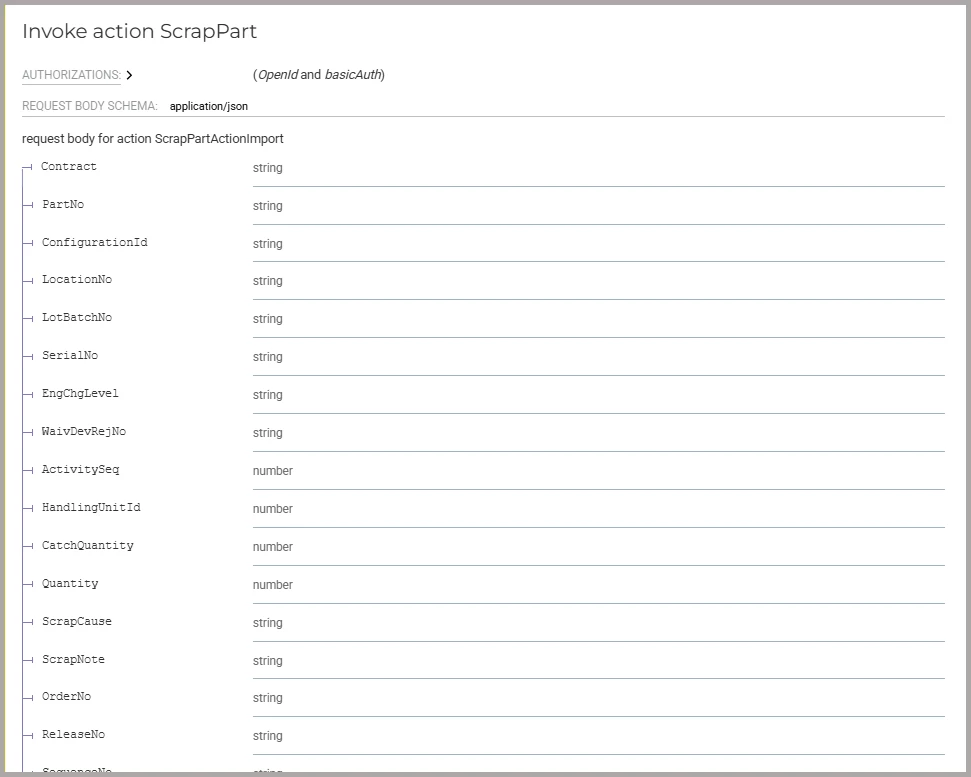
I guess the answer to that question depends on how you are moving material off your stock. For example, if you are scrapping material, you are likely calling the ScrapInventoryPart Projection. More specifically you will be calling the HTTP POST method (Action) ScrapPart which again, you can find in API Explorer.


That OData call contains a Payload with all the parameters that PL/SQL needs. Talking about PL/SQL, the API call is...

BEGIN
Scrap_Inventory_Part_SVC.Do_Scrap_Part([CONTRACT_NO], [PART_NO], [etc..]);
END;

Bottom line: Learn how to use the Chrome Developer Extensions to “Look Under the Hood” so you can find this information I’m providing by yourself and then you will always know what code you need to run based on the Form that hosts the functionality you are trying to emulate in your script. Go to IFS, open the form you want to mimic, fire up the Chrome Dev Extensions, and observe what get’s called as you perform the action.


I know that is leaving you a ton of learning homework, but the ability to do integration and extensibility in IFS will pay off!


Hope that helps