Inventory part

  • August 9, 2024
  • 6 replies
  • 128 views

Forum|alt.badge.img+7

Hi all,


Is there any way to finding out by whom created the inventory part?


Thanks

Ozge 

6 replies

Forum|alt.badge.img+5

Hi,

If inventory part screen logs data were opened, you can run below code;


select * from history_log x

left join history_log_attribute_tab y

on x.log_id = y.log_id

where x.lu_name = ‘&LU_NAME’


Best regards,


Forum|alt.badge.img+10
  • Hero
  • August 13, 2024

Hi @nafismertapaydin 

how do we open logs data?


Forum|alt.badge.img+5

Hi,

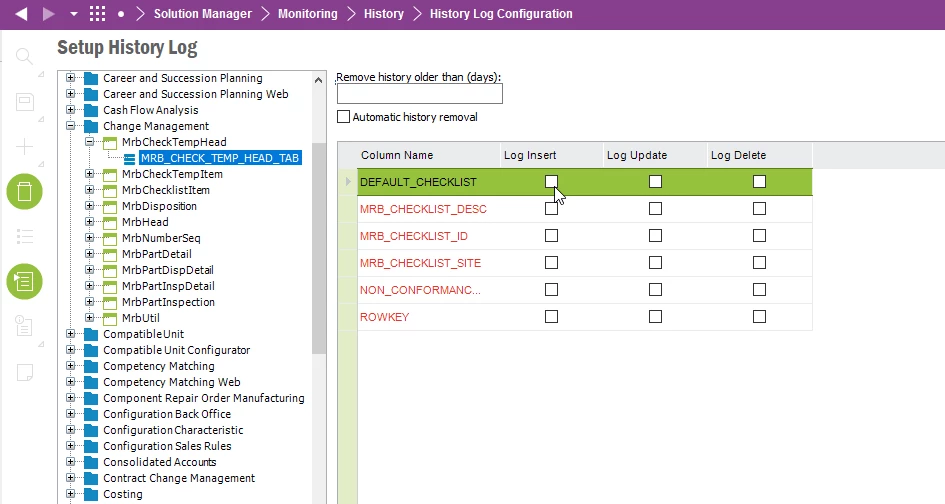
Solution Manager → Monitoring → History → History Log Configuration

and then you need to find the relevant screen from navigator on the left side and mark which fields you want to open the log record.


Forum|alt.badge.img+10
  • Hero
  • August 13, 2024

Hi,

Solution Manager → Monitoring → History → History Log Configuration

and then you need to find the relevant screen from navigator on the left side and mark which fields you want to open the log record.


Thank you.


Forum|alt.badge.img+10
  • Hero
  • August 13, 2024

Hi,

If inventory part screen logs data were opened, you can run below code;


select * from history_log x

left join history_log_attribute_tab y

on x.log_id = y.log_id

where x.lu_name = ‘&LU_NAME’


Best regards,


@nafismertapaydin i made a little modification on where clause, it fits my needs better.
 

where x.lu_name like nvl('&[-C-BL]LU_NAME','%')


Forum|alt.badge.img+7
  • Author
  • Sidekick
  • October 28, 2024

Hi @nafismertapaydin ,


You have shared below code to find out by whom created, deleted or changed the inventory part?

So, how can I learn which column has been changed? Is it possible to learn it?

select * from history_log x

left join history_log_attribute_tab y

on x.log_id = y.log_id

where x.lu_name = ‘&LU_NAME’


Thanks