

Question

IFS Aurena Agent extension for Edge unable to install

  • April 2, 2026
  • 2 replies
  • 29 views

Hello IFS Community,

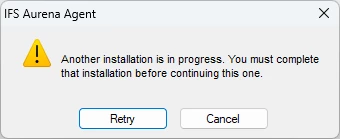
I am able to install the IFS Aurena Agent extension in Google Chrome but not in Microsoft Edge. When running the installer I’m receiving error message “Another installation is in progress. You must complete that installation before continuing to use this one.”

All other users on site are able to install. I’ve restarted my computer and restarted the Windows installer task. Are there any known work arounds for installing?
 

2 replies

Lingesan08
Hero (Partner)
Forum|alt.badge.img+9
  • Hero (Partner)
  • April 3, 2026

Hi ​@Justin DeSilva ,

What’s happening

Error:

“Another installation is in progress…”

 This means:

  • Windows thinks an MSI installation is still running or stuck
  • So it blocks new installs (like Aurena Agent for Edge)

 Why it works in Chrome but not Edge

  • Chrome extension install ≠ MSI installer
  • Edge version uses:
    • Windows installer (Aurena Agent MSI)

➡️ So the issue is at OS level, not browser

 What people usually do (fixes)

✔ Option 1 — Kill stuck installer (most common fix)

  1. Open Task Manager
  2. End:
    • msiexec.exe
    • any installer-related processes

Then retry

✔ Option 2 — Restart Windows Installer service

Run (as admin):

net stop msiservernet start msiserver

 Then install again

✔ Option 3 — Reboot (clean state)

  • Full restart (not shutdown + fast boot)
  • Then try install immediately

✔ Option 4 — Check pending installs (important)

Sometimes Windows Update is running in background

 Check:

  • Windows Update → pending installs
  • Finish them first

✔ Option 5 — Clear installer lock (advanced)

Run:

msiexec /unregistermsiexec /regserver

✔ Option 6 — Install as Admin

  • Right-click installer
  • Run as Administrator

 Less common causes

  • Group policy restriction
  • Antivirus blocking MSI
  • Corrupted installer cache

Lingesan08
Hero (Partner)
Forum|alt.badge.img+9
  • Hero (Partner)
  • April 6, 2026

Hi ​@Justin DeSilva ,

What’s happening

Error:

“Another installation is in progress…”

 This means:

  • Windows thinks an MSI installation is still running or stuck
  • So it blocks new installs (like Aurena Agent for Edge)

 Why it works in Chrome but not Edge

  • Chrome extension install ≠ MSI installer
  • Edge version uses:
    • Windows installer (Aurena Agent MSI)

➡️ So the issue is at OS level, not browser

 What people usually do (fixes)

✔ Option 1 — Kill stuck installer (most common fix)

  1. Open Task Manager
  2. End:
    • msiexec.exe
    • any installer-related processes

Then retry

✔ Option 2 — Restart Windows Installer service

Run (as admin):

net stop msiservernet start msiserver

 Then install again

✔ Option 3 — Reboot (clean state)

  • Full restart (not shutdown + fast boot)
  • Then try install immediately

✔ Option 4 — Check pending installs (important)

Sometimes Windows Update is running in background

 Check:

  • Windows Update → pending installs
  • Finish them first

✔ Option 5 — Clear installer lock (advanced)

Run:

msiexec /unregistermsiexec /regserver

✔ Option 6 — Install as Admin

  • Right-click installer
  • Run as Administrator

 Less common causes

  • Group policy restriction
  • Antivirus blocking MSI
  • Corrupted installer cache

Hi ​@Justin DeSilva ,

 Have you got the solution?

