


Question

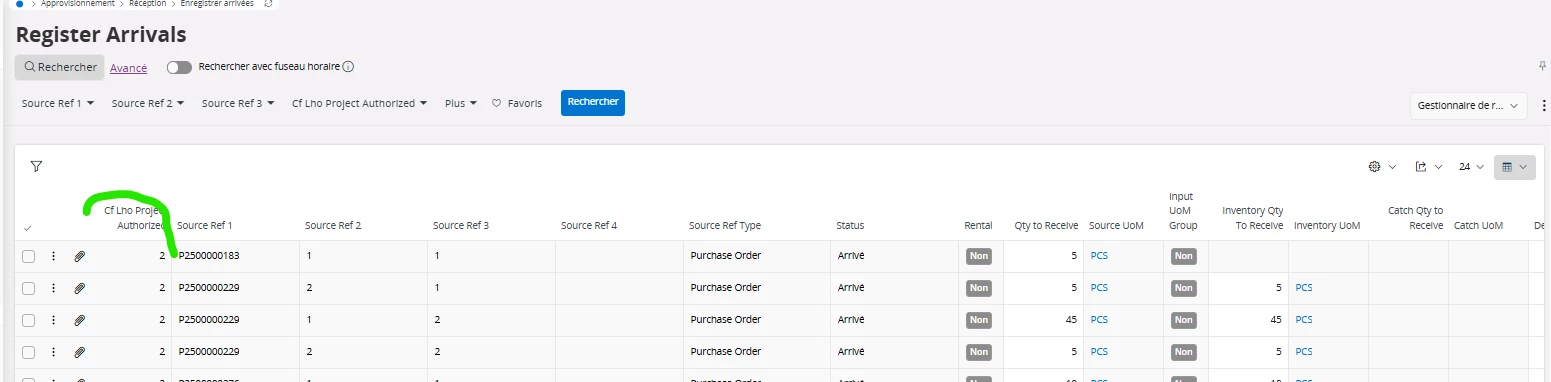
Display Lines in a list according a field value (or custom field value)

  • December 9, 2025
  • 2 replies
  • 37 views

Forum|alt.badge.img+1
  • Do Gooder (Customer)

Hello,


I’m looking for a way to display lines in a list according to a custom field value. (I think it works such a way for enumeration in a visible attribute with syntax like Cf_XXX eq '2').

I know it’s possible to make visible a field or not according to another field value but for a line in list I don’t know how to do.

I want the condition to make the line visible all the time, so I don’t think saved search could be an option because it does not apply in a mandatory way.

I work under 25.1.4 version.


Thanks in advance.
Kr


2 replies

Marcel.Ausan
Ultimate Hero (Partner)
Forum|alt.badge.img+22
  • Ultimate Hero (Partner)
  • December 9, 2025

@VMet what you want cannot be achieved with a configuration. This can be achieved only through proper search - considering the value of the custom attribute when executing the search. If you wanna block Receipts when the Custom Attribute value is not 2, then you have the following options:

Option1 - do a modification - and change the DB view receivable_object_info to only show PO Lines that satisfy the condition you want → this is the only way to do exactly what you described

Option2 (workaround) - put a condition on the Receive button - so that if a PO Line is selected and the custom attribute doesn’t have the correct value, the Receive button will be hidden

Option3 (workaround) - create a BPA WF that shows a toast error message when users try to register arrival for a PO Line that doesn’t satisfy the conditions you need


I would personally go for Option2. It’s the easiest to implement and get’s the job done.


Forum|alt.badge.img+1
  • Author
  • Do Gooder (Customer)
  • December 15, 2025

Hello ​@Marcel.Ausan thanks very much for you answer. I’m gonna have a look and will come back to you when I implement one of those solutions.


