Solved

Column sorting by number

  • December 9, 2025
  • 6 replies
  • 91 views

Forum|alt.badge.img+7

Hi all,

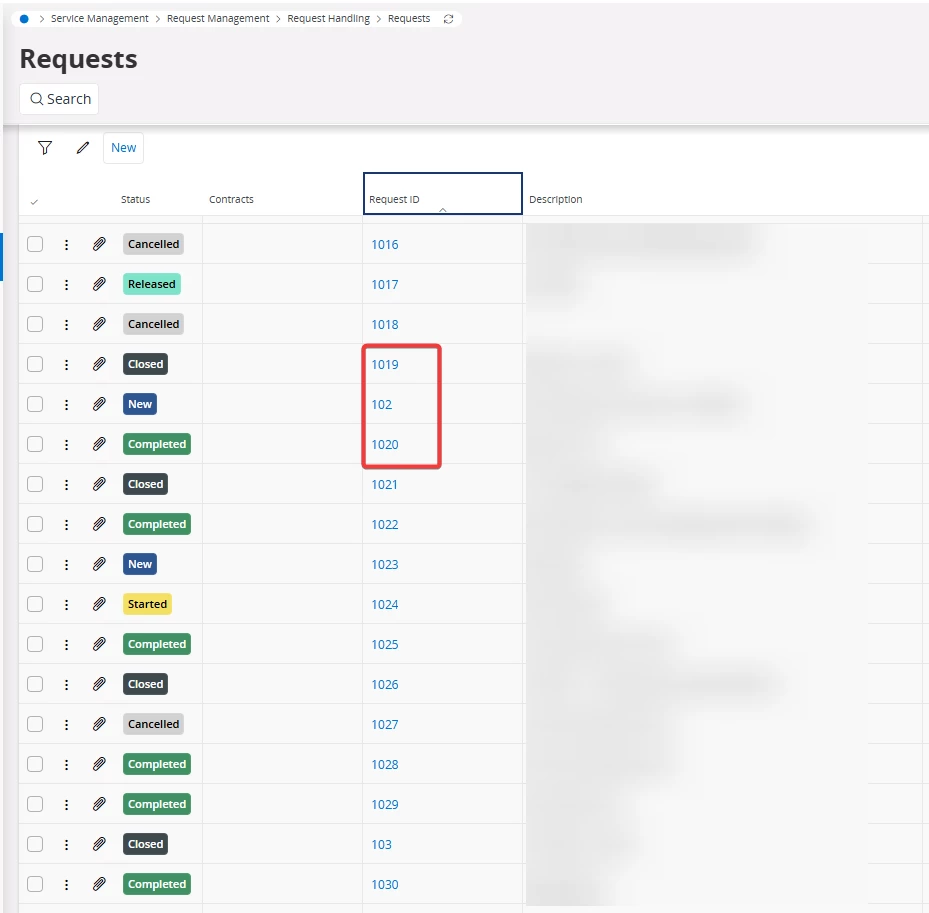
when sorting any table by one columns numbers, the sorting is not according the the number itself, but the first numeral of the number itself.

First all numbers starting with a 3 and then all numbers with a 4, and so on.
Can this be changed to a normal sorting by increasing complete number?
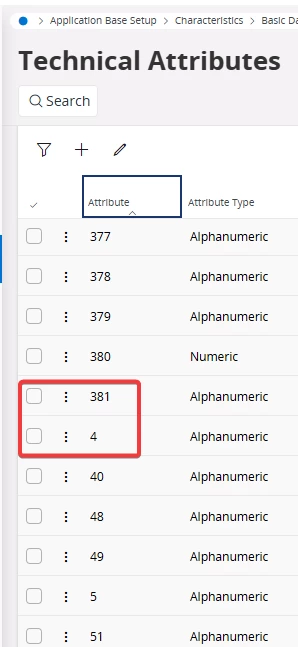
Weird sorting of table by increasing first numeral

Thanks,

Best answer by Alexander Heinze

It was initially created as a text and later it’s hard to make such changes. There is a chance that some customers already changed the numbering to include alphanumeric characters.

6 replies

eqbstal
Superhero (Partner)
Forum|alt.badge.img+21
  • Superhero (Partner)
  • December 9, 2025

As I can see, all ‘numbers’ are left aligned. This means treated as characters. Hence the sorting may be other than expected. I may help if you enter the attribute 4 as '004’. Give it a try and let us know the results. 


Alexander Heinze
Ultimate Hero (Employee)
Forum|alt.badge.img+23
  • Ultimate Hero (Employee)
  • December 9, 2025

The ATTRIBUTE column is of data type STRING(15)/UPPERCASE, that’s why sorting shows the alphabetical order, not the numeric order. What you are looking for can only be achieved with numeric columns.

You could create a custom numeric column and populate it with the numeric equivalent of the ATTRIBUTE (but what if someone puts in an alphanumeric attribute?), but that sounds like a lot of overhead just for sorting.


Forum|alt.badge.img+7
  • Author
  • Do Gooder (Customer)
  • December 9, 2025

It is the same for e.g. Request IDs.
These are not done by ourselves, but from IFS Cloud created automatically.

So why are these done as a String and not a numeric? Is there a logical reason for that?


Thanks,
Chris


Alexander Heinze
Ultimate Hero (Employee)
Forum|alt.badge.img+23
  • Ultimate Hero (Employee)
  • Answer
  • December 9, 2025

It was initially created as a text and later it’s hard to make such changes. There is a chance that some customers already changed the numbering to include alphanumeric characters.


Forum|alt.badge.img+12
  • Hero (Customer)
  • December 10, 2025

One thing you can do if you’re only going to use numbers as text, is create a custom field that basically transforms the text into a number (with validate_conversion) and into NULL if it’s not transformable to a number.


You can then display that “number converted field” and use that to sort, however, like ​@Alexander Heinze said, that’s a lot of overhead and work just to sort a list. 


Forum|alt.badge.img+7
  • Author
  • Do Gooder (Customer)
  • January 5, 2026

Thanks for your feedbacks.

May I ask, why this was initially created as a text?

It is not that important to specifically create a new customer column.
 

Regards,
Chris