Solved

Cleanup inbox connectivity

  • April 10, 2026
  • 6 replies
  • 52 views

Forum|alt.badge.img+7

Hi,

Is there a backgroung job that i can use to delete (or archive) all the  connectivity inbox message with particular state ?

Best answer by knepiosko

Hi ​@Julien T. 


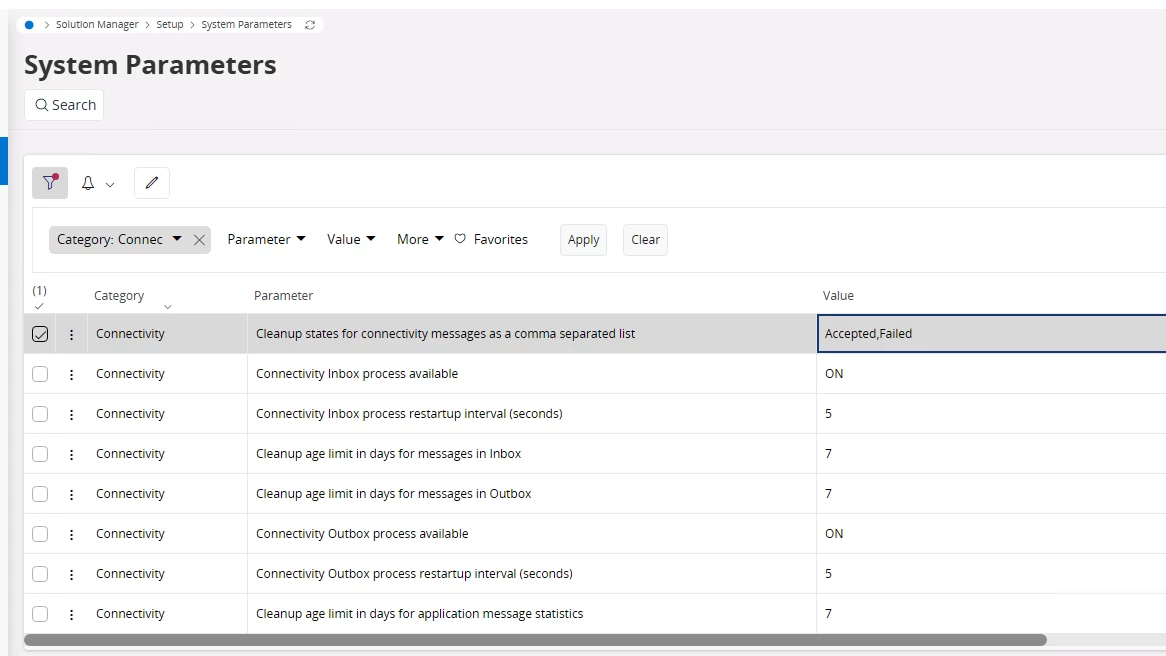
Below You have parameters which helps You to manage the connectivity logs. It is a part of Heavy Cleanup so You do not need to create another batch schedule - adjust only parameters(list of states, etc.)


6 replies

Manulak
Hero (Customer)
Forum|alt.badge.img+8
  • Hero (Customer)
  • April 10, 2026

As far as I know there are none! 
So, I had to prepare some database tasks that accept parameters like TYPE_, STATE_ and DELETE_OLDER_THAN_ and our database administrator sets them up with creating separate schedules per object.

TYPE_ to define the type of the connectivity message, like INBOX, OUTBOX or HISTORY

STATE_ to define the state

DELETER_OLDER_THAN_ to define number of months the records are older than

So, the task will remove only the satisfying records via a background job.

Hope this helps


Forum|alt.badge.img+7
  • Author
  • Sidekick (Customer)
  • April 10, 2026

@Manulak : Thank you for your answer.


Do you have the name of method name ?


Manulak
Hero (Customer)
Forum|alt.badge.img+8
  • Hero (Customer)
  • April 10, 2026

@Manulak : Thank you for your answer.


Do you have the name of method name ?

I just used the standard IFS public wrapper methods like

IN_MESSAGE_API.Remove__


Forum|alt.badge.img+17
  • Superhero (Partner)
  • April 10, 2026

This is rather part of Heavy Cleanup process and Connectivity_SYS.Cleanup__ method.


Forum|alt.badge.img+7
  • Author
  • Sidekick (Customer)
  • April 13, 2026

@knepiosko : I wan’t to remove all the rejected inbox message connectivity over 30 days.

Can I do it by using this Connectivity_SYS.Cleanup__ method ?


Forum|alt.badge.img+17
  • Superhero (Partner)
  • Answer
  • April 13, 2026

Hi ​@Julien T. 


Below You have parameters which helps You to manage the connectivity logs. It is a part of Heavy Cleanup so You do not need to create another batch schedule - adjust only parameters(list of states, etc.)