



Question

What is the purpose of the Notes field if I cannot enter a note?

  • March 4, 2026
  • 3 replies
  • 30 views

matt.watters
Ultimate Hero (Partner)
Forum|alt.badge.img+26

25.1.2

I have seen this shortcoming in many pages, but here I am focusing on the material transactions on a Shop Order.

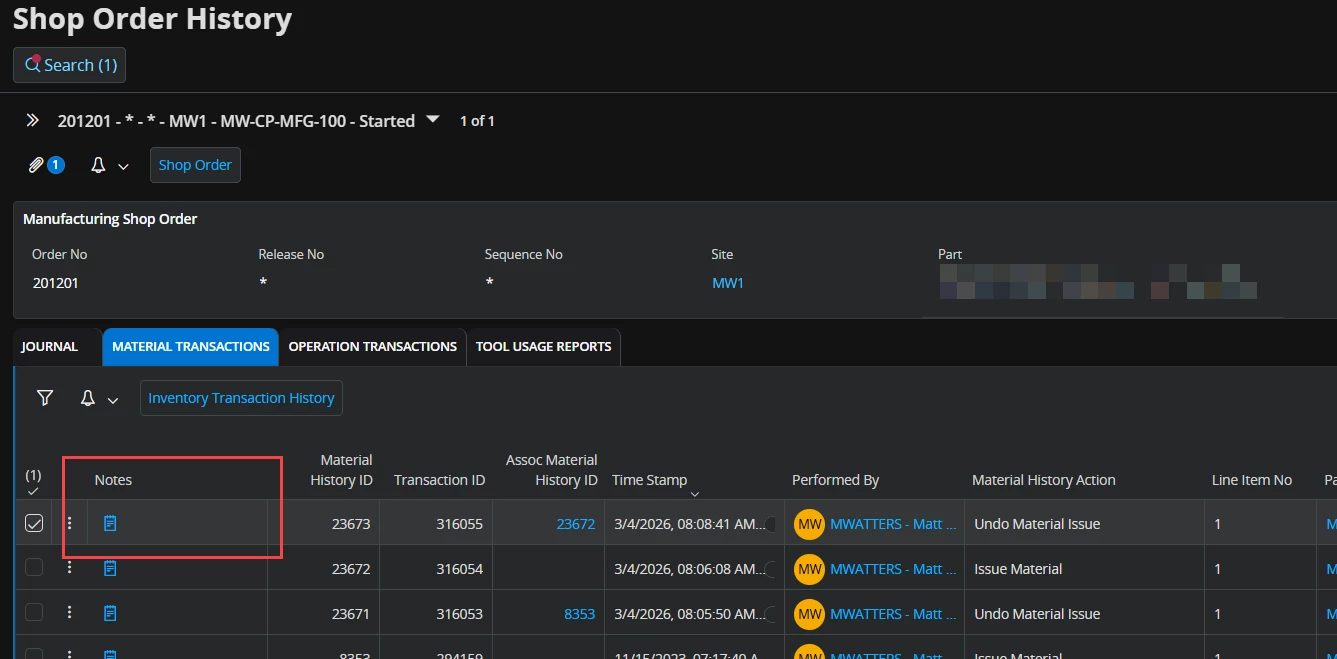
In Shop Order History, in the Material Transactions tab there is a Notes field. This cannot be edited; the user cannot enter a note against a transaction. One would think this would be the proper place for the user to enter a note explaining why the part was unissued from the order.

Why does this field exist? Is information only entered here by the system when a transaction occurs?
 

3 replies

NickPorter
Superhero (Customer)
Forum|alt.badge.img+18
  • Superhero (Customer)
  • March 4, 2026

As I understand it, the Notes field on an overview list/table like this is typically just intended to show the Note that was entered as the transaction was done (i.e. a Note made during the transaction).  Same way you can see the timestamp but cannot modify that either. 


matt.watters
Ultimate Hero (Partner)
Forum|alt.badge.img+26
  • Author
  • Ultimate Hero (Partner)
  • March 4, 2026

@NickPorter the problem is on many transactions such as Unissue Material there is no place to enter a Note, thus no information gets stored in the Notes field. The user enters the info, clicks OK or Save and that’s it. 


NickPorter
Superhero (Customer)
Forum|alt.badge.img+18
  • Superhero (Customer)
  • March 4, 2026

I would guess (and that’s all it is) that the Notes field is coded as a standard field for overview tables, so that it can be used to show data if the underlying objects actually have Notes in them, and in this case it doesn’t.  It would be interesting to know if that Notes field was enabled by default for the screen or if it was manually added using the column chooser… that might help validate my thinking.

We’re not on the same version so I cannot check it myself.

